Tri un peu spécial

Bonjour

Les explications sont sur le fichier joint

je vous remercie

16test-tri-1.xlsx (10.73 Ko)

Bonjour Joco7915,

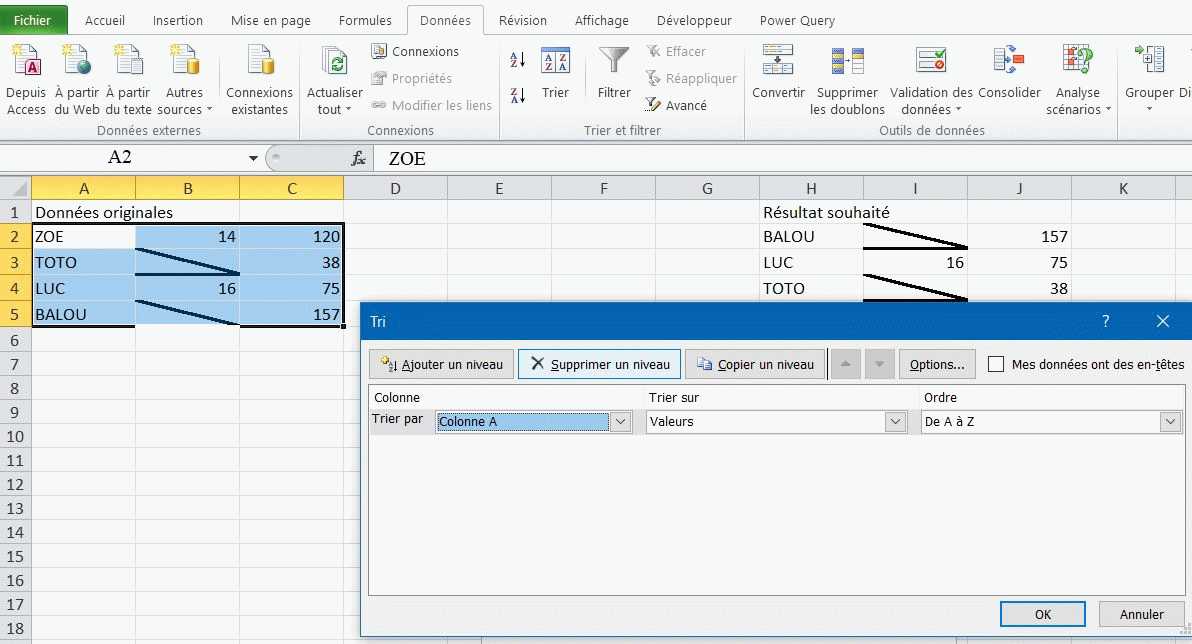
Sélectionner l'ensemble du tableau, puis.

A partir du ruban.

Sélectionner "Données"

Puis "Trier" ► dans la fenêtre qui s'ouvre, sélectionner la colonne A de A à Z

Cordialement.

PS: Une p'tite capture d'écran.

capture

Bonjour,

S'il faut faire suivre le format des cellules de la colonnes B, il faut passer par un bout de code en VBA.

Exemple;

Sub Tri()
    Dim i As Long, DerLig As Long
    Application.ScreenUpdating = False
    DerLig = Range("A" & Rows.Count).End(xlUp).Row
    Range("A2:C" & DerLig).Sort [A1], 1

    With Range("B2:B" & DerLig)
        .Borders(xlEdgeBottom).LineStyle = xlNone
        .Borders(xlDiagonalDown).LineStyle = xlNone
    End With
    For i = 2 To DerLig
        If Cells(i, "B") = "" Then
            With Cells(i, "B").Borders(xlDiagonalDown)
                .LineStyle = xlContinuous
                .ColorIndex = xlAutomatic
                .TintAndShade = 0
                .Weight = xlThick
            End With
            With Cells(i, "B").Borders(xlEdgeBottom)
                .LineStyle = xlContinuous
                .ColorIndex = xlAutomatic
                .TintAndShade = 0
                .Weight = xlThick
            End With
        End If
    Next i
End Sub

Le fichier

Cdlt
Merci pour vos réponses

mdo100 ne fonctionne pas

Arturo83 dans le fichier ci-joint tu verras quand on fait une modif il y a un trait horizontal qui reste

Re Joco7915,

Ok, je n'avais pas compris qu'il fallait faire suivre le format de cellule de la colonne "B".

Hello Arturo83,

Bravo pour le code VBA

Cdlt.

Voilà la modif

Sub Tri()
    Dim i As Long, DerLig As Long
    Application.ScreenUpdating = False
    DerLig = Range("A" & Rows.Count).End(xlUp).Row
    Range("A2:C" & DerLig).Sort [A1], 1

    With Range("B2:B" & DerLig)
        .Borders(xlDiagonalDown).LineStyle = xlNone
        .Borders(xlDiagonalUp).LineStyle = xlNone
        .Borders(xlEdgeLeft).LineStyle = xlNone
        .Borders(xlEdgeTop).LineStyle = xlNone
        .Borders(xlEdgeBottom).LineStyle = xlNone
        .Borders(xlEdgeRight).LineStyle = xlNone
        .Borders(xlInsideVertical).LineStyle = xlNone
        .Borders(xlInsideHorizontal).LineStyle = xlNone
    End With
    For i = 2 To DerLig
        If Cells(i, "B") = "" Then
            With Cells(i, "B").Borders(xlDiagonalDown)
                .LineStyle = xlContinuous
                .ColorIndex = xlAutomatic
                .TintAndShade = 0
                .Weight = xlThick
            End With
            With Cells(i, "B").Borders(xlEdgeBottom)
                .LineStyle = xlContinuous
                .ColorIndex = xlAutomatic
                .TintAndShade = 0
                .Weight = xlThick
            End With
        End If
    Next i
End Sub

Bonjour et merci Arturo83

Exactement ce que je voulais .

bonne journée

Rechercher des sujets similaires à "tri peu special"