Avant ces modifications pensez à faire une sauvegarde du fichier juste pour conserver les codes initiaux
Puis essayez comme ceci
1. Dans la feuille Provisio, remplacez tout le code par celui ci-dessous
Option Explicit
Dim stpevt As Boolean
Private Sub Worksheet_Change(ByVal Target As Range)

If Target.Count > 1 Or Target.Row <= 4 Or stpevt = True Then Exit Sub

If Not Intersect(Target, Range("Q" & Target.Row & ":S" & Target.Row)) Is Nothing Then
    lig = Target.Row
    Call planning
End If

If Not Intersect(Target, Range("U" & Target.Row & ":V" & Target.Row)) Is Nothing Then
    If Target.Column = 21 And Target <> vbNullString Then
        stpevt = True
        Cells(Target.Row, Target.Column) = "S" & Format(Cells(Target.Row, Target.Column), "00")
        stpevt = False
    End If
    lig = Target.Row
    Call planning
End If

If Not Intersect(Target, Range("W" & Target.Row)) Is Nothing Then
    If UCase(Target.Value) = vbNullString Then
        lig = Target.Row
        Call Ajout_couleur(lig, couleur)
        Call planning
    End If
End If
End Sub
2. Macro Planning
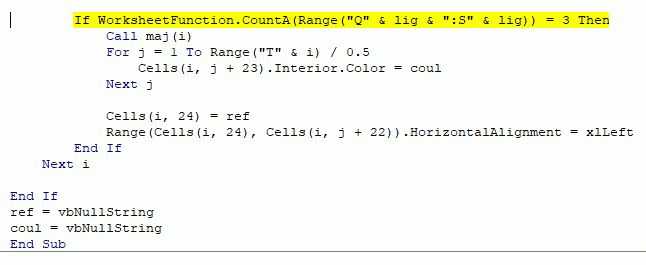
Remplacez les deux lignes
If WorksheetFunction.CountA(Range("Q" & lig & ":V" & lig)) = 6 Then
par ceci
If WorksheetFunction.CountA(Range("Q" & lig & ":S" & lig)) = 3 Then