Enregistrement des données d’une requête sur un tableau récapitulatif
Pourriez-vous m’aider à développer une macro pour faire copier des données saisies sur un formulaire et les transferts à une base de données au deuxième feuille
L’objectif est de :
Faire copie les données depuis le formulaire (Feuil1) et les recopies sur la base de donne feuil2
Si un champ est vide alors un message d’alerte se déclenche afin de remplir les informations manquantes
Si seulement la première ligne est remplie mais la deuxième non alors les informations résignaient (ligne 1) seront transférés à la BD
À partir d’une macro déjà utilisée dans un autre projet j’ai essayé de l’appliquer sur ce formulaire mais je ne me suis bloqué sur le fait que :
Si la deuxième ligne est non renseignée alors le message d’alerte se déclenche même si la deuxième ligne est vide
Ci-après le code ainsi que le fichier Excel ci joint
Merci d'avance pour l'aide.
Sub ctrl_1()

      Dim Reponse As Byte
      Dim PL As Range, Cel As Range, Lettre$, Message$
      Dim Mavariable As String

      'Mavariable = Feuil1.Range("K9").Value

      Set PL = Feuil1.Range("E3,G3,E6,G6,I6,E9,G9,I9")
      For Each Cel In PL
            Select Case Cel.Address(False, False, xlA1)
                  Case "E3": Lettre = "'Commande'"
                  Case "G3": Lettre = "'Date'"
                  Case "E6": Lettre = "'Article'"
                  Case "G6": Lettre = "'Réf.'"
                  Case "I6": Lettre = "'Matricule'"
                  Case "E9": Lettre = "'Article'"
                  Case "G9": Lettre = "'Réf."
                  Case "I9": Lettre = "'Matricule'"

            End Select
            Select Case Cel.Text
                  Case Is = ""
                        Cel.Interior.Color = RGB(255, 46, 46)
                        If Message = "" Then Message = "Champ(s) non renseigné(s) :  " & vbLf & vbLf & Lettre Else Message = Message & ", " & Lettre
                  Case Else: Cel.Interior.ColorIndex = xlColorIndexNone
                  Range("E59,J59").Interior.Color = RGB(221, 235, 247)
            End Select

      Next Cel

      If Message <> "" Then
            MsgBox Message & vbLf & vbLf & vbLf & "Veuillez saisir le champ signalé (s) ", vbCritical + vbOKOnly, "Erreur de saisie"

      Else

            Feuil2.Range("B9999").End(xlUp).Offset(1, 0) = Feuil1.Range("E3")
            Feuil2.Range("C9999").End(xlUp).Offset(1, 0) = Feuil1.Range("G3")

            Feuil2.Range("D9999").End(xlUp).Offset(1, 0) = Feuil1.Range("E6")
            Feuil2.Range("E9999").End(xlUp).Offset(1, 0) = Feuil1.Range("G6")
            Feuil2.Range("F9999").End(xlUp).Offset(1, 0) = Feuil1.Range("I6")

            Feuil2.Range("B9999").End(xlUp).Offset(1, 0) = Feuil1.Range("E3")
            Feuil2.Range("C9999").End(xlUp).Offset(1, 0) = Feuil1.Range("G3")

            Feuil2.Range("D9999").End(xlUp).Offset(1, 0) = Feuil1.Range("E9")
            Feuil2.Range("E9999").End(xlUp).Offset(1, 0) = Feuil1.Range("G9")
            Feuil2.Range("F9999").End(xlUp).Offset(1, 0) = Feuil1.Range("I9")

            Reponse = MsgBox(vbCr & "    " & "Les données ont bien été enregistrées" & vbCr & " " & vbCr & " " & "Voulez-vous effacer les champs de saisie ?" _
                        , vbInformation + vbYesNo, "Enregistrement effectué...")

            Dim i As Long, k As Long
                With Feuil2
                    k = 1
                    For i = 2 To .Range("B" & .Rows.Count).End(xlUp).Row
                        If IsNumeric(.Range("A" & i)) And .Range("B" & i) <> "" Then
                        .Range("A" & i) = k
                            k = k + 1
                            Else
                          End If
                        Next i
                    End With
            If Reponse = 6 Then clear_dn_1

            End If

End SubBonjour Niba,
Voici comment moi perso je ferrais
Sub ctrl_1()
  Dim ShtForm As Worksheet
  Dim TabCel() As String, Cel As Range, Ind As Integer
  Dim Col As Long, nLig As Long
  ' Définir la feuille de saisie formulaire
  Set ShtForm = ThisWorkbook.Sheets("Feuil1")
  ' Définir le tableau des cellules à remplir
  TabCel = Split("E3,G3,E6,G6,I6,E9,G9,I9", ",")
  ' Pour chaque indice du tableau
  For Ind = 0 To UBound(TabCel) - 1
    ' Définir la cellule de vérification
    Set Cel = ShtForm.Range(TabCel(Ind))
    ' Si article 2ème ligne est vide on passe
    If Ind = 5 And Cel.Text = "" Then Exit For
    ' Sinon
    If Cel.Text = "" Then
      Cel.Interior.Color = RGB(255, 46, 46)
      Cel.Select
      MsgBox "Champ(s) non renseigné(s) :  " & Cel.Offset(0, -1), vbCritical + vbOKOnly, "Erreur de saisie"
      Exit Sub
    Else
      Cel.Interior.ColorIndex = xlColorIndexNone
      Range("E59,J59").Interior.Color = RGB(221, 235, 247)
    End If
  Next Ind
  ' Avec la feuille BdD
  With ThisWorkbook.Sheets("Feuil2")
    ' Pour les indices concernant les article
    For Ind = 2 To 7
      Select Case Ind
      Case 2, 5
        nLig = .Range("A" & Rows.Count).End(xlUp).Row + 1
        .Cells(nLig, 1) = .Cells(nLig - 1, 1) + 1
        .Cells(nLig, 2) = ShtForm.Range(TabCel(0))
        .Cells(nLig, 3) = ShtForm.Range(TabCel(1))
        .Cells(nLig, 4) = ShtForm.Range(TabCel(Ind))
        Col = 5
      Case Else
        .Cells(nLig, Col) = ShtForm.Range(TabCel(Ind))
        Col = Col + 1
      End Select
    Next Ind
  End With
  ' Doti on effacer les données
  If MsgBox(vbCr & "    " & "Les données ont bien été enregistrées" _
    & vbCr & " " & vbCr & " " & "Voulez-vous effacer les champs de saisie ?", _
    vbInformation + vbYesNo, "Enregistrement effectué...") = vbYes Then clear_dn_1

End Sub
A+
Salut brunoM45 ;
Je vous remercie pour la solution, mais il lui manque quelque retouche :
Car si je fais enregistré et la BdD est vide alors un blocage se génère
Erreur d’exécution ‘13’ :
Incompatibilité de type
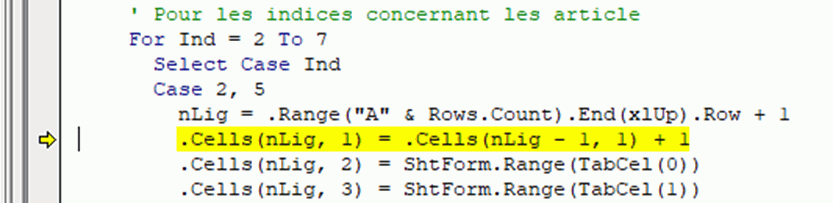
Mais si j’ai rempli la première cellule ‘numéro’ de BdD du feuil2 et la ligne 1 sur le formulaire uniquement rempli alors le résultat est le suivant

Re,
Pour moi le numéro de commande est un chiffre et d'après votre exemple précédent,
il me semblait que vous aviez +1 à chaque fois, c'est donc simple à régler.
Ceci dit, vous semblez continuer à demander de l'aide sur l'autre forum... est-ce que je me trompe ?
Indiquez le comme clôturé ou je le ferais ici, je ne tolèrerais pas le cross posting (déjà dit)
A+
Bruno,
c'est inéduqué comme clôturé
je pense que c'est bien
Merci de vote compréhension
Voici le code modifié car, il résidait un bug si la 2ème ligne d'article était vide
Sub ctrl_11()
  Dim ShtForm As Worksheet
  Dim TabCel() As String, Cel As Range, Ind As Integer
  Dim Col As Long, nLig As Long
  ' Définir la feuille de saisie formulaire
  Set ShtForm = ThisWorkbook.Sheets("Feuil1")
  ' Définir le tableau des cellules à remplir
  TabCel = Split("E3,G3,E6,G6,I6,E9,G9,I9", ",")
  ' Pour chaque indice du tableau
  For Ind = 0 To UBound(TabCel) - 1
    ' Définir la cellule de vérification
    Set Cel = ShtForm.Range(TabCel(Ind))
    ' Si article 2ème ligne est vide on passe
    If Ind = 5 And Cel.Text = "" Then Exit For
    ' Sinon
    If Cel.Text = "" Then
      Cel.Interior.Color = RGB(255, 46, 46)
      Cel.Select
      MsgBox "Champ(s) non renseigné(s) :  " & Cel.Offset(0, -1), vbCritical + vbOKOnly, "Erreur de saisie"
      Exit Sub
    Else
      Cel.Interior.ColorIndex = xlColorIndexNone
      Range("E59,J59").Interior.Color = RGB(221, 235, 247)
    End If
  Next Ind
  ' Avec la feuille BdD
  With ThisWorkbook.Sheets("Feuil2")
    ' Pour les indices concernant les article
    For Ind = 2 To 7
      Select Case Ind
      Case 2, 5
        ' Si la 2ème ligne est vide, on sort
        If Ind = 5 And ShtForm.Range(TabCel(Ind)) = "" Then Exit For
        ' Sinon
        nLig = .Range("A" & Rows.Count).End(xlUp).Row + 1
        ' Si > 2ème ligne, il existe un article sur la ligne précédente
        If nLig > 2 Then
          .Cells(nLig, 1).Value = .Cells(nLig - 1, 1).Value + 1
        Else
          .Cells(nLig, 1).Value = 1
        End If
        .Cells(nLig, 2) = ShtForm.Range(TabCel(0))
        .Cells(nLig, 3) = ShtForm.Range(TabCel(1))
        .Cells(nLig, 4) = ShtForm.Range(TabCel(Ind))
        Col = 5
      Case Else
        .Cells(nLig, Col) = ShtForm.Range(TabCel(Ind))
        Col = Col + 1
      End Select
    Next Ind
  End With
  ' Doti on effacer les données
  If MsgBox(vbCr & "    " & "Les données ont bien été enregistrées" _
    & vbCr & " " & vbCr & " " & "Voulez-vous effacer les champs de saisie ?", _
    vbInformation + vbYesNo, "Enregistrement effectué...") = vbYes Then clear_dn_1

End Sub
J'espère que cette solution vous conviendra
A+
C'est parfait, merci beaucoup