Arrêter un Userform qui tourne (timer)
Bonjour,
j'ai actuellement un problème, j'ai fait un userform pour faire un timer, le problème c'est que je n'arrive pas à le stoper.
Private Sub START_Click()

a = UserForm2.TextBox1.Value
b = UserForm2.TextBox2.Value
c = UserForm2.TextBox3.Value
d = UserForm2.TextBox4.Value
e = UserForm2.TextBox5.Value
f = UserForm2.TextBox6.Value

n = a * 10 * 60 * 60 + b * 60 * 60 + c * 10 * 60 + d * 60 + e * 60 + f

Unload Me
UserForm1.Show 0
UserForm1.Label1.Caption = a & b & ":" & c & d & ":" & e & f

For i = 1 To n
Application.Wait (Now + #12:00:01 AM#)
DoEvents
UserForm1.Label1.Caption = Format(DateAdd("s", -1, UserForm1.Label1.Caption), "hh:mm:ss")
UserForm1.Label3.Width = 234 - 234 * i / n

If UserForm1.Label1.Caption < #12:00:11 AM# Then
UserForm1.Label3.BackColor = vbRed
    Beep
End If
Next i

End Sub
Private Sub Close_Open_Click()
Unload UserForm1
UserForm2.Show 0
End Sub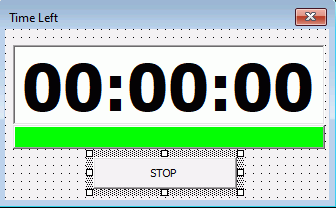
merci par avance Goat
Bonjour,
Dans un module standard
    Declare Sub Sleep Lib "kernel32" (ByVal dwMilliseconds As Long)
    Dim Arreter As Boolean

Sub Start()
    Arreter = False 'initialise la variable "Arreter" à true
    a = UserForm2.TextBox1.Value
    b = UserForm2.TextBox2.Value
    c = UserForm2.TextBox3.Value
    d = UserForm2.TextBox4.Value
    e = UserForm2.TextBox5.Value
    f = UserForm2.TextBox6.Value

    n = a * 10 * 60 * 60 + b * 60 * 60 + c * 10 * 60 + d * 60 + e * 60 + f

    Unload Me
    UserForm1.Show 0
    UserForm1.Label1.Caption = a & b & ":" & c & d & ":" & e & f

    For i = 1 To n
        Application.Wait (Now + #12:00:01 AM#)
        DoEvents
        UserForm1.Label1.Caption = Format(DateAdd("s", -1, UserForm1.Label1.Caption), "hh:mm:ss")
        UserForm1.Label3.Width = 234 - 234 * i / n

        If UserForm1.Label1.Caption < #12:00:11 AM# Then
            UserForm1.Label3.BackColor = vbRed
            Beep
        End If
    Next i
End Sub

Sub Arret()
    Arreter = True 'Attend que les dernières valeurs en cours de récupération soient enregistrées avant d'arrêter la macro
End Sub
Dans le module du formulaire:
Private Sub START_Click()
    Start
End Sub
Bien sûr, faute de fichier, je n'ai pas testé, mais en l'adaptant un peu ça devrait marcher.
Cdlt
J'ai essayé mais ce n'a pas marché.
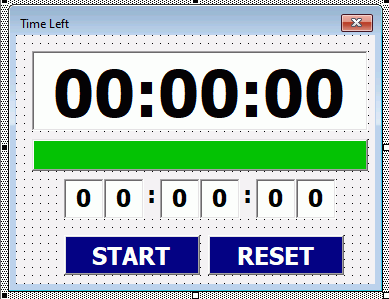
La j'essaye de faire en sorte que quand j'appuis sur START le minuteur se déclenche et le bouton START devient le bouton PAUSE. Si j'appuis sur PAUSE, j'aimerais que le décompte du minuteur s'arrête la ou il est et le bouton devient REPRENDRE. Si je clique sur REPRENDRE, j'aimerais que le minuteur redémarre. Enfin si je clique sur RESET, j'aimerais que le minuteur s'arrète et qu'il se reinitialise à 0.
Je galère sur tout les bouton... mes boutons ne font rien et n'arrète pas la macro.
ci-joint le fichier pour que ce soit plus simple
Private Sub RESET_Click()

UserForm1.Label1.Caption = TimeValue("00:00:00")
UserForm1.START.Caption = "START"

End Sub

Private Sub START_Click()

If UserForm1.START.Caption = "START" Then

UserForm1.START.Caption = "PAUSE"
    fin_chrono1 = True
    a = UserForm1.TextBox1.Value
    b = UserForm1.TextBox2.Value
    c = UserForm1.TextBox3.Value
    d = UserForm1.TextBox4.Value
    e = UserForm1.TextBox5.Value
    f = UserForm1.TextBox6.Value

    n = a * 10 * 60 * 60 + b * 60 * 60 + c * 10 * 60 + d * 60 + e * 10 + f

    UserForm1.Label1.Caption = a & b & ":" & c & d & ":" & e & f

    For i = 1 To n
        Application.Wait Now + TimeValue("00:00:01")
        DoEvents
        UserForm1.Label1.Caption = Format(DateAdd("s", -1, UserForm1.Label1.Caption), "hh:mm:ss")
        UserForm1.Label3.Width = 252 - 252 * i / n

        If UserForm1.Label1.Caption < TimeValue("00:00:06") Then
            UserForm1.Label3.BackColor = vbRed
            Beep
        End If
    Next i
End If

If UserForm1.START.Caption = "PAUSE" Then
    UserForm1.START.Caption = "REPRENDRE"

    End If

If UserForm1.START.Caption = "PAUSE" Then
Call STOP1
End If

End Sub
Public fin_chrono1 As Boolean
Public Temp1 As Double
Sub STOP1()
If fin_chrono1 = True Then
fin_chrono1 = False
End If
End Submerci par avance.
- Messages
- 4'199
- Excel
- 2021 FR 64 bits
- Inscrit
- 13/06/2016
- Emploi
- bénévole associations Goutte d'Or
- Messages
- 4'199
- Excel
- 2021 FR 64 bits
- Inscrit
- 13/06/2016
- Emploi
- bénévole associations Goutte d'Or
Bonsoir,
ci-jointe nouvelle version plus complète qui devrait mieux répondre à votre demande
Bonjour,
déjà merci pour votre aide. La 3ème version corresponds plutôt bien à mes attentes. Cependant l'option du "beep" quand il reste 5 seconde est enlevé. Je pense aussi retirer la partie qui demande de mettre une valeur numérique
Merci beaucoup déjà
- Messages
- 4'199
- Excel
- 2021 FR 64 bits
- Inscrit
- 13/06/2016
- Emploi
- bénévole associations Goutte d'Or
Je pense aussi retirer la partie qui demande de mettre une valeur numérique
Si vous n'avez pas ce contrôle, vous pouvez rentrer du texte ou plus d'un chiffre, ce qui générera un bug.
Cependant l'option du "beep" quand il reste 5 seconde est enlevé.
J'ai effectivement oublié de le remettre. Mais vous pouvez le faire aisément.
Bonjour Thev
j'ai réussi à remettre le beep et à changer la couleur quand la ligne label3 passe en dessous de 5sec. De plus j'ai retirer la partie "valeur numérique" même si ca peut generer un bug.
j'ai cependant quelque problème : j'aimerais que quand le chrono se finit, le bouton redevient en "start" afin de pouvoir relancer directement un deuxième minuteur sans passer par le bouton reset. de plus j'aimerais que la barre label3 défile avec le temps qui s'écoule comme sur mon premier excel.
j'avais mis la formule : UserForm1.Label3.Width = 252 - 252 * i / n or j'ai plus de i donc je ne sais pas comment faire.
je voudrais aussi ouvrir le minuteur à partir d'un autre Userform et non dès que le fichier excel s'ouvre. j'ai essayé mais du coup avec le bouton reset sa bug ^^
si jamais je peux avoir de l'aide
Private Sub START_Click()

    Me.START.Visible = False: Me.PAUSE.Visible = True
    arrêt = False
    If Me.START.Caption = "START" Then chrono = TimeValue(Me.TextBox1 & Me.TextBox2 & ":" & Me.TextBox3 & Me.TextBox4 & ":" & Me.TextBox5 & Me.TextBox6)
    While chrono > 0 And Not arrêt
        Application.Wait (Now + TimeValue("00:00:01"))
        chrono = DateAdd("s", -1, chrono)
        Me.Label1 = Format(chrono, "hh:mm:ss")
        If chrono < TimeValue("00:00:06") Then
        Me.Label3.BackColor = vbRed
        Beep
        End If
        DoEvents
    Wend

End Sub
Private Sub PAUSE_Click()
    arrêt = True
    Me.START.Caption = "REPRENDRE"
    Me.START.Visible = True: Me.PAUSE.Visible = False
End Sub

Private Sub RESET_Click()
    Unload Me
    ThisWorkbook.Workbook_Open
End Sub

Private Sub TextBox1_Change()
    ctrl_un_chiffre TextBox1
End Sub
Private Sub TextBox2_Change()
    ctrl_un_chiffre TextBox2
End Sub
Private Sub TextBox3_Change()
    ctrl_un_chiffre TextBox3
End Sub
Private Sub TextBox4_Change()
    ctrl_un_chiffre TextBox4
End Sub
Private Sub TextBox5_Change()
    ctrl_un_chiffre TextBox5
End Sub
Private Sub TextBox6_Change()
    ctrl_un_chiffre TextBox6
End Sub
Private Sub ctrl_un_chiffre(ctrl As Control)
    If Len(ctrl) > 1 Then ctrl = Left(ctrl, 1): Exit Sub
    If Not IsNumeric(ctrl) Then MsgBox "valeur non mumérique": ctrl = 0: Exit Sub
End Sub

Private Sub UserForm_QueryClose(Cancel As Integer, CloseMode As Integer)
    arrêt = True
End Sub
Goat
Bonjour Goat, Le Forum,
de plus j'aimerais que la barre label3 défile avec le temps qui s'écoule comme sur mon premier excel.Modifier le code comme ci-dessous.
 If Me.START.Caption = "START" Then Chrono = TimeValue(Me.TextBox1 & Me.TextBox2 & ":" & Me.TextBox3 & Me.TextBox4 & ":" & Me.TextBox5 & Me.TextBox6)
    Chronodeb = Chrono
    While Chrono > 0 And Not arrêt
        Application.Wait (Now + TimeValue("00:00:01"))
        Chrono = DateAdd("s", -1, Chrono)
        Me.Label1 = Format(Chrono, "hh:mm:ss")
        If Chrono < TimeValue("00:00:06") Then
        Me.Label3.BackColor = vbRed: Label3.Width = 252
        Beep
        Else: Label3.Width = 252 - 252 * (CDbl(Chrono) / CDbl(Chronodeb))
        End If
Ne pas oublier de DIMensionner Chronodeb comme Date.
- Messages
- 4'199
- Excel
- 2021 FR 64 bits
- Inscrit
- 13/06/2016
- Emploi
- bénévole associations Goutte d'Or
Bonsoir à tous,
Une petite rectification relative à une décrémentation d'une seconde de trop du compteur si aucun arrêt n'est demandé
Private Sub START_Click()
    Dim Chronodeb as Date

    Me.START.Visible = False: Me.PAUSE.Visible = True
    arrêt = False
    If Me.START.Caption = "START" Then chrono = TimeValue(Me.TextBox1 & Me.TextBox2 & ":" & Me.TextBox3 & Me.TextBox4 & ":" & Me.TextBox5 & Me.TextBox6)
    Chronodeb = chrono
    While chrono > TimeValue("00:00:01") And Not arrêt
        Application.Wait (Now + TimeValue("00:00:01"))
        chrono = DateAdd("s", -1, chrono)
        Me.Label1 = Format(chrono, "hh:mm:ss")
        Me.Label3.Width = 252 - 252 * (CDbl(chrono) / CDbl(Chronodeb))
        If chrono < TimeValue("00:00:06") Then Me.Label3.BackColor = vbRed: Beep
        DoEvents
    Wend

End SubBonjour, merci à vous deux pour vos réponse j'ai réussi à faire ce que je voulais. Il me reste néanmoins un problème lié à l'incrémentation de la seconde.
Quand je suis par exemple à une minute le chrono se bloque à 00:00:01 au lieu de 00:00:00. Je ne sais pas comment régler le problème, j'ai essayé de modifier la Valeur de Chrono > TimeValue("00:00:XX") mais soit le chrono finit à 23:59:59 soit à 00:00:01.
Voici mon dernier code :
Dim arrêt As Boolean
Dim chrono As Date
Dim Chronodeb As Date

Private Sub Label3_Click()

End Sub

Private Sub START_Click()

    Me.START.Visible = False: Me.PAUSE.Visible = True
    arrêt = False
     If Me.START.Caption = "START" Then chrono = TimeValue(Me.TextBox1 & Me.TextBox2 & ":" & Me.TextBox3 & Me.TextBox4 & ":" & Me.TextBox5 & Me.TextBox6)
    Chronodeb = chrono
    While chrono > TimeValue("00:00:01") And Not arrêt
        Application.Wait (Now + TimeValue("00:00:01"))
        chrono = DateAdd("s", -1, chrono)
        Me.Label1 = Format(chrono, "hh:mm:ss")
        Me.Label3.Width = 252 - 252 * (CDbl(chrono) / CDbl(Chronodeb))
        If chrono < TimeValue("00:00:05") Then
        Me.Label3.BackColor = vbRed
        Beep
        End If
        DoEvents
    Wend

If Me.Label1 = TimeValue("00:00:01") Or Me.Label1 = TimeValue("00:00:00") Then
    Me.START.Caption = "START"
    Me.Label1 = TimeValue("00:00:00")
    Me.START.Visible = True: Me.PAUSE.Visible = False
    Me.Label3.BackColor = vbGreen
    Me.Label3.Width = 252
    End If

End Sub
Private Sub PAUSE_Click()
    arrêt = True
    Me.START.Caption = "REPRENDRE"
    Me.START.Visible = True: Me.PAUSE.Visible = False
End Sub

Private Sub RESET_Click()
    arrêt = True
    Me.Label1 = TimeValue("00:00:00")
    Me.START.Caption = "START"
    Me.START.Visible = True: Me.PAUSE.Visible = False
    Me.Label3.BackColor = vbGreen
    Me.Label3.Width = 252

End Sub

Private Sub TextBox1_Change()
    ctrl_un_chiffre TextBox1
End Sub
Private Sub TextBox2_Change()
    ctrl_un_chiffre TextBox2
End Sub
Private Sub TextBox3_Change()
    ctrl_un_chiffre TextBox3
End Sub
Private Sub TextBox4_Change()
    ctrl_un_chiffre TextBox4
End Sub
Private Sub TextBox5_Change()
    ctrl_un_chiffre TextBox5
End Sub
Private Sub TextBox6_Change()
    ctrl_un_chiffre TextBox6
End Sub
Private Sub ctrl_un_chiffre(ctrl As Control)
    If Len(ctrl) > 1 Then ctrl = Left(ctrl, 1): Exit Sub
End Sub

Private Sub UserForm_QueryClose(Cancel As Integer, CloseMode As Integer)
    arrêt = True
End Sub
Si vous avez une solution je suis preneur.
Goat
- Messages
- 4'199
- Excel
- 2021 FR 64 bits
- Inscrit
- 13/06/2016
- Emploi
- bénévole associations Goutte d'Or
Bonsoir,
Il y a effectivement un souci avec la décrémentation de la seconde. Le plus simple est ce code :
Private Sub START_Click()
    Dim Chronodeb As Date

    Me.START.Visible = False: Me.PAUSE.Visible = True
    arrêt = False
    If Me.START.Caption = "START" Then chrono = TimeValue(Me.TextBox1 & Me.TextBox2 & ":" & Me.TextBox3 & Me.TextBox4 & ":" & Me.TextBox5 & Me.TextBox6)
    Chronodeb = chrono
    While chrono > 0 And Not arrêt
        Application.Wait (Now + TimeValue("00:00:01"))
        chrono = DateAdd("s", -1, chrono)
        Me.Label1 = Format(chrono, "hh:mm:ss")
        Me.Label3.Width = 252 - 252 * (CDbl(chrono) / CDbl(Chronodeb))
        If chrono < TimeValue("00:00:06") Then Me.Label3.BackColor = vbRed: Beep
        DoEvents
    Wend

    If Not arrêt Then
        Me.START.Caption = "START"
        Me.Label1 = TimeValue("00:00:00")
        Me.START.Visible = True: Me.PAUSE.Visible = False
        Me.Label3.BackColor = vbGreen
        Me.Label3.Width = 252
    End If

End SubOui, j'ai tout essayé mais je n'y arrive pas :/
Même avec votre code, il y a toujours un problème :/
- Messages
- 4'199
- Excel
- 2021 FR 64 bits
- Inscrit
- 13/06/2016
- Emploi
- bénévole associations Goutte d'Or
C'est curieux, car chez moi, le souci de la décrémentation intempestive de 1 seconde est bien effacé avec la nouvelle condition.
Bonjour Thev
en gros j'ai un problème à partir de 13/14seconde. soit si je met plus de 14seconde le code à la fin saute 2 secondes, soit il finit à 23:59:59. le problème est quand les valeur sont soit supérieur à 14 seconde soit suivant le code inférieur à 14 seconde
- Messages
- 4'199
- Excel
- 2021 FR 64 bits
- Inscrit
- 13/06/2016
- Emploi
- bénévole associations Goutte d'Or
Avec ce code à la sortie de la boucle, le timer est forcément à zéro.
    If Not arrêt Then
        Me.START.Caption = "START"
        Me.Label1 = TimeValue("00:00:00")
        Me.START.Visible = True: Me.PAUSE.Visible = False
        Me.Label3.BackColor = vbGreen
        Me.Label3.Width = 252
End Ifoui mais le problème c'est pas de mettre le trimer à zéro mais de faire en sorte que je n'ai pas un seconde en moins