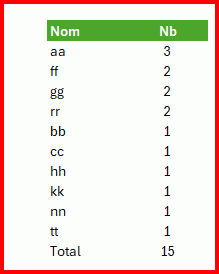
Salut Furgoz,
Salut JFL,
Faut bien un peu de VBA, non ?
Un double clic sur la feuille 'Synthèse' pour démarre la macro.
Private Sub Worksheet_BeforeDoubleClick(ByVal Target As Range, Cancel As Boolean)
'
Dim Dico As Object, tTab, tTab1, tTab2
'
Cancel = True
Set Dico = CreateObject("scripting.dictionary")
tTab = Range("H2:J" & UsedRange.Rows.Count + 1).Value
For x = 1 To UBound(tTab, 1)
    For y = 1 To UBound(tTab, 2)
        If tTab(x, y) <> "" And Trim(tTab(x, y)) <> "//" Then Dico(tTab(x, y)) = Dico(tTab(x, y)) + 1
    Next
Next
With Worksheets("Calcul")
    tTab1 = Dico.keys
    tTab2 = Dico.items
    .Range("A4:B" & .Range("A" & Rows.Count).End(xlUp).Row).ClearContents
    .Range("A3").Resize(1, 2).Value = Array("Noms", "Fréquence")
    .Range("A4").Resize(UBound(tTab1) + 1, 1).Value = WorksheetFunction.Transpose(tTab1)
    .Range("B4").Resize(UBound(tTab1) + 1, 1).Value = WorksheetFunction.Transpose(tTab2)
    .Range("A4:B" & .Range("A" & Rows.Count).End(xlUp).Row).Sort _
        key1:=.Range("B4"), order1:=xlDescending, _
        key2:=.Range("A4"), order2:=xlAscending, _
        Orientation:=xlTopToBottom, Header:=xlNo
    .Activate
End With
'
End Sub
A+