Temps d'exécution Macro
Bonjour à tous,
J'ai un problème de temps d'exécution de la macro suivante :
Public Sub AddButton_Click()
Dim lFirst As Long
Dim r As Range

Application.ScreenUpdating = False
Application.DisplayStatusBar = False

t = Timer
Worksheets("Customer").Activate
lFirst = 1 + ActiveSheet.Range("G5").End(xlDown).Row

ActiveSheet.Cells(lFirst, 1).Value = TextBox3.Value 'customer
ActiveSheet.Cells(lFirst, 2).Value = TextBox4.Value 'site
ActiveSheet.Cells(lFirst, 3).Value = TextBox5.Value 'location
ActiveSheet.Cells(lFirst, 4).Value = TextBox6.Value 'commessa
ActiveSheet.Cells(lFirst, 5).Value = TextBox1.Value 'site code
ActiveSheet.Cells(lFirst, 6).Value = TextBox2.Value 'system ID
ActiveSheet.Cells(lFirst, 7).Value = ComboBox1.Value 'sub_code
ActiveSheet.Cells(lFirst, 8).Value = TextBox7.Value 'date
ActiveSheet.Cells(lFirst, 9).Value = ComboBox2.Value 'type
sTime1 = Timer - t

t = Timer
Worksheets("SAM_CSM").Activate
lFirst = 1 + ActiveSheet.Range("B5").End(xlDown).Row

ActiveSheet.Cells(lFirst, 1).Value = TextBox1.Value 'site code
ActiveSheet.Cells(lFirst, 2).Value = ComboBox1.Value 'sub_code
ActiveSheet.Cells(lFirst, 3).Value = TextBox3.Value 'customer
ActiveSheet.Cells(lFirst, 4).Value = TextBox5.Value 'location
ActiveSheet.Cells(lFirst, 5).Value = TextBox4.Value 'site
ActiveSheet.Cells(lFirst, 6).Value = TextBox6.Value 'commessa
sTime2 = Timer - t

t = Timer
Worksheets("SHOOT").Activate
lFirst = 1 + ActiveSheet.Range("G5").End(xlDown).Row

ActiveSheet.Cells(lFirst, 1).Value = TextBox3.Value 'customer
ActiveSheet.Cells(lFirst, 2).Value = TextBox4.Value 'site
ActiveSheet.Cells(lFirst, 3).Value = TextBox5.Value 'location
ActiveSheet.Cells(lFirst, 4).Value = TextBox6.Value 'commessa
ActiveSheet.Cells(lFirst, 5).Value = TextBox1.Value 'site code
ActiveSheet.Cells(lFirst, 6).Value = TextBox2.Value 'system ID
ActiveSheet.Cells(lFirst, 7).Value = ComboBox1.Value 'sub_code
ActiveSheet.Cells(lFirst, 8).Value = TextBox7.Value 'date
ActiveSheet.Cells(lFirst, 9).Value = ComboBox2.Value 'type
sTime3 = Timer - t

t = Timer
Worksheets("SYS_Services").Activate
lFirst = 1 + ActiveSheet.Range("G5").End(xlDown).Row

ActiveSheet.Cells(lFirst, 1).Value = TextBox3.Value 'customer
ActiveSheet.Cells(lFirst, 2).Value = TextBox4.Value 'site
ActiveSheet.Cells(lFirst, 3).Value = TextBox5.Value 'location
ActiveSheet.Cells(lFirst, 4).Value = TextBox6.Value 'commessa
ActiveSheet.Cells(lFirst, 5).Value = TextBox1.Value 'site code
ActiveSheet.Cells(lFirst, 6).Value = TextBox2.Value 'system ID
ActiveSheet.Cells(lFirst, 7).Value = ComboBox1.Value 'sub_code
ActiveSheet.Cells(lFirst, 8).Value = TextBox7.Value 'date
ActiveSheet.Cells(lFirst, 9).Value = ComboBox2.Value 'type
sTime3 = Timer - t

t = Timer
Worksheets("Sys_Customer_DB").Activate
lFirst = 1 + ActiveSheet.Range("F5").End(xlDown).Row

ActiveSheet.Cells(lFirst, 1).Value = TextBox3.Value 'customer
ActiveSheet.Cells(lFirst, 2).Value = TextBox4.Value 'site
ActiveSheet.Cells(lFirst, 3).Value = TextBox5.Value 'location
ActiveSheet.Cells(lFirst, 4).Value = TextBox6.Value 'commessa
ActiveSheet.Cells(lFirst, 5).Value = TextBox1.Value 'site code
ActiveSheet.Cells(lFirst, 6).Value = ComboBox1.Value 'sub_code
ActiveSheet.Cells(lFirst, 7).Value = TextBox7.Value 'date
ActiveSheet.Cells(lFirst, 8).Value = ComboBox2.Value 'type
sTime4 = Timer - t

t = Timer
Worksheets("PC_Customer_DB").Activate
lFirst = 1 + ActiveSheet.Range("F5").End(xlDown).Row

ActiveSheet.Cells(lFirst, 1).Value = TextBox3.Value 'customer
ActiveSheet.Cells(lFirst, 2).Value = TextBox4.Value 'site
ActiveSheet.Cells(lFirst, 3).Value = TextBox5.Value 'location
ActiveSheet.Cells(lFirst, 4).Value = TextBox6.Value 'commessa
ActiveSheet.Cells(lFirst, 5).Value = TextBox1.Value 'site code
ActiveSheet.Cells(lFirst, 6).Value = ComboBox1.Value 'sub_code
ActiveSheet.Cells(lFirst, 7).Value = TextBox7.Value 'date
ActiveSheet.Cells(lFirst, 8).Value = ComboBox2.Value 'type
sTime5 = Timer - t

t = Timer

ActiveWorkbook.Worksheets("Customer").AutoFilter.Sort.SortFields.Clear
    ActiveWorkbook.Worksheets("Customer").AutoFilter.Sort.SortFields.Add2 Key:= _
       Range("E4:E999"), SortOn:=xlSortOnValues, Order:=xlAscending, DataOption _
       :=xlSortNormal
   With ActiveWorkbook.Worksheets("Customer").AutoFilter.Sort
        .Header = xlYes
        .MatchCase = False
        .Orientation = xlTopToBottom
        .SortMethod = xlPinYin
        .Apply
   End With

ActiveWorkbook.Worksheets("SAM_CSM").AutoFilter.Sort.SortFields.Clear
    ActiveWorkbook.Worksheets("SAM_CSM").AutoFilter.Sort.SortFields.Add2 Key:= _
       Range("B4:B999"), SortOn:=xlSortOnValues, Order:=xlAscending, DataOption _
       :=xlSortNormal
   With ActiveWorkbook.Worksheets("SAM_CSM").AutoFilter.Sort
        .Header = xlYes
        .MatchCase = False
        .Orientation = xlTopToBottom
        .SortMethod = xlPinYin
        .Apply
   End With

ActiveWorkbook.Worksheets("SHOOT").AutoFilter.Sort.SortFields.Clear
    ActiveWorkbook.Worksheets("SHOOT").AutoFilter.Sort.SortFields.Add2 Key:= _
       Range("E4:E999"), SortOn:=xlSortOnValues, Order:=xlAscending, DataOption _
       :=xlSortNormal
   With ActiveWorkbook.Worksheets("SHOOT").AutoFilter.Sort
        .Header = xlYes
        .MatchCase = False
        .Orientation = xlTopToBottom
        .SortMethod = xlPinYin
        .Apply
   End With

ActiveWorkbook.Worksheets("Sys_Customer_DB").AutoFilter.Sort.SortFields.Clear
    ActiveWorkbook.Worksheets("Sys_Customer_DB").AutoFilter.Sort.SortFields.Add2 Key:= _
       Range("E4:E999"), SortOn:=xlSortOnValues, Order:=xlAscending, DataOption _
       :=xlSortNormal
   With ActiveWorkbook.Worksheets("Sys_Customer_DB").AutoFilter.Sort
        .Header = xlYes
        .MatchCase = False
        .Orientation = xlTopToBottom
        .SortMethod = xlPinYin
        .Apply
   End With

ActiveWorkbook.Worksheets("PC_Customer_DB").AutoFilter.Sort.SortFields.Clear
    ActiveWorkbook.Worksheets("PC_Customer_DB").AutoFilter.Sort.SortFields.Add2 Key:= _
       Range("E4:E999"), SortOn:=xlSortOnValues, Order:=xlAscending, DataOption _
       :=xlSortNormal
   With ActiveWorkbook.Worksheets("PC_Customer_DB").AutoFilter.Sort
        .Header = xlYes
        .MatchCase = False
        .Orientation = xlTopToBottom
        .SortMethod = xlPinYin
        .Apply
   End With

ActiveWorkbook.Worksheets("SYS_Services").AutoFilter.Sort.SortFields.Clear
    ActiveWorkbook.Worksheets("SYS_Services").AutoFilter.Sort.SortFields.Add2 Key:= _
       Range("E4:E999"), SortOn:=xlSortOnValues, Order:=xlAscending, DataOption _
       :=xlSortNormal
   With ActiveWorkbook.Worksheets("SYS_Services").AutoFilter.Sort
        .Header = xlYes
        .MatchCase = False
        .Orientation = xlTopToBottom
        .SortMethod = xlPinYin
        .Apply
   End With

sTime6 = Timer - t

Call UserForm_Initialize
'Call configurationend
Application.ScreenUpdating = True
Application.DisplayStatusBar = True
sTot = sTime1 + sTime2 + sTime3 + sTime4 + sTime5 + sTime6
MsgBox sTime1 & Chr(10) & sTime2 & Chr(10) & sTime3 & Chr(10) & sTime4 & Chr(10) & sTime5 & Chr(10) & sTime6 & Chr(10) & sTot
End Sub
Cette à pour but :
Lorsqu'on rempli des textbox et combobox dans un userform puis qu'on appuis sur le bouton ADD :
Chercher la dernière ligne de chaque onglet, mettre les valeurs des textbox et ComboBox dans certaines cellules, puis à la fin du programme classer par ordre croissant suivant certaines colonnes.
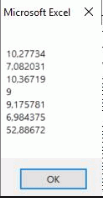
Dans l'image ci-dessus vous pouvez voir les temps d'exécution de chaque partie puis le total (53s). C'est donc très long.
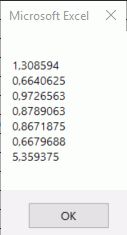
Dans l'image ci-dessus, ce sont les temps d'exécution pour la même macro, dans les mêmes conditions etc.
La seule chose qui a changé : j'ai appuyé plein de fois sur le clique droit de ma sourie !
Le résultat avec ou sans clique est exactement le même, pas de manque etc.
Je suis plutôt débutant en VBA et je ne comprend vraiment pas ce qui ce passe, comment faire pour que ce temps soit aussi cours que dans le deuxième cas mais sans clique ?
Je m'excuse d'avance mais je ne pourrais pas partager le fichier...
Si quelqu'un peut m'éclairer sur ce sujet.
Merci d'avance!
Bonjour
Pour le feuille Customer votre code pourrait être ceci
Public Sub AddButton_Click()
Dim lFirst As Long
Dim r As Range

Application.ScreenUpdating = False
Application.Calculation = xlCalculationManual

t = Timer
With Worksheets("Customer")
    lFirst = .Range("G" & Rows.Count).End(xlUp).Row + 1

    .Cells(lFirst, 1).Value = TextBox3.Value 'customer
    .Cells(lFirst, 2).Value = TextBox4.Value 'site
    .Cells(lFirst, 3).Value = TextBox5.Value 'location
    .Cells(lFirst, 4).Value = TextBox6.Value 'commessa
    .Cells(lFirst, 5).Value = TextBox1.Value 'site code
    .Cells(lFirst, 6).Value = TextBox2.Value 'system ID
    .Cells(lFirst, 7).Value = ComboBox1.Value 'sub_code
    .Cells(lFirst, 8).Value = TextBox7.Value 'date
    .Cells(lFirst, 9).Value = ComboBox2.Value 'type

    'Tri de la feuille
    .Select 'si plantage lors du tri
    With .AutoFilter.Sort
        .SortFields.Clear
        .SortFields.Add2 Key:=Range("E4:E999"), SortOn:=xlSortOnValues, Order:=xlAscending, DataOption:=xlSortNormal
        .Header = xlYes
        .MatchCase = False
        .Orientation = xlTopToBottom
        .SortMethod = xlPinYin
        .Apply
   End With
End With

sTime1 = Timer - t
.....
Ensuite à la fin du code, mettez --> Application.Calculation = xlCalculationAutomatic
Supprimez la ligne -->Application.DisplayStatusBar = True
Vous pouvez modifier le reste du code sur base de ce que je montre ci-dessus
Cordialement
Bonjour @Dan,
Merci beaucoup pour votre réponse ! Simplement en ajoutant Application.Calculation = xlCalculationManual et en rétablissant à la fin :
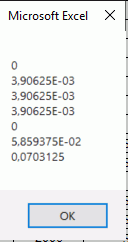
En remplaçant par le reste des modifications on gagne encore plus de temps !
Encore une fois merci et bonne journée !