Problème avec rowspan à l'importation
Bonjour,
J'aurai besoin de vos lumières
J'importe des tables d'un site et lors de l'importation les cellules sont décaler à cause des rowspans de deux colonnes
J'ai pas mal chercher et cherche encore sur stakoverflow mais rien pour le moment après plusieurs test
La page html de base :
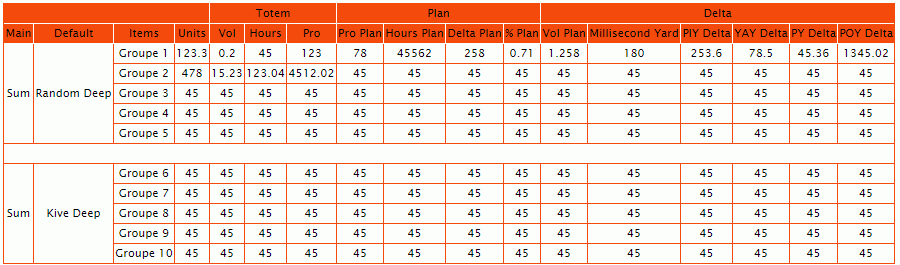
le résultat :
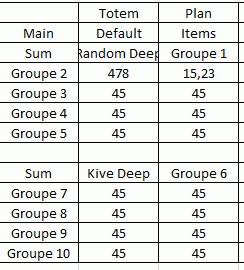
Le code :
Je sais que la modification doit s'opérer au niveau des getelements.... les deux rowspan ont un ID et une class, mais je bug
Je peux fournir la page html de test qui est en serveur local mais pas possible de l'héberger sur ce site
Sub ProcessHTMLPage(HTMLPage As MSHTML.HTMLDocument)

    Dim HTMLTable As MSHTML.IHTMLElement
    Dim HTMLTables As MSHTML.IHTMLElementCollection
    Dim HTMLRow As MSHTML.IHTMLElement
    Dim HTMLCell As MSHTML.IHTMLElement
    Dim RowNum As Long, ColNum As Integer
    Set HTMLTables = HTMLPage.getElementsByTagName("table")

    For Each HTMLTable In HTMLTables

        'Worksheets("PPR").Activate
        Range("A1").Value = "Dernière modification"
        Range("B1").Value = Now
        RowNum = 3
        For Each HTMLRow In HTMLTable.getElementsByTagName("tr")
            ColNum = 1
            For Each HTMLCell In HTMLRow.Children
                Cells(RowNum, ColNum) = HTMLCell.innerText
                ColNum = ColNum + 1
            Next HTMLCell
            RowNum = RowNum + 1
        Next HTMLRow
    Next HTMLTable
End Sub

Sub Import()
    Dim XMLPage As New MSXML2.XMLHTTP60
    Dim HTMLDoc As New MSHTML.HTMLDocument
    Dim JDate As String, JHours As String

    JDate = Format(Now, "YYYY-MM-DD")

    Cells.Clear

    XMLPage.Open "GET", "http://rollup/Shenzar", False

    XMLPage.send

    HTMLDoc.body.innerHTML = XMLPage.responseText

    Worksheets("Row").Activate

    ProcessHTMLPage HTMLDoc

    Range("A3").CurrentRegion.Select
    With Selection
        .HorizontalAlignment = xlCenter
        .Borders.Value = 1
    End With

End Sub
Merci pour vos lumières.
Bonjour,
J'ai personnellement une solution beaucoup plus simple que j'utilise en premier lieu sans me poser de questions ...
https://www.excel-pratique.com/fr/telechargements/macros/tables-html-site-excel-no432
Bonjour,
Merci pour ton aide
Effectivement Steelson j'avais ton fichier, je voulais maitrisé les collections HTML en VBA :)
Mais cette solution sera la bonne, l'autre n'est pas pour toute suite, elle fonctionne pour d'autres tableau, mais sur celui la sa coince
ton fichier j'avais fais des modifs comme suit : Car j'avais besoin de la table 2 qui a 5 sous table
Avec ActiveSheet.Paste le tableau est surperbement récupérer
Tandis qu'avec Sheets(2).[A1].Paste cela ne fonctionne pas, tu serais pourquoi ? Dans le cas ou le code est exécuter via une autre feuille pour aller dans la feuille 2
Sub ImportYOY()

Dim URL$, obj As New DataObject

Application.ScreenUpdating = False

'Sheets(2).Activate

On Error Resume Next

    DoEvents

    URL = ""

    On Error Resume Next

    With CreateObject("MSXML2.XMLHTTP")

        .Open "GET", URL, False
        .Send

        If .Status = 200 Then
            txt = "<table" & Split(Split(.responseText, "<table")(2), "</table>")(0) & "</table>"
            obj.SetText txt
            obj.PutInClipboard
            Sheets(2).[A4].Paste
            'ActiveSheet.Paste
        End If

    End With

    Selection.Delete

Application.ScreenUpdating = True

MsgBox "All Done"

End Sub
Cordialement,
Je vais toujours au plus simple ... et excel retranscrit bin les <table> html !
Tandis qu'avec Sheets(2).[A1].Paste cela ne fonctionne pas, tu serais pourquoi ? Dans le cas ou le code est exécuter via une autre feuille pour aller dans la feuille 2
Pour copier en sheets(x), décompose
sheets("ma_feuille").activate
Range("là_ou_tu_veux_copier")
activesheet.pasteMerci pour la décomposition sa à fonctionner :)
Merci pour le complément, j'avais testé .getElementsByTagName("TD") mais avec HTMLPage.getElementsByTagName("TD") mais j'avais zappé TDelement.rowspan
Je vais regardé au fur et a mesure ce que sa donne sur excel Il me reste un dernier site a scraper sur e plus hardu qui renvoie les TD du premier tableau deux fois de suite en les collants sur excel, chaque site intranet est différent chez le géant du e-commerce :) je reviendrai
Pour reprendre ton code, avec ceci je récupère en effet le rowspan et le colspan
Il suffit alors d'en tenir compte dans la retranscription du tableau
Sub Import()
Dim HTMLPage As New HTMLDocument

    With CreateObject("WINHTTP.WinHTTPRequest.5.1")
        .Open "GET", [url], False
        .send
        HTMLPage.body.innerHTML = .responseText
    End With
    Set HTMLTables = HTMLPage.getElementsByTagName("table")

    For Each HTMLTable In HTMLTables
        For Each HTMLRow In HTMLTable.getElementsByTagName("tr")
            For Each HTMLCell In HTMLRow.Children
                Debug.Print "rowspan : " & HTMLCell.rowSpan, "colspan : " & HTMLCell.colSpan
            Next HTMLCell
        Next HTMLRow
    Next HTMLTable

End SubBonjour Steelson
De mon côté cela me renvoie un nombre entier, je vais creuser un peu plus, mais ton fichier de base fonctionne bien pour ce cas la
Le premier site a scraper était un tableau
Je vais regarder sur le prochain et dernier site a scraper en VBA ce que sa donne
Bonjour,
De mon côté cela me renvoie un nombre entier, je vais creuser un peu plus,
je n'ai pas compris la remarque ... peux-tu expliciter ?
mais ton fichier de base fonctionne bien pour ce cas la
Le premier site a scraper était un tableau
Je vais regarder sur le prochain et dernier site a scraper en VBA ce que sa donne
en effet, si la structure du site web est en tableau, c'est a priori assez simple
il peut y avoir
- d'autres types de structuration par exemple du json ou xml > dans ce cas il existe des méthodes spécifiques https://forum.excel-pratique.com/excel/recuperer-tableau-page-web-136496#p839242
- ou des structures plus "libres" où l'usage de div est à profusion, dans ce cas
- on peut passer via google sheets avec XPath https://forum.excel-pratique.com/sheets/aide-pour-ligne-de-commande-importxml-149996#p925398
- ou Selenium https://forum.excel-pratique.com/excel/formulaire-pour-attestation-148130/3#p913930.
Merci à toi pour la lecture
Et bien quand je fais un debug.print du rowspan il me renvoie = 1 mais sa doit être moi qui est commis une erreur
J'explore des pistes : mais celui la me tord l'esprit car il y a des TD rowspan partout d'autant que le tableau réelle est plus grand
Sur ton fichier je mets 1min pour récupérer les infos du tableau 2 sans le div au dessus
En QueryTable sa mets 8 min
Sur celui la j'ai rajouter une infos de plus sur une div qui est recuperer en 10 seconde mais le rowspan me les brises, faut peut être que j'aille sur du getelement...=range... mais tous les td et tr ont un id et un name le fichier va devenir un champ de mines avec mon niveau
Je regarde tes liens et vais garder ton fichier et continuer a me perfectionner pour venir a bout de ce souci
Sub ProcessHTMLPage(HTMLPage As MSHTML.HTMLDocument)

    Dim HTMLTable As MSHTML.IHTMLElement
    Dim HTMLTables As MSHTML.IHTMLElementCollection
    Dim HTMLDivName As MSHTML.IHTMLElementCollection
    Dim HTMLDiv As MSHTML.IHTMLElement
    Dim HTMLRow As MSHTML.IHTMLElement
    Dim HTMLCell As MSHTML.IHTMLElement
    Dim RowNum As Long, ColNum As Integer

    Set HTMLTables = HTMLPage.getElementsByClassName("result-table")
    Set HTMLDivName = HTMLPage.getElementsByClassName("resourceDrilldownLink")

    For Each HTMLDiv In HTMLDivName
        [A3] = "Data last checked at"
        [A4] = HTMLDiv.innerText
    Next

    For Each HTMLTable In HTMLTables

        Range("A1").Value = "Dernière modification"
        Range("B1").Value = Now

        RowNum = 6

        For Each HTMLRow In HTMLTable.getElementsByTagName("tr")

            ColNum = 1

            For Each HTMLCell In HTMLRow.Children

                Cells(RowNum, ColNum).MergeArea = HTMLCell.innerText
                ColNum = ColNum + 1

            Next HTMLCell

            RowNum = RowNum + 1

        Next HTMLRow

    Next HTMLTable
End Subessaie ceci
Sub Import()
Dim HTMLPage As New HTMLDocument

    With CreateObject("WINHTTP.WinHTTPRequest.5.1")
        .Open "GET", [url], False
        .send
        HTMLPage.body.innerHTML = .responseText
    End With
    Set HTMLTables = HTMLPage.getElementsByTagName("table")

    For Each HTMLTable In HTMLTables
        For Each HTMLRow In HTMLTable.getElementsByTagName("tr")
            For Each HTMLCell In HTMLRow.Children
                Debug.Print "rowspan : " & HTMLCell.rowSpan, "colspan : " & HTMLCell.colSpan
            Next HTMLCell
        Next HTMLRow
    Next HTMLTable

End Sub
sur le site dont je t'envoie l'adresse en mp
| AAAAAAAA | BBBBBBBB BBBBBBBB | CCCCCCCC CCCCCCCC | DDDDDDDD DDDDDDDD |
| E | F | 123 456,78 € | |
| H | I | J | |
| K | L | M | |
| N | O | ||
| P | Q | R | S |
| T | U | V | |
| W | X | Y | Z |
tu obtiendras bien
rowspan : 3 colspan : 1
rowspan : 1 colspan : 1
rowspan : 1 colspan : 1
rowspan : 1 colspan : 1
rowspan : 1 colspan : 1
rowspan : 1 colspan : 1
rowspan : 1 colspan : 1
rowspan : 1 colspan : 1
rowspan : 1 colspan : 1
rowspan : 1 colspan : 1
rowspan : 1 colspan : 1
rowspan : 2 colspan : 2
rowspan : 1 colspan : 1
rowspan : 1 colspan : 1
rowspan : 1 colspan : 1
rowspan : 1 colspan : 1
rowspan : 1 colspan : 1
rowspan : 1 colspan : 1
rowspan : 1 colspan : 1
rowspan : 1 colspan : 1
rowspan : 1 colspan : 1
rowspan : 1 colspan : 2
rowspan : 1 colspan : 1
rowspan : 1 colspan : 1
rowspan : 1 colspan : 1
rowspan : 1 colspan : 1
si tu as un fichier source html, tu peux me l'envoyer (en mp si besoin) je regarderai
Proposition de code pour importer la table avec ses TD fusionnées
Sub Import()
Dim HTMLPage As New HTMLDocument

    With CreateObject("WINHTTP.WinHTTPRequest.5.1")
        .Open "GET", [url], False
        .send
        HTMLPage.body.innerHTML = .responseText
    End With
    Set HTMLTables = HTMLPage.getElementsByTagName("table")

    n = 0
    For Each HTMLTable In HTMLTables
        n = n + 1
        lig = 1
        ThisWorkbook.Sheets.Add(After:=ThisWorkbook.Sheets(ThisWorkbook.Sheets.Count)).Name = "Table#" & n
        For Each HTMLRow In HTMLTable.getElementsByTagName("tr")
            lig = lig + 1
            col = 1
            For Each HTMLCell In HTMLRow.Children
                col = col + 1
                Do Until InStr(Cells(lig, col).MergeArea.Address, ":") = 0
                    col = col + 1
                Loop
                If (HTMLCell.rowSpan * HTMLCell.colSpan) > 1 Then
                    Range(Cells(lig, col), Cells(lig + HTMLCell.rowSpan - 1, col + HTMLCell.colSpan - 1)).Merge
                End If
                Cells(lig, col) = HTMLCell.innerHTML
            Next HTMLCell
        Next HTMLRow
    Next HTMLTable

End Sub