Bonjour à tous,
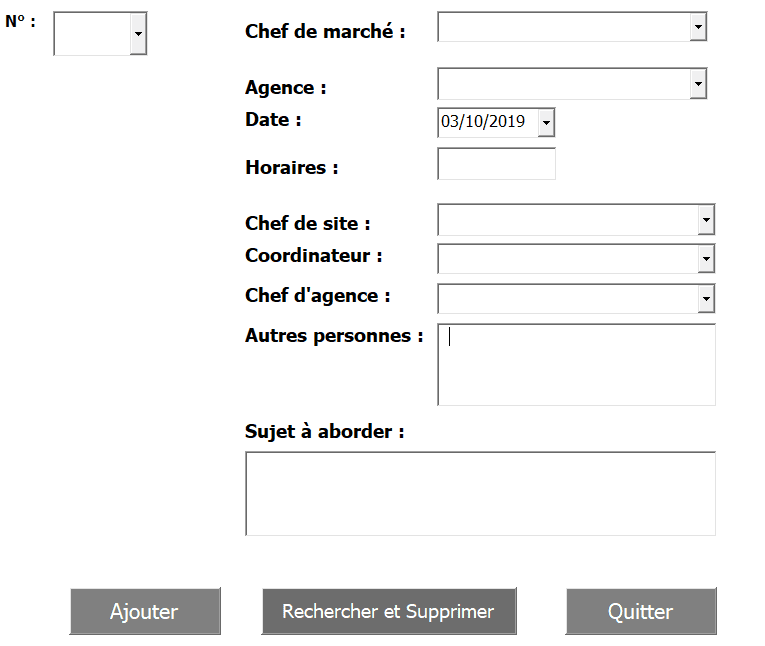
Je me suis inscris sur ce forum pour avoir votre aide, je suis une grande débutante dans VBA, j'ai souhaité réaliser pour mon entreprise un formulaire pour Ajouter et Supprimer des Rendez-vous (Revues de performance).
Mon formulaire fonctionne très bien pour l'ajout mais je n'arrive pas du tout à supprimer des lignes ...
Idéalement, j'avais en tête d'utiliser le "N°" (Colonne C) qui me permettrait de ressortir la ligne dans mon formulaire avec les différentes infos du rendez-vous et ensuite de pouvoir supprimer celui-ci. Le soucis est que quand on sélectionne un numéro dans mon formulaire les informations de la ligne ne ressorte pas
Par confidentialité, je me peux pas vous envoyer mon fichier avec les informations de mon entreprise mais je vous joint quelques photos.
Je vous transmets une partie de mon code que j'ai déjà pu effectuer pour mon formulaire :
Private Sub TextBox10_AfterUpdate()
TextBox10 = Format(TextBox10, ["short text"])
End Sub
Private Sub TextBox10_KeyPress(ByVal KeyAscii As MSForms.ReturnInteger)
If Not ((KeyAscii > 46 And KeyAscii < 58)) Then
KeyAscii = 0
End If
End Sub
Private Sub CommandButton1_Click()
Dim dlt As String
If ComboBox1 = "" Or ComboBox2 = "" Or ComboBox3 = "" Or ComboBox4 = "" Or ComboBox5 = "" Or DTPicker1 = "" Or TextBox16 = "" Or TextBox15 = "" Then
MsgBox ("Veuillez remplir toutes les informations nécessaires")
Else
If Sheets("Planing RP").Range("d35") = "" Then
Sheets("Planing RP").Range("d35") = DTPicker1
End If
With Sheets(1)
.Unprotect Password:=21081996
dlt = Sheets("Planing RP").Range("d1048576").End(xlUp).Row + 1
Sheets("Planing RP").Range("h" & dlt) = ComboBox1
Sheets("Planing RP").Range("g" & dlt) = ComboBox2
Sheets("Planing RP").Range("e" & dlt) = DTPicker1
Sheets("Planing RP").Range("f" & dlt) = TextBox16
Sheets("Planing RP").Range("j" & dlt) = ComboBox3
Sheets("Planing RP").Range("k" & dlt) = ComboBox4
Sheets("Planing RP").Range("i" & dlt) = ComboBox5
Sheets("Planing RP").Range("l" & dlt) = TextBox14
Sheets("Planing RP").Range("m" & dlt) = TextBox15
Sheets("Planing RP").Range("c" & dlt) = ComboNum
Unload UserForm1
.Protect Password:=21081996
End With
End If
End Sub
Private Sub RecherSup_Click()
Dim dlt As String
.Unprotect Password:=21081996
Der_Ligne = ComboNum.ListBox + 3
ComboNum.Value = Cells(dlt, 1)
DTPicker1.Value = Cells(dlt, 2)
TextBox16.Value = Cells(dlt, 3)
ComboBox2.Value = Cells(dlt, 4)
ComboBox1.Value = Cells(dlt, 5)
ComboBox5.Value = Cells(dlt, 6)
ComboBox3.Value = Cells(dlt, 7)
ComboBox4.Value = Cells(dlt, 8)
TextBox14.Value = Cells(dlt, 9)
TextBox15.Value = Cells(dlt, 10)
.Protect Password:=21081996
End Sub
Private Sub Quitter_Click()
Unload Me
End Sub
J'espère que vous allez pouvoir m'aider, j'aimerais vraiment pourvoir présenter ce nouveau tableau à notre équipe,
En vous remerciant par avance,