Copier Coller avec insertion ligne, masque des lignes vides
- Messages
- 4'199
- Excel
- 2021 FR 64 bits
- Inscrit
- 13/06/2016
- Emploi
- bénévole associations Goutte d'Or
Bonjour,
Essayer cette modification :
    Dim cell_copie As Range, nb_lignes As Integer, nb_colonnes As Integer, i As Integer

    Set cell_copie = Sheets("Output").Cells(Ligne, "A")
    With Sheets("Mouvements")
        With .ListObjects("Tableau22")
            .Range.AutoFilter Field:=2, Criteria1:="*" 'contient quelque chose
            .Range.AutoFilter Field:=14, Criteria1:="*->*" 'contient "->"
            .Range.SpecialCells(xlCellTypeVisible).Copy cell_copie
            For i = 1 To .Range.Columns.Count
                .Range.AutoFilter Field:=i  'annulation filtres
            Next i
        End With
    End With
    With Sheets("Output")
        On Error Resume Next
        nb_lignes = .UsedRange.SpecialCells(xlCellTypeLastCell).Row - cell_copie.Row + 1
        nb_colonnes = .UsedRange.SpecialCells(xlCellTypeLastCell).Column - cell_copie.Column + 1
        .ListObjects.Add(xlSrcRange, cell_copie.Resize(nb_lignes, nb_colonnes), , xlYes).Name = "Tableau22"
        On Error GoTo 0
        With .ListObjects(1)
            .ShowTotals = True   'affichage ligne Total
            .ListRows.Add        'ajout 1igne vierge
            Ligne = .HeaderRowRange.Row + .ListRows.Count + 3   '2ème ligne libre après tableau
        End With
End Withce code ne fonctionne pas
.Range.SpecialCells(xlCellTypeVisible).Copy cell_copieen fait moi je vais juste travailler avec le tableau qu'on viens de la copier puis faire autre tableau pour total
 Dim nb_lignes_visibles  As Integer, nb_colonnes As Integer ,i As Integer
    With Sheets("Mouvements")
        With .ListObjects("Tableau22")
             .Range.AutoFilter Field:=2, Criteria1:="*" 'contient quelque chose
             .Range.AutoFilter Field:=14, Criteria1:="*->*" 'contient "->"
             .Range.SpecialCells(xlCellTypeVisible).Copy Sheets("Output").Range("A7")
            nb_colonnes = .Range.Columns.Count
            nb_lignes_visibles = .Range.SpecialCells(xlCellTypeVisible).Count / nb_colonnes
            For i = 1 To nb_colonnes
                .Range.AutoFilter Field:=i  'annulation filtres
             Next i
        End With
    End With
    With Sheets("Output")
        On Error Resume Next
        .ListObjects.Add(xlSrcRange, .Range("A7").Resize(nb_lignes_visibles, nb_colonnes), , xlYes).Name = "Tableau22"
        On Error GoTo 0
        With .ListObjects(1)
            .ShowTotals = True   'affichage ligne Total
             .ListRows.Add        'ajout 1igne vierge
             Ligne = .HeaderRowRange.Row + .ListRows.Count + 3   '2ème ligne libre après tableau
        End With
    End With
L'idée maintenant est de faire dans cet esprit
2016 2017
Promos déjà réalisées x 27
Attention .. dans ce tableau « 2016 » par exemple sera issue des 4 derniers caractères de la ligne
Et bien prévoir le cas où tu auras « 0 ligne » ce qui peut être le cas en début d’année par exemple.
Vous voyais un peu ??
- Messages
- 4'199
- Excel
- 2021 FR 64 bits
- Inscrit
- 13/06/2016
- Emploi
- bénévole associations Goutte d'Or
Nad89 a écrit :ce code ne fonctionne pas
Redonnez-moi votre code mis à jour avec la modification que je viens de vous donner.
Public Sub SuiviPromos()

    Application.EnableEvents = True

   Call SubMouvements(True)

    Dim SetNames As Scripting.Dictionary
    Dim Names As Scripting.Dictionary
    Set SetNames = ListTabs 'la liste des mois Rhubics
    Set Names = ListTabs 'la liste des mois Rhubics ensuite completée par les prévisions

    Dim Ligne As Integer, LigneSave As Integer

    Ligne = 2
    'index de ligne courante
    'plus facile pour gérer les sauts de ligne ou les ajouts oubliés dans une catégorie

    'création de la feuille "Output"
    Sheets.Add
    ActiveSheet.Name = "Output"
    Call FillWhite

    Call BigTitle("suivi des promotions réalisées et à venir ", Ligne, 1)
    Ligne = Ligne + 3

     Ligne = Ligne
        Call BigTitle("Promo déjà réalisées (Rhubics) ", Ligne, 1)
        Ligne = Ligne

    Dim cell_copie As Range, nb_lignes As Integer, nb_colonnes As Integer, i As Integer

    Set cell_copie = Sheets("Output").Cells(Ligne, "A")
    With Sheets("Mouvements")
        With .ListObjects("Tableau22")
            .Range.AutoFilter Field:=2, Criteria1:="*" 'contient quelque chose
            .Range.AutoFilter Field:=14, Criteria1:="*->*" 'contient "->"
            .Range.SpecialCells(xlCellTypeVisible).Copy cell_copie
            For i = 1 To .Range.Columns.Count
                .Range.AutoFilter Field:=i  'annulation filtres
            Next i
        End With
    End With
    With Sheets("Output")
        On Error Resume Next
        nb_lignes = .UsedRange.SpecialCells(xlCellTypeLastCell).Row - cell_copie.Row + 1
        nb_colonnes = .UsedRange.SpecialCells(xlCellTypeLastCell).Column - cell_copie.Column + 1
        .ListObjects.Add(xlSrcRange, cell_copie.Resize(nb_lignes, nb_colonnes), , xlYes).Name = "Tableau22"
        On Error GoTo 0
        With .ListObjects(1)
            .ShowTotals = True   'affichage ligne Total
            .ListRows.Add        'ajout 1igne vierge
            Ligne = .HeaderRowRange.Row + .ListRows.Count + 3   '2ème ligne libre après tableau
        End With
    End With

    Call promoavenir(Ligne)
    Call TableauEmbauches(ThisWorkbook.Path & "\Previsions.xlsb", Ligne, 2, "", Names, "Mutation interne à la structure avec promo", ")()(", True)
    Call TableauEmbauches(ThisWorkbook.Path & "\Previsions.xlsb", Ligne, 2, "", Names, "Arrivée d'autres structures RTE avec promo", ")()(", True)
   Ligne = Ligne + 2
  ' Call TableauEmbauches(ThisWorkbook.Path & "\Previsions.xlsb", Ligne, 2, "Autres mouvements (Rhubics et Previsions)", Names, "", "Mutation", True)

    Call RenameOutput("SuiviPromos")
End Sub

Public Sub promoavenir(Ligne)
    'TODO
    'parcourir les mois en notant surtout l'année
    'lorsqu'on change d'année, traiter le groupe qu'on vient de passer

    Dim FSM As New FileSystemObject
    Dim MutY As New Scripting.Dictionary
    Dim MutM As New Scripting.Dictionary
    Dim TypesMut As New Collection

    TypesMut.Add "Mutation interne à la structure avec promo"
    TypesMut.Add "Arrivée d'autres structures  avec promo"
    PrevName = ThisWorkbook.Path & "\Previsions.xlsb"

    If SpFileExists(PrevName) Then
        Dim PrevBook As Excel.Workbook
        Application.DisplayAlerts = False
        Set PrevBook = Application.Workbooks.Open(PrevName, , , , , , , , , , , , , , xlRepairFile)
        For Each s In PrevBook.Sheets
            If s.visible = True Then
                With s
                    m = 6
                    Do While .Cells(m, 1).Value <> ""
                        Dim Merge As Range
                        Set Merge = .Cells(m, 1).MergeArea
                        date2 = .Cells(m, 1).Value
                        date1 = Mid(date2, Application.Max(1, InStrRev(date2, " ") + 1))
                        Set Rng = .Range(.Cells(Merge.Rows(1).Row, 1), .Cells(Merge.Rows(Merge.Rows.Count).Row, .Columns.Count))
                        For Each item In TypesMut
                            Call DoubleDicIncrement(MutY, date1, item, Application.WorksheetFunction.CountIf(Rng, item))
                            Call DoubleDicIncrement(MutM, date2, item, Application.WorksheetFunction.CountIf(Rng, item))
                        Next
                        m = m + Merge.Rows.Count
                    Loop
                End With
            End If
        Next
        PrevBook.Close
        Application.DisplayAlerts = True

       Ligne = Ligne + 3
        Call BigTitle("Promos à Venir (Prévisions)", Ligne, 1)
        Ligne = Ligne + 3
'Calcul total par ligne et par Année
       j = 1
        For Each item In TypesMut
            With Range(Cells(Ligne + j, 1), Cells(Ligne + j, 2))
                .Merge
                .Value = item
            End With
            i = 3
            For Each key In MutY.Keys
                With Cells(Ligne + 0, i)
                    .NumberFormat = "@"
                    .Value = ReduceMonth(key & " " & Chr(160))

               End With
                Cells(Ligne + j, i).Value = MutY(key)(item)
                i = i + 1
            Next
            Cells(Ligne + j, i).Value = "=SUM(" & Cells(Ligne + j, 3).Address & ":" & Cells(Ligne + j, i - 1).Address & ")"
            j = j + 1
        Next

        'total colonnes ...........................................................................................................

         Cells(Ligne + j, 1) = "TOTAL"
          Call TableVert(Cells(Ligne + j, 3), Cells(Ligne + j, i), 200, 250, 255)

          '..............................
         ' Application D 'une formule de somme pour la ligne = Ligne +j et les colonnes 3 à i.Pour que le formule soit transposée pour chaque colonne,
          'il est nécessaire que dans la formule les adresses soient relatives (ex: A1) et non absolues (ex: $A$1).
          'D'où la correction du .Address en .Address(0,0).
          '..............
        Range(Cells(Ligne + j, 3), Cells(Ligne + j, i)).Formula = "=SUM(" & Cells(Ligne + 1, 3).Address(0, 0) & ":" & Cells(Ligne + j - 1, 3).Address(0, 0) & ")"
        '.............
        '........................................................................................................................................

        Call TableVert(Cells(Ligne + 1, 1), Cells(Ligne + TypesMut.Count, MutY.Count + 2))
        Call TableVert(Cells(Ligne + 1, MutY.Count + 3), Cells(Ligne + TypesMut.Count, MutY.Count + 3), 200, 250, 255)
        Cells(Ligne, MutY.Count + 3).Value = "Total"
     'graphe avec total ....
       ' Ligne = Graphe(Ligne + TypesMut.Count + 1, Range(Cells(Ligne, 1), Cells(Ligne + TypesMut.Count + 1, MutY.Count + 2)), Range(Cells(Ligne + TypesMut.Count + 2, 3), Cells(Ligne + TypesMut.Count + 2, MutY.Count + 3)), xlColumnStacked, "recrutementsparannee")

'graphe sans total ....
 Ligne = Graphe(Ligne + TypesMut.Count, Range(Cells(Ligne, 1), Cells(Ligne + TypesMut.Count, MutY.Count + 2)), Range(Cells(Ligne + TypesMut.Count + 1, 3), Cells(Ligne + TypesMut.Count + 1, MutY.Count + 3)), xlColumnStacked, "recrutementsparannee")

    ActiveSheet.ChartObjects("recrutementsparannee").Activate
    ActiveChart.PlotArea.Select
    ActiveChart.ChartArea.Select
    ActiveSheet.Shapes("recrutementsparannee").ScaleHeight 0.9548611111, msoFalse, _
        msoScaleFromTopLeft
    ActiveChart.FullSeriesCollection(1).Select
    ActiveChart.PlotArea.Select
    Selection.Left = 20.915
    Selection.Top = 26.605
    Selection.Left = 20.915
    Selection.Top = 26.605
    ActiveChart.ChartArea.Select
    ActiveSheet.Shapes("recrutementsparannee").ScaleHeight 0.8945454545, msoFalse, _
        msoScaleFromBottomRight

        'copier-coller à factoriser ici

        j = 1
        For Each item In TypesMut
            With Range(Cells(Ligne + j, 1), Cells(Ligne + j, 2))
                .Merge
                .Value = item
            End With
            i = 3
            For Each key In MutM.Keys
                With Cells(Ligne + 0, i)
                    .NumberFormat = "@"
                    .Value = ReduceMonth(key & " " & Chr(160))
                    'un .NumberFormat="@" seul afficherait un warning sur la cellule, un espace serait automatiquement supprimé, un Chr(160) seul ferait planter ReduceMonth
                End With
                Cells(Ligne + j, i).Value = MutM(key)(item)
                i = i + 1
            Next
            Cells(Ligne + j, i).Value = "=SUM(" & Cells(Ligne + j, 3).Address & ":" & Cells(Ligne + j, i - 1).Address & ")"
            j = j + 1
        Next

        'total colonnes horizontal et vertical .............................................................................
        '.............................................
         Cells(Ligne + j, 1) = "TOTAL"
          Call TableVert(Cells(Ligne + j, 3), Cells(Ligne + j, i), 200, 250, 255)
        Range(Cells(Ligne + j, 3), Cells(Ligne + j, i)).Formula = "=SUM(" & Cells(Ligne + 1, 3).Address(0, 0) & ":" & Cells(Ligne + j - 1, 3).Address(0, 0) & ")"
        '........
        Call TableVert(Cells(Ligne + 1, 1), Cells(Ligne + TypesMut.Count, MutM.Count + 2))
        Call TableVert(Cells(Ligne + 1, MutM.Count + 3), Cells(Ligne + TypesMut.Count, MutM.Count + 3), 200, 250, 255)
        Cells(Ligne, MutM.Count + 3).Value = "Total"
        'graphe avect otal ....
       ' Ligne = Graphe(Ligne + TypesMut.Count + 1, Range(Cells(Ligne, 1), Cells(Ligne + TypesMut.Count + 1, MutM.Count + 2)), Range(Cells(Ligne + TypesMut.Count + 2, 3), Cells(Ligne + TypesMut.Count + 2, MutM.Count + 3)), xlColumnStacked, "recrutementsparmois")
        'graphe sans total ....
         Ligne = Graphe(Ligne + TypesMut.Count, Range(Cells(Ligne, 1), Cells(Ligne + TypesMut.Count, MutM.Count + 2)), Range(Cells(Ligne + TypesMut.Count + 1, 3), Cells(Ligne + TypesMut.Count + 1, MutM.Count + 3)), xlColumnStacked, "recrutementsparmois")

    ActiveChart.PlotArea.Select
    ActiveChart.ChartArea.Select
    ActiveSheet.Shapes("recrutementsparmois").IncrementLeft 3.75
    ActiveSheet.Shapes("recrutementsparmois").IncrementTop 39.75

       Else
        MsgBox "file does not exist"
    End If
    Set TypesEmb = Nothing
End Sub
Débogage sur cette ligne de code
.Range.SpecialCells(xlCellTypeVisible).Copy cell_copie- Messages
- 4'199
- Excel
- 2021 FR 64 bits
- Inscrit
- 13/06/2016
- Emploi
- bénévole associations Goutte d'Or
Modifier cette instruction :
Set cell_copie = Sheets("Output").Cells(Ligne, "A")par
Set cell_copie = Sheets("Output").Cells(Ligne + 2, "A")la ca marche mais comment on peut faire un autre tableau pour total c'est possible en regardant que l'année qui correspond a 4 dernier caractères sur colonne période , que sera en dessous de tableau qu'on arrive a la copier, comme ça :
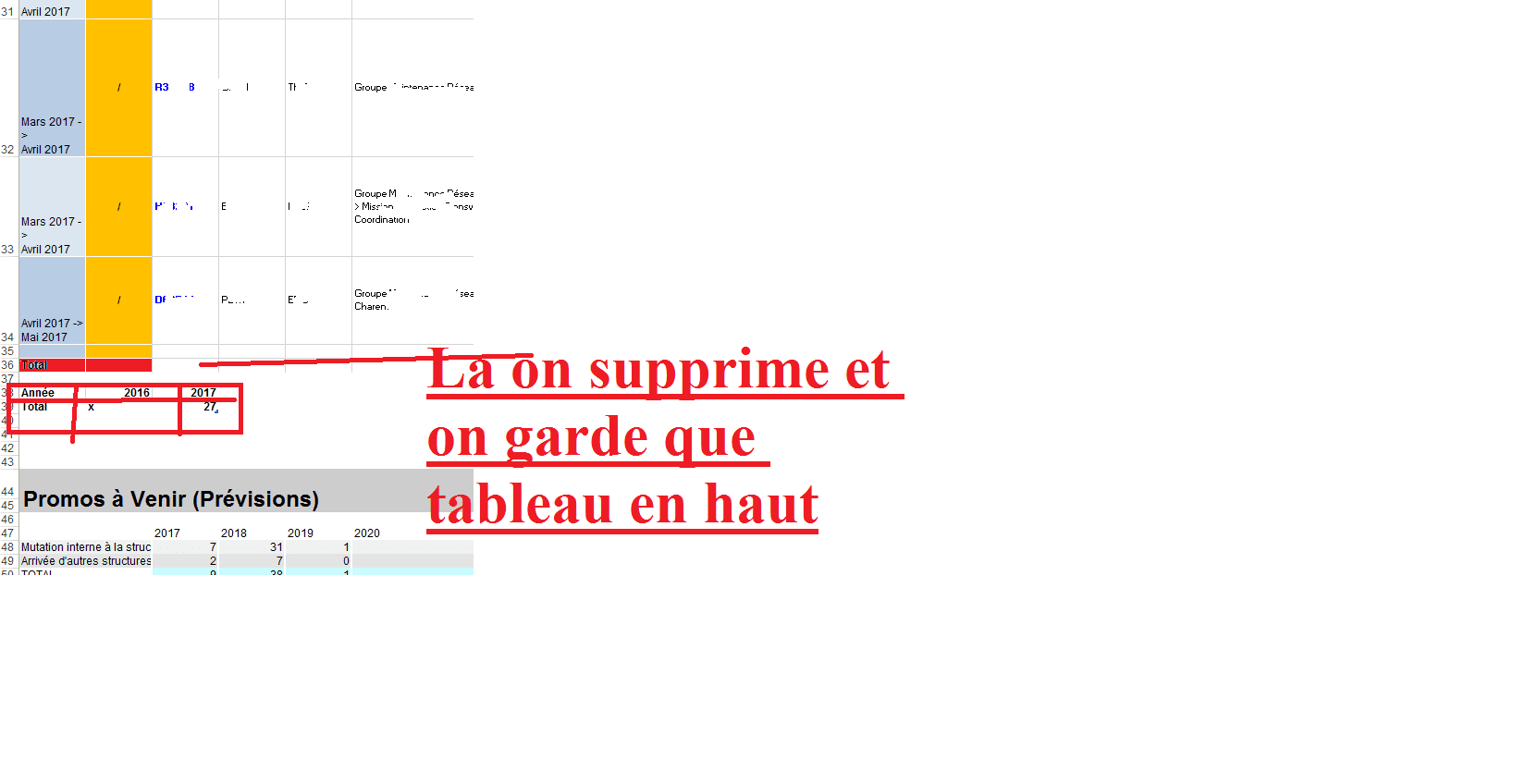
Vous voyais un peu l'idée ??
- Messages
- 4'199
- Excel
- 2021 FR 64 bits
- Inscrit
- 13/06/2016
- Emploi
- bénévole associations Goutte d'Or
Il suffit de supprimer l'instruction correspondant l'affichage de la ligne TOTAL du tableau, donc remplacer ceci :
        With .ListObjects(1)
            .ShowTotals = True   'affichage ligne Total
           .ListRows.Add        'ajout 1igne vierge
           Ligne = .HeaderRowRange.Row + .ListRows.Count + 3   '2ème ligne libre après tableau
       End With
par cela :
        With .ListObjects(1)
            .ListRows.Add        'ajout 1igne vierge
           Ligne = .HeaderRowRange.Row + .ListRows.Count + 3   '2ème ligne libre après tableau
End WithOui , je sais mais comment on peut créer l'autre tableau en dessous , mon algorithme est de regardé le 4 dernier caractère dans la colonne type et le mettre dans un tableau puis incrémenter par 1 pour voir le total çàd comme ça :

- Messages
- 4'199
- Excel
- 2021 FR 64 bits
- Inscrit
- 13/06/2016
- Emploi
- bénévole associations Goutte d'Or
Bonsoir,
ci-dessous modification du code pour ajout de votre tableau Années
    Dim cell_copie As Range, nb_lignes As Integer, nb_colonnes As Integer, i As Integer
    Dim année As String
    Dim Total_années As New Scripting.Dictionary
    Total_années("Année") = "Total"    'initialisation de la collection correspondant au tableau Années

    Set cell_copie = Sheets("Output").Cells(Ligne + 2, "A")
    With Sheets("Mouvements")
        With .ListObjects("Tableau22")
            .Range.AutoFilter Field:=2, Criteria1:="*" 'contient quelque chose
            .Range.AutoFilter Field:=14, Criteria1:="*->*" 'contient "->"
            .Range.SpecialCells(xlCellTypeVisible).Copy cell_copie
            For i = 1 To .Range.Columns.Count
                .Range.AutoFilter Field:=i  'annulation filtres
            Next i
        End With
    End With
    With Sheets("Output")
        On Error Resume Next
        nb_lignes = .UsedRange.SpecialCells(xlCellTypeLastCell).Row - cell_copie.Row + 1
        nb_colonnes = .UsedRange.SpecialCells(xlCellTypeLastCell).Column - cell_copie.Column + 1
        .ListObjects.Add(xlSrcRange, cell_copie.Resize(nb_lignes, nb_colonnes), , xlYes).Name = "Tableau22"
        On Error GoTo 0
        With .ListObjects(1)
            '// remplissage tableau années
            For i = 1 To .ListRows.Count
                année = Right(.ListColumns(1).DataBodyRange.Rows(i), 4)
                Total_années(année) = Total_années(année) + 1
            Next i
            '// ajout ligne vierge et positionnement variable Ligne
            .ListRows.Add        'ajout 1igne vierge
            Ligne = .HeaderRowRange.Row + .ListRows.Count + 2   '2ème ligne libre après tableau
        End With
        '// affichage tableau années
        nb_colonnes = Total_années.Count
        .Cells(Ligne, 1).Resize(, nb_colonnes).Value = Application.Transpose(Application.Transpose(Total_années.Keys))
        Ligne = Ligne + 1
        .Cells(Ligne, 1).Resize(, nb_colonnes).Value = Application.Transpose(Application.Transpose(Total_années.Items))
        Ligne = Ligne + 1
End Withca fonctionne bien merci
en fait la juste il compte les lignes puis il met en total et on récupère le 4 dernier caractère mais si on prenons le cas ou on a plusieurs années , par exemple comme dans ce tableau :
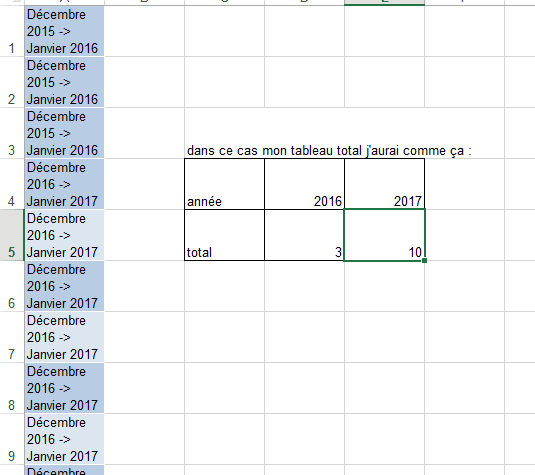
dans ce cas on fait une comparaison ??
Bonjour ,
Je reviens vers vous car j'aurai besoin d'aide encore , en fait avec mes tableaux comme sur la photo , je vais faire un tableau de synthèse aussi comme indiquer sur figure 2 est ce que c'est possible et comment le faire , merciii
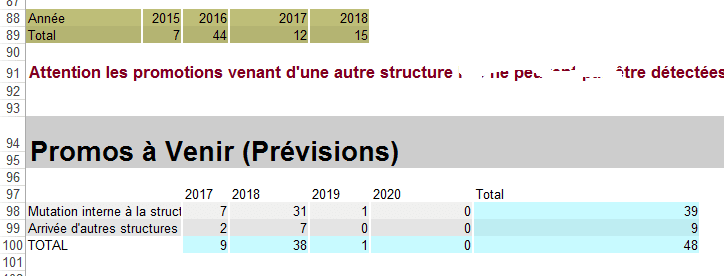
figure 2

voila code
Public Sub SuiviPromos()

   Dim SetNames As Scripting.Dictionary
   Dim Names As Scripting.Dictionary
   Set SetNames = ListTabs 'la liste des mois Rhubics
   Set Names = ListTabs 'la liste des mois Rhubics ensuite completée par les prévisions

      Dim Ligne As Integer, LigneSave As Integer

    Ligne = 2
    'index de ligne courante
    'plus facile pour gérer les sauts de ligne ou les ajouts oubliés dans une catégorie

    'création de la feuille "Output"
    Sheets.Add
    ActiveSheet.Name = "Output"
    Call FillWhite

    Cells(1, 1).Value = " " 'sert à éviter de mettre la date et l'heure de la dernière mise à jour lors de RenameOutput

    Call BigTitle("suivi des promotions réalisées et à venir ", Ligne, 1)
    Ligne = Ligne + 3

     Ligne = Ligne
        Call BigTitle("Promo déjà réalisées (Rhubics) ", Ligne, 1)
        Ligne = Ligne

  Dim cell_copie As Range, nb_lignes As Integer, nb_colonnes As Integer, i As Integer
    Dim année As String
    Dim Total_années As New Scripting.Dictionary
    Total_années("Année") = "Total"    'initialisation de la collection correspondant au tableau Années

    Set cell_copie = Sheets("Output").Cells(Ligne + 2, "A")
    With Sheets("Mouvements")
        With .ListObjects("Tableau22")
            .Range.AutoFilter Field:=2, Criteria1:="*" 'contient quelque chose
            .Range.AutoFilter Field:=14, Criteria1:="*->*" 'contient "->"
            .Range.SpecialCells(xlCellTypeVisible).Copy cell_copie
            For i = 1 To .Range.Columns.Count
                .Range.AutoFilter Field:=i  'annulation filtres
            Next i
        End With
    End With
    With Sheets("Output")
        On Error Resume Next
        nb_lignes = .UsedRange.SpecialCells(xlCellTypeLastCell).Row - cell_copie.Row + 1
        nb_colonnes = .UsedRange.SpecialCells(xlCellTypeLastCell).Column - cell_copie.Column + 1
        .ListObjects.Add(xlSrcRange, cell_copie.Resize(nb_lignes, nb_colonnes), , xlYes).Name = "Tableau22"
        On Error GoTo 0
        With .ListObjects(1)
            '// remplissage tableau années
            For i = 1 To .ListRows.Count
                année = Right(.ListColumns(1).DataBodyRange.Rows(i), 4)
                Total_années(année) = Total_années(année) + 1
            Next i
            '// ajout ligne vierge et positionnement variable Ligne
          '  .ListRows.Add        'ajout 1igne vierge dans le tableau
            Ligne = .HeaderRowRange.Row + .ListRows.Count + 3   '2ème ligne libre après tableau
        ' ajuster les lignes
        Range(Cells(2, 20), Cells(i - 1, 20)).RowHeight = 33

        End With
        '// affichage tableau années
        nb_colonnes = Total_années.Count
        '//Application.Transpose :Renvoie une plage de cellules verticales sous forme de plage horizontale
        .Cells(Ligne, 1).Resize(, nb_colonnes).Value = Application.Transpose(Application.Transpose(Total_années.Keys))
        Ligne = Ligne + 1
        .Cells(Ligne, 1).Resize(, nb_colonnes).Value = Application.Transpose(Application.Transpose(Total_années.Items))
        Ligne = Ligne + 1
        'Pour mise en forme de tableau année
         Call TableVert(Cells(Ligne - 1, 1), Cells(Ligne - 1, Total_années.Count), 190, 190, 120)
         Call TableVert(Cells(Ligne - 2, 1), Cells(Ligne - 1, Total_années.Count), 190, 190, 120)

     ' mise en forme de tableau....................................

     ' ajuster les colonnes
    Columns("A").ColumnWidth = 16
    Columns("B").ColumnWidth = 5
    Columns("C").ColumnWidth = 6
    Columns("E").ColumnWidth = 8
    Columns("F").ColumnWidth = 14
    Columns("K").ColumnWidth = 9
    Columns("L").ColumnWidth = 9
    Columns("M").ColumnWidth = 7
    Columns("N").ColumnWidth = 8
    Columns("O").ColumnWidth = 10
    Columns("P").ColumnWidth = 4
    Columns("Q").ColumnWidth = 15
    Columns("R:R").ColumnWidth = 26 ' Pierre pour améliorer la présentation
    Columns("T").ColumnWidth = 13
    Rows(2).VerticalAlignment = xlTop

         ' Le commentaire

         Ligne = Ligne + 1
    Cells(Ligne, 1).Font.color = RGB(128, 0, 32) ' pour changer couleur de texte
    Cells(Ligne, 1).Font.Bold = True ' pour mettre le texte en gras
    Cells(Ligne, 1).Font.Size = 13 ' size de texte
    Cells(Ligne, 1).Value = "Attention les promotions venant d'une autre structure  ici, il faut les rajouter à la main "

    End With

    Call promoavenir(Ligne)
    Call TableauEmbauches(ThisWorkbook.Path & "\Previsions.xlsb", Ligne, 2, "", Names, "Mutation interne à la structure avec promo", ")()(", True)
    Call TableauEmbauches(ThisWorkbook.Path & "\Previsions.xlsb", Ligne, 2, "", Names, "Arrivée d'autres structures  avec promo", ")()(", True)
   Ligne = Ligne + 2
  ' Call TableauEmbauches(ThisWorkbook.Path & "\Previsions.xlsb", Ligne, 2, "Autres mouvements (Rhubics et Previsions)", Names, "", "Mutation", True)

    Call RenameOutput("SuiviPromos")
End Sub

Public Sub promoavenir(Ligne)
    'TODO
    'parcourir les mois en notant surtout l'année
    'lorsqu'on change d'année, traiter le groupe qu'on vient de passer

    Dim FSM As New FileSystemObject
    Dim MutY As New Scripting.Dictionary
    Dim MutM As New Scripting.Dictionary
    Dim TypesMut As New Collection

    TypesMut.Add "Mutation interne à la structure avec promo"
    TypesMut.Add "Arrivée d'autres structures  avec promo"
    PrevName = ThisWorkbook.Path & "\Previsions.xlsb"

    If SpFileExists(PrevName) Then
        Dim PrevBook As Excel.Workbook
        Application.DisplayAlerts = False
        Set PrevBook = Application.Workbooks.Open(PrevName, , , , , , , , , , , , , , xlRepairFile)
        For Each s In PrevBook.Sheets
            If s.visible = True Then
                With s
                    m = 6
                    Do While .Cells(m, 1).Value <> ""
                        Dim Merge As Range
                        Set Merge = .Cells(m, 1).MergeArea
                        date2 = .Cells(m, 1).Value
                        date1 = Mid(date2, Application.Max(1, InStrRev(date2, " ") + 1))
                        Set Rng = .Range(.Cells(Merge.Rows(1).Row, 1), .Cells(Merge.Rows(Merge.Rows.Count).Row, .Columns.Count))
                        For Each item In TypesMut
                            Call DoubleDicIncrement(MutY, date1, item, Application.WorksheetFunction.CountIf(Rng, item))
                            Call DoubleDicIncrement(MutM, date2, item, Application.WorksheetFunction.CountIf(Rng, item))
                        Next
                        m = m + Merge.Rows.Count
                    Loop
                End With
            End If
        Next
        PrevBook.Close
        Application.DisplayAlerts = True

       Ligne = Ligne + 3
        Call BigTitle("Promos à Venir (Prévisions)", Ligne, 1)
        Ligne = Ligne + 3
'Calcul total par ligne et par Année
       j = 1
        For Each item In TypesMut
            With Range(Cells(Ligne + j, 1), Cells(Ligne + j, 2))
                .Merge
                .Value = item
            End With
            i = 3
            For Each key In MutY.Keys
                With Cells(Ligne + 0, i)
                    .NumberFormat = "@"
                    .Value = ReduceMonth(key & " " & Chr(160))

               End With
                Cells(Ligne + j, i).Value = MutY(key)(item)
                i = i + 1
            Next
            Cells(Ligne + j, i).Value = "=SUM(" & Cells(Ligne + j, 3).Address & ":" & Cells(Ligne + j, i - 1).Address & ")"
            j = j + 1
        Next

        'total colonnes ...........................................................................................................

         Cells(Ligne + j, 1) = "TOTAL"
          Call TableVert(Cells(Ligne + j, 3), Cells(Ligne + j, i), 200, 250, 255)

          '..............................
         ' Application D 'une formule de somme pour la ligne = Ligne +j et les colonnes 3 à i.Pour que le formule soit transposée pour chaque colonne,
          'il est nécessaire que dans la formule les adresses soient relatives (ex: A1) et non absolues (ex: $A$1).
          'D'où la correction du .Address en .Address(0,0).
          '..............
        Range(Cells(Ligne + j, 3), Cells(Ligne + j, i)).Formula = "=SUM(" & Cells(Ligne + 1, 3).Address(0, 0) & ":" & Cells(Ligne + j - 1, 3).Address(0, 0) & ")"
        '.............
        '........................................................................................................................................

        Call TableVert(Cells(Ligne + 1, 1), Cells(Ligne + TypesMut.Count, MutY.Count + 2))
        Call TableVert(Cells(Ligne + 1, MutY.Count + 3), Cells(Ligne + TypesMut.Count, MutY.Count + 3), 200, 250, 255)
        Cells(Ligne, MutY.Count + 3).Value = "Total"
     'graphe avec total ....
       ' Ligne = Graphe(Ligne + TypesMut.Count + 1, Range(Cells(Ligne, 1), Cells(Ligne + TypesMut.Count + 1, MutY.Count + 2)), Range(Cells(Ligne + TypesMut.Count + 2, 3), Cells(Ligne + TypesMut.Count + 2, MutY.Count + 3)), xlColumnStacked, "recrutementsparannee")

'graphe sans total ....
 Ligne = Graphe(Ligne + TypesMut.Count, Range(Cells(Ligne, 1), Cells(Ligne + TypesMut.Count, MutY.Count + 2)), Range(Cells(Ligne + TypesMut.Count + 1, 3), Cells(Ligne + TypesMut.Count + 1, MutY.Count + 3)), xlColumnStacked, "recrutementsparannee")

    ActiveSheet.ChartObjects("recrutementsparannee").Activate
    ActiveChart.PlotArea.Select
    ActiveChart.ChartArea.Select
    ActiveSheet.Shapes("recrutementsparannee").ScaleHeight 0.9548611111, msoFalse, _
        msoScaleFromTopLeft
    ActiveChart.FullSeriesCollection(1).Select
    ActiveChart.PlotArea.Select
    Selection.Left = 20.915
    Selection.Top = 26.605
    Selection.Left = 20.915
    Selection.Top = 26.605
    ActiveChart.ChartArea.Select
    ActiveSheet.Shapes("recrutementsparannee").ScaleHeight 0.8945454545, msoFalse, _
        msoScaleFromBottomRight

        'copier-coller à factoriser ici

        j = 1
        For Each item In TypesMut
            With Range(Cells(Ligne + j, 1), Cells(Ligne + j, 2))
                .Merge
                .Value = item
            End With
            i = 3
            For Each key In MutM.Keys
                With Cells(Ligne + 0, i)
                    .NumberFormat = "@"
                    .Value = ReduceMonth(key & " " & Chr(160))
                    'un .NumberFormat="@" seul afficherait un warning sur la cellule, un espace serait automatiquement supprimé, un Chr(160) seul ferait planter ReduceMonth
                End With
                Cells(Ligne + j, i).Value = MutM(key)(item)
                i = i + 1
            Next
            Cells(Ligne + j, i).Value = "=SUM(" & Cells(Ligne + j, 3).Address & ":" & Cells(Ligne + j, i - 1).Address & ")"
            j = j + 1
        Next

        'total colonnes horizontal et vertical .............................................................................
        '.............................................
         Cells(Ligne + j, 1) = "TOTAL"
          Call TableVert(Cells(Ligne + j, 3), Cells(Ligne + j, i), 200, 250, 255)
        Range(Cells(Ligne + j, 3), Cells(Ligne + j, i)).Formula = "=SUM(" & Cells(Ligne + 1, 3).Address(0, 0) & ":" & Cells(Ligne + j - 1, 3).Address(0, 0) & ")"
        '........
        Call TableVert(Cells(Ligne + 1, 1), Cells(Ligne + TypesMut.Count, MutM.Count + 2))
        Call TableVert(Cells(Ligne + 1, MutM.Count + 3), Cells(Ligne + TypesMut.Count, MutM.Count + 3), 200, 250, 255)
        Cells(Ligne, MutM.Count + 3).Value = "Total"
        'graphe avect otal ....
       ' Ligne = Graphe(Ligne + TypesMut.Count + 1, Range(Cells(Ligne, 1), Cells(Ligne + TypesMut.Count + 1, MutM.Count + 2)), Range(Cells(Ligne + TypesMut.Count + 2, 3), Cells(Ligne + TypesMut.Count + 2, MutM.Count + 3)), xlColumnStacked, "recrutementsparmois")
        'graphe sans total ....
         Ligne = Graphe(Ligne + TypesMut.Count, Range(Cells(Ligne, 1), Cells(Ligne + TypesMut.Count, MutM.Count + 2)), Range(Cells(Ligne + TypesMut.Count + 1, 3), Cells(Ligne + TypesMut.Count + 1, MutM.Count + 3)), xlColumnStacked, "recrutementsparmois")

    ActiveChart.PlotArea.Select
    ActiveChart.ChartArea.Select
    ActiveSheet.Shapes("recrutementsparmois").IncrementLeft 3.75
    ActiveSheet.Shapes("recrutementsparmois").IncrementTop 39.75

       Else
        MsgBox "file does not exist"
    End If
    Set TypesEmb = Nothing
End Sub- Messages
- 4'199
- Excel
- 2021 FR 64 bits
- Inscrit
- 13/06/2016
- Emploi
- bénévole associations Goutte d'Or
Bonjour,
1- variable à définir au niveau du module
Dim Récap_années As New Scripting.Dictionary

Public Sub SuiviPromos()
2- 1ère modification à effectuer
    Dim cell_copie As Range, nb_lignes As Integer, nb_colonnes As Integer, i As Integer
    Dim année As String, tb()
    '// initialisation de la collection correspondant au tableau récapitulatif
    Set Récap_années = Nothing
    Récap_années("Récapitulatif") = Array("Promos réalisées", "Promos à venir", "Total")

    '// initialisation de la collection correspondant au tableau Années
    Dim Total_années As New Scripting.Dictionary
    Total_années("Année") = "Total"

    '// copie tableau22 avec filtrage sur la feuille Output
    Set cell_copie = Sheets("Output").Cells(ligne + 2, "A")
    With Sheets("Mouvements")
        With .ListObjects("Tableau22")
            .Range.AutoFilter Field:=2, Criteria1:="*" 'contient quelque chose
            .Range.AutoFilter Field:=14, Criteria1:="*->*" 'contient "->"
            .Range.SpecialCells(xlCellTypeVisible).Copy cell_copie
            For i = 1 To .Range.Columns.Count
                .Range.AutoFilter Field:=i 'annulation filtres
            Next i
        End With
    End With

    '// création tableau sur la feuille Output
       ]With Sheets("Output")
        On Error Resume Next
        nb_lignes = .UsedRange.SpecialCells(xlCellTypeLastCell).Row - cell_copie.Row + 1
        nb_colonnes = .UsedRange.SpecialCells(xlCellTypeLastCell).Column - cell_copie.Column + 1
        .ListObjects.Add(xlSrcRange, cell_copie.Resize(nb_lignes, nb_colonnes), , xlYes).Name = "Tableau22"
        On Error GoTo 0
        With .ListObjects(1)
            ' remplissage tableau années
            For i = 1 To .ListRows.Count
                année = Right(.ListColumns(1).DataBodyRange.Rows(i), 4) & " " & Chr(160)
                Total_années(année) = Total_années(année) + 1
                If Not Récap_années.Exists(année) Then Récap_années(année) = Array("", "", "")
                tb = Récap_années(année): tb(0) = Val(tb(0)) + 1: tb(2) = Val(tb(2)) + 1: Récap_années(année) = tb
            Next i
            ligne = .HeaderRowRange.Row + .ListRows.Count + 3 '2ème ligne libre après tableau
         End With
        ' ajuster les lignes
         .Range(.Cells(2, 20), .Cells(i - 1, 20)).RowHeight = 33

        '// affichage tableau années
        nb_colonnes = Total_années.Count
        .Cells(ligne, 1).Resize(, nb_colonnes).Value = Total_années.Keys
        ligne = ligne + 1
        .Cells(ligne, 1).Resize(, nb_colonnes).Value = Total_années.Items
        ligne = ligne + 1
        'Pour mise en forme de tableau année
        Call TableVert(.Cells(ligne - 1, 1), .Cells(ligne - 1, Total_années.Count), 190, 190, 120)
        Call TableVert(.Cells(ligne - 2, 1), .Cells(ligne - 1, Total_années.Count), 190, 190, 120)
    End With
3- 2ème modification à effectuer
Public Sub promoavenir(ligne)
    'TODO
    'parcourir les mois en notant surtout l'année
    'lorsqu'on change d'année, traiter le groupe qu'on vient de passer

    Dim FSM As New FileSystemObject
    Dim MutY As New Scripting.Dictionary
    Dim MutM As New Scripting.Dictionary
    Dim TypesMut As New Collection

    TypesMut.Add "Mutation interne à la structure avec promo"
    TypesMut.Add "Arrivée d'autres structures avec promo"
    PrevName = ThisWorkbook.Path & "\Previsions.xlsb"

    If SpFileExists(PrevName) Then
        Dim PrevBook As Excel.Workbook
        Application.DisplayAlerts = False
        Set PrevBook = Application.Workbooks.Open(PrevName, , , , , , , , , , , , , , xlRepairFile)
        For Each s In PrevBook.Sheets
            If s.Visible = True Then
                With s
                    m = 6
                    Do While .Cells(m, 1).Value <> ""
                        Dim Merge As Range
                        Set Merge = .Cells(m, 1).MergeArea
                        date2 = .Cells(m, 1).Value
                        date1 = Mid(date2, Application.Max(1, InStrRev(date2, " ") + 1))
                        Set Rng = .Range(.Cells(Merge.Rows(1).Row, 1), .Cells(Merge.Rows(Merge.Rows.Count).Row, .Columns.Count))
                        For Each Item In TypesMut
                            Call DoubleDicIncrement(MutY, date1, Item, Application.WorksheetFunction.CountIf(Rng, Item))
                            Call DoubleDicIncrement(MutM, date2, Item, Application.WorksheetFunction.CountIf(Rng, Item))
                        Next
                        m = m + Merge.Rows.Count
                    Loop
                End With
            End If
        Next
        PrevBook.Close
        Application.DisplayAlerts = True

        ligne = ligne + 3
        Call BigTitle("Promos à Venir (Prévisions)", ligne, 1)
        ligne = ligne + 3
        'Calcul total par ligne et par Année
        j = 1
        For Each Item In TypesMut
            With Range(Cells(ligne + j, 1), Cells(ligne + j, 2))
                .Merge
                .Value = Item
            End With
            i = 3
            For Each Key In MutY.Keys
                With Cells(ligne + 0, i)
                    .NumberFormat = "@"
                    .Value = ReduceMonth(Key & " " & Chr(160))
                    année = .Value
                    'un .NumberFormat="@" seul afficherait un warning sur la cellule, un espace serait automatiquement supprimé, un Chr(160) seul ferait planter ReduceMonth
                End With
                Cells(ligne + j, i).Value = MutY(Key)(Item)
                If Not Récap_années.Exists(année) Then Récap_années(année) = Array("", "", "")
                tb = Récap_années(année): tb(1) = Val(tb(1)) + MutY(Key)(Item): tb(2) = Val(tb(2)) + MutY(Key)(Item): Récap_années(année) = tb
                i = i + 1
            Next
            Cells(ligne + j, i).Value = "=SUM(" & Cells(ligne + j, 3).Address & ":" & Cells(ligne + j, i - 1).Address & ")"
            j = j + 1
        Next

        'total colonnes ...........................................................................................................

        Cells(ligne + j, 1) = "TOTAL"
        Call TableVert(Cells(ligne + j, 3), Cells(ligne + j, i), 200, 250, 255)

        '..............................
        ' Application D 'une formule de somme pour la ligne = Ligne +j et les colonnes 3 à i.Pour que le formule soit transposée pour chaque colonne,
        'il est nécessaire que dans la formule les adresses soient relatives (ex: A1) et non absolues (ex: $A$1).
        'D'où la correction du .Address en .Address(0,0).
        '..............
        Range(Cells(ligne + j, 3), Cells(ligne + j, i)).Formula = "=SUM(" & Cells(ligne + 1, 3).Address(0, 0) & ":" & Cells(ligne + j - 1, 3).Address(0, 0) & ")"
        '.............
        '// affichage tableau récapitulatif
        nb_colonnes = Récap_années.Count
        '//Application.Transpose :Renvoie une plage de cellules verticales sous forme de plage horizontale
        Cells(ligne + j + 2, 1).Resize(, nb_colonnes).Value = Récap_années.Keys
        ligne = ligne + 1
        Cells(ligne + j + 2, 1).Resize(3, nb_colonnes).Value = Application.Transpose(Récap_années.Items)
        ligne = ligne + 5
        '........................................................................................................................................

        Call TableVert(Cells(ligne + 1, 1), Cells(ligne + TypesMut.Count, MutY.Count + 2))
        Call TableVert(Cells(ligne + 1, MutY.Count + 3), Cells(ligne + TypesMut.Count, MutY.Count + 3), 200, 250, 255)
        Cells(ligne, MutY.Count + 3).Value = "Total"
ligne = Graphe(ligne + TypesMut.Count + 1, Range(Cells(ligne, 1), Cells(ligne + TypesMut.Count + 1, MutY.Count + 2)), Range(Cells(ligne + TypesMut.Count + 2, 3), Cells(ligne + TypesMut.Count + 2, MutY.Count + 3)), xlColumnStacked, "recrutementsparannee")Bonjour,
Ca marche mais reste positionnement , je veux bien qu'il soit tout en bas ,
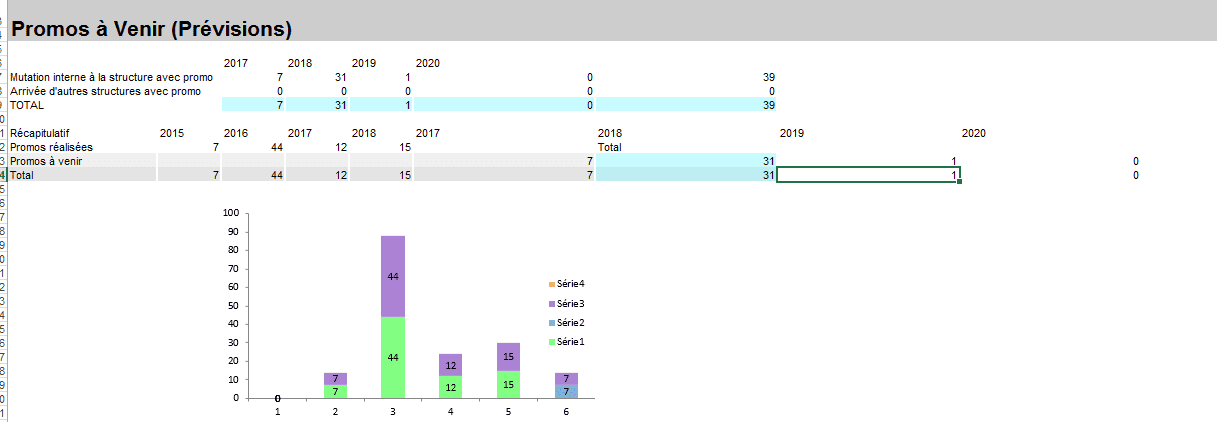
arrivée d'autre structure ca change ca donne rien
- Messages
- 4'199
- Excel
- 2021 FR 64 bits
- Inscrit
- 13/06/2016
- Emploi
- bénévole associations Goutte d'Or
Il y a un souci sur cette valeur
.Value = ReduceMonth(Key & " " & Chr(160))qui n'est pas identique à celle-ci
année = Right(.ListColumns(1).DataBodyRange.Rows(i), 4) & " " & Chr(160)Il faudrait me donner le code de la fonction "ReduceMonth" ainsi qu'un exemple de la valeur exacte de Key.
code de reduce months
Public Function ReduceMonth(ByVal Str As String)
    'réduit "Décembre 2015" en "Déce 2015"
    ReduceMonth = Mid(Str, 1, Application.Max(1, Application.Min(4, InStr(Str, " ") - 1))) & " " & Mid(Str, Application.Max(5, Len(Str) - 3), 4)
End Function
J"ai pas compris "exemple de la valeur exacte de Key."
Public Function getKey(Dic As Scripting.Dictionary, item) As Integer
    getKey = 0
    For Each key In Dic.Keys
        If Dic(key) = item Then getKey = key
    Next
End Function- Messages
- 4'199
- Excel
- 2021 FR 64 bits
- Inscrit
- 13/06/2016
- Emploi
- bénévole associations Goutte d'Or
Essayer ces modifications
1-
Dim année As String, tb()-->
Dim année As Integer, tb()2-
année = Right(.ListColumns(1).DataBodyRange.Rows(i), 4) & " " & Chr(160)-->
année = Val(Right(.ListColumns(1).DataBodyRange.Rows(i), 4))3-
année = .Value-->
année = Val(.Value)Dim Récap_années As New Scripting.Dictionary
Public Sub SuiviPromos()
Dim SetNames As Scripting.Dictionary
Dim Names As Scripting.Dictionary
Set SetNames = ListTabs 'la liste des mois Rhubics
Set Names = ListTabs 'la liste des mois Rhubics ensuite completée par les prévisions
Dim ligne As Integer, LigneSave As Integer
ligne = 2
'index de ligne courante
'plus facile pour gérer les sauts de ligne ou les ajouts oubliés dans une catégorie
'création de la feuille "Output"
Sheets.Add
ActiveSheet.Name = "Output"
Call FillWhite
Cells(1, 1).Value = " " 'sert à éviter de mettre la date et l'heure de la dernière mise à jour lors de RenameOutput
Call BigTitle("suivi des promotions réalisées et à venir ", ligne, 1)
ligne = ligne + 3
ligne = ligne
Call BigTitle("Promo déjà réalisées (Rhubics) ", ligne, 1)
ligne = ligne
Dim cell_copie As Range, nb_lignes As Integer, nb_colonnes As Integer, i As Integer
'Modifiii
'Dim année As String, tb()
Dim année As Integer, tb()
'// initialisation de la collection correspondant au tableau récapitulatif
Set Récap_années = Nothing
Récap_années("Récapitulatif") = Array("Promos réalisées", "Promos à venir", "Total")
'// initialisation de la collection correspondant au tableau Années
Dim Total_années As New Scripting.Dictionary
Total_années("Année") = "Total"
'// copie tableau22 avec filtrage sur la feuille Output
Set cell_copie = Sheets("Output").Cells(ligne + 2, "A")
With Sheets("Mouvements")
With .ListObjects("Tableau22")
.Range.AutoFilter Field:=2, Criteria1:="*" 'contient quelque chose
.Range.AutoFilter Field:=14, Criteria1:="*->*" 'contient "->"
.Range.SpecialCells(xlCellTypeVisible).Copy cell_copie
For i = 1 To .Range.Columns.Count
.Range.AutoFilter Field:=i 'annulation filtres
Next i
End With
End With
'// création tableau sur la feuille Output
With Sheets("Output")
On Error Resume Next
nb_lignes = .UsedRange.SpecialCells(xlCellTypeLastCell).Row - cell_copie.Row + 1
nb_colonnes = .UsedRange.SpecialCells(xlCellTypeLastCell).Column - cell_copie.Column + 1
.ListObjects.Add(xlSrcRange, cell_copie.Resize(nb_lignes, nb_colonnes), , xlYes).Name = "Tableau22"
On Error GoTo 0
With .ListObjects(1)
' remplissage tableau années
For i = 1 To .ListRows.Count
'année = Right(.ListColumns(1).DataBodyRange.Rows(i), 4) & " " & Chr(160) '...........
'modifii
année = Right(.ListColumns(1).DataBodyRange.Rows(i), 4)
Total_années(année) = Total_années(année) + 1
If Not Récap_années.Exists(année) Then Récap_années(année) = Array("", "", "")
tb = Récap_années(année): tb(0) = Val(tb(0)) + 1: tb(2) = Val(tb(2)) + 1: Récap_années(année) = tb
Next i
ligne = .HeaderRowRange.Row + .ListRows.Count + 3 '2ème ligne libre après tableau
End With
' ajuster les lignes
.Range(.Cells(2, 20), .Cells(i - 1, 20)).RowHeight = 33
'// affichage tableau années
nb_colonnes = Total_années.Count
.Cells(ligne, 1).Resize(, nb_colonnes).Value = Total_années.Keys
ligne = ligne + 1
.Cells(ligne, 1).Resize(, nb_colonnes).Value = Total_années.Items
ligne = ligne + 1
'Pour mise en forme de tableau année
Call TableVert(.Cells(ligne - 1, 1), .Cells(ligne - 1, Total_années.Count), 190, 190, 120)
Call TableVert(.Cells(ligne - 2, 1), .Cells(ligne - 1, Total_années.Count), 190, 190, 120)
End With
Call promoavenir(ligne)
Call TableauEmbauches(ThisWorkbook.Path & "\Previsions.xlsb", ligne, 2, "", Names, "Mutation interne à la structure avec promo", ")()(", True)
Call TableauEmbauches(ThisWorkbook.Path & "\Previsions.xlsb", ligne, 2, "", Names, "Arrivée d'autres structures RTE avec promo", ")()(", True)
ligne = ligne + 2
' Call TableauEmbauches(ThisWorkbook.Path & "\Previsions.xlsb", Ligne, 2, "Autres mouvements (Rhubics et Previsions)", Names, "", "Mutation", True)
Call RenameOutput("SuiviPromos")
End Sub
Public Sub promoavenir(ligne)
'TODO
'parcourir les mois en notant surtout l'année
'lorsqu'on change d'année, traiter le groupe qu'on vient de passer
Dim FSM As New FileSystemObject
Dim MutY As New Scripting.Dictionary
Dim MutM As New Scripting.Dictionary
Dim TypesMut As New Collection
TypesMut.Add "Mutation interne à la structure avec promo"
TypesMut.Add "Arrivée d'autres structures avec promo"
PrevName = ThisWorkbook.Path & "\Previsions.xlsb"
If SpFileExists(PrevName) Then
Dim PrevBook As Excel.Workbook
Application.DisplayAlerts = False
Set PrevBook = Application.Workbooks.Open(PrevName, , , , , , , , , , , , , , xlRepairFile)
For Each s In PrevBook.Sheets
If s.visible = True Then
With s
m = 6
Do While .Cells(m, 1).Value <> ""
Dim Merge As Range
Set Merge = .Cells(m, 1).MergeArea
date2 = .Cells(m, 1).Value
date1 = Mid(date2, Application.Max(1, InStrRev(date2, " ") + 1))
Set Rng = .Range(.Cells(Merge.Rows(1).Row, 1), .Cells(Merge.Rows(Merge.Rows.Count).Row, .Columns.Count))
For Each item In TypesMut
Call DoubleDicIncrement(MutY, date1, item, Application.WorksheetFunction.CountIf(Rng, item))
Call DoubleDicIncrement(MutM, date2, item, Application.WorksheetFunction.CountIf(Rng, item))
Next
m = m + Merge.Rows.Count
Loop
End With
End If
Next
PrevBook.Close
Application.DisplayAlerts = True
ligne = ligne + 3
Call BigTitle("Promos à Venir (Prévisions)", ligne, 1)
ligne = ligne + 3
'Calcul total par ligne et par Année
j = 1
For Each item In TypesMut
With Range(Cells(ligne + j, 1), Cells(ligne + j, 2))
.Merge
.Value = item
End With
i = 3
For Each key In MutY.Keys
With Cells(ligne + 0, i)
.NumberFormat = "@"
.Value = ReduceMonth(key & " " & Chr(160))
'modfiii
' année = .Value
année = Val(.Value)
'un .NumberFormat="@" seul afficherait un warning sur la cellule, un espace serait automatiquement supprimé, un Chr(160) seul ferait planter ReduceMonth
End With
Cells(ligne + j, i).Value = MutY(key)(item)
If Not Récap_années.Exists(année) Then Récap_années(année) = Array("", "", "")
tb = Récap_années(année): tb(1) = Val(tb(1)) + MutY(key)(item): tb(2) = Val(tb(2)) + MutY(key)(item): Récap_années(année) = tb
i = i + 1
Next
Cells(ligne + j, i).Value = "=SUM(" & Cells(ligne + j, 3).Address & ":" & Cells(ligne + j, i - 1).Address & ")"
j = j + 1
Next
'total colonnes ...........................................................................................................
Cells(ligne + j, 1) = "TOTAL"
Call TableVert(Cells(ligne + j, 3), Cells(ligne + j, i), 200, 250, 255)
'..............................
' Application D 'une formule de somme pour la ligne = Ligne +j et les colonnes 3 à i.Pour que le formule soit transposée pour chaque colonne,
'il est nécessaire que dans la formule les adresses soient relatives (ex: A1) et non absolues (ex: $A$1).
'D'où la correction du .Address en .Address(0,0).
'..............
Range(Cells(ligne + j, 3), Cells(ligne + j, i)).Formula = "=SUM(" & Cells(ligne + 1, 3).Address(0, 0) & ":" & Cells(ligne + j - 1, 3).Address(0, 0) & ")"
'.............
'// affichage tableau récapitulatif
nb_colonnes = Récap_années.Count
'//Application.Transpose :Renvoie une plage de cellules verticales sous forme de plage horizontale
Cells(ligne + j + 2, 1).Resize(, nb_colonnes).Value = Récap_années.Keys
ligne = ligne + 1
Cells(ligne + j + 2, 1).Resize(3, nb_colonnes).Value = Application.Transpose(Récap_années.Items)
ligne = ligne + 5
'........................................................................................................................................
Call TableVert(Cells(ligne + 1, 1), Cells(ligne + TypesMut.Count, MutY.Count + 2))
Call TableVert(Cells(ligne + 1, MutY.Count + 3), Cells(ligne + TypesMut.Count, MutY.Count + 3), 200, 250, 255)
Cells(ligne, MutY.Count + 3).Value = "Total"
ligne = Graphe(ligne + TypesMut.Count + 1, Range(Cells(ligne, 1), Cells(ligne + TypesMut.Count + 1, MutY.Count + 2)), Range(Cells(ligne + TypesMut.Count + 2, 3), Cells(ligne + TypesMut.Count + 2, MutY.Count + 3)), xlColumnStacked, "recrutementsparannee")
'graphe sans total ....
ligne = Graphe(ligne + TypesMut.Count, Range(Cells(ligne, 1), Cells(ligne + TypesMut.Count, MutY.Count + 2)), Range(Cells(ligne + TypesMut.Count + 1, 3), Cells(ligne + TypesMut.Count + 1, MutY.Count + 3)), xlColumnStacked, "recrutementsparannee")
ActiveSheet.ChartObjects("recrutementsparannee").Activate
ActiveChart.PlotArea.Select
ActiveChart.ChartArea.Select
ActiveSheet.Shapes("recrutementsparannee").ScaleHeight 0.9548611111, msoFalse, _
msoScaleFromTopLeft
ActiveChart.FullSeriesCollection(1).Select
ActiveChart.PlotArea.Select
Selection.Left = 20.915
Selection.Top = 26.605
Selection.Left = 20.915
Selection.Top = 26.605
ActiveChart.ChartArea.Select
ActiveSheet.Shapes("recrutementsparannee").ScaleHeight 0.8945454545, msoFalse, _
msoScaleFromBottomRight
'copier-coller à factoriser ici
j = 1
For Each item In TypesMut
With Range(Cells(ligne + j, 1), Cells(ligne + j, 2))
.Merge
.Value = item
End With
i = 3
For Each key In MutM.Keys
With Cells(ligne + 0, i)
.NumberFormat = "@"
.Value = ReduceMonth(key & " " & Chr(160))
'un .NumberFormat="@" seul afficherait un warning sur la cellule, un espace serait automatiquement supprimé, un Chr(160) seul ferait planter ReduceMonth
End With
Cells(ligne + j, i).Value = MutM(key)(item)
i = i + 1
Next
Cells(ligne + j, i).Value = "=SUM(" & Cells(ligne + j, 3).Address & ":" & Cells(ligne + j, i - 1).Address & ")"
j = j + 1
Next
'total colonnes horizontal et vertical .............................................................................
'.............................................
Cells(ligne + j, 1) = "TOTAL"
Call TableVert(Cells(ligne + j, 3), Cells(ligne + j, i), 200, 250, 255)
Range(Cells(ligne + j, 3), Cells(ligne + j, i)).Formula = "=SUM(" & Cells(ligne + 1, 3).Address(0, 0) & ":" & Cells(ligne + j - 1, 3).Address(0, 0) & ")"
'........
Call TableVert(Cells(ligne + 1, 1), Cells(ligne + TypesMut.Count, MutM.Count + 2))
Call TableVert(Cells(ligne + 1, MutM.Count + 3), Cells(ligne + TypesMut.Count, MutM.Count + 3), 200, 250, 255)
Cells(ligne, MutM.Count + 3).Value = "Total"
'graphe avect otal ....
' Ligne = Graphe(Ligne + TypesMut.Count + 1, Range(Cells(Ligne, 1), Cells(Ligne + TypesMut.Count + 1, MutM.Count + 2)), Range(Cells(Ligne + TypesMut.Count + 2, 3), Cells(Ligne + TypesMut.Count + 2, MutM.Count + 3)), xlColumnStacked, "recrutementsparmois")
'graphe sans total ....
ligne = Graphe(ligne + TypesMut.Count, Range(Cells(ligne, 1), Cells(ligne + TypesMut.Count, MutM.Count + 2)), Range(Cells(ligne + TypesMut.Count + 1, 3), Cells(ligne + TypesMut.Count + 1, MutM.Count + 3)), xlColumnStacked, "recrutementsparmois")
ActiveChart.PlotArea.Select
ActiveChart.ChartArea.Select
ActiveSheet.Shapes("recrutementsparmois").IncrementLeft 3.75
ActiveSheet.Shapes("recrutementsparmois").IncrementTop 39.75
Else
MsgBox "file does not exist"
End If
Set TypesEmb = Nothing
End SubNon arrivée d'autre structure toujours zéro
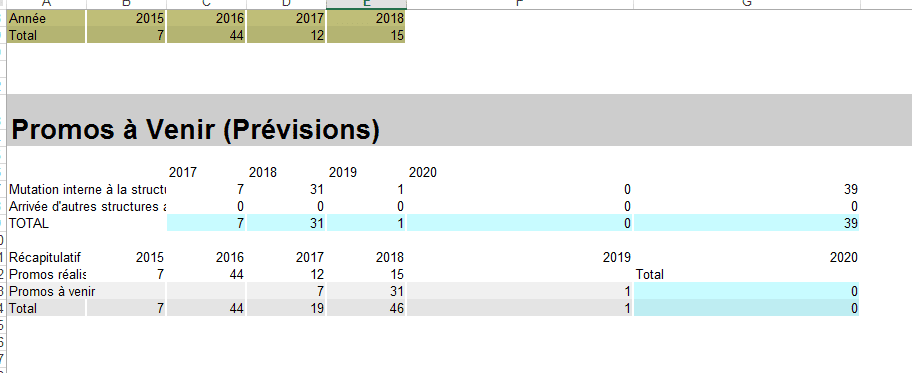
- Messages
- 4'199
- Excel
- 2021 FR 64 bits
- Inscrit
- 13/06/2016
- Emploi
- bénévole associations Goutte d'Or
essayer à nouveau
Public Sub promoavenir(ligne)
    'TODO
    'parcourir les mois en notant surtout l'année
    'lorsqu'on change d'année, traiter le groupe qu'on vient de passer

    Dim FSM As New FileSystemObject
    Dim MutY As New Scripting.Dictionary
    Dim MutM As New Scripting.Dictionary
    Dim TypesMut As New Collection

    TypesMut.Add "Mutation interne à la structure avec promo"
    TypesMut.Add "Arrivée d'autres structures avec promo"
    PrevName = ThisWorkbook.Path & "\Previsions.xlsb"

    If SpFileExists(PrevName) Then
        Dim PrevBook As Excel.Workbook
        Application.DisplayAlerts = False
        Set PrevBook = Application.Workbooks.Open(PrevName, , , , , , , , , , , , , , xlRepairFile)
        For Each s In PrevBook.Sheets
            If s.Visible = True Then
            With s
            m = 6
            Do While .Cells(m, 1).Value <> ""
                Dim Merge As Range
                Set Merge = .Cells(m, 1).MergeArea
                date2 = .Cells(m, 1).Value
                date1 = Mid(date2, Application.Max(1, InStrRev(date2, " ") + 1))
                Set Rng = .Range(.Cells(Merge.Rows(1).Row, 1), .Cells(Merge.Rows(Merge.Rows.Count).Row, .Columns.Count))
                For Each Item In TypesMut
                    Call DoubleDicIncrement(MutY, date1, Item, Application.WorksheetFunction.CountIf(Rng, Item))
                    Call DoubleDicIncrement(MutM, date2, Item, Application.WorksheetFunction.CountIf(Rng, Item))
                Next
                m = m + Merge.Rows.Count
            Loop
            End With
            End If
        Next
        PrevBook.Close
        Application.DisplayAlerts = True

        ligne = ligne + 3
        Call BigTitle("Promos à Venir (Prévisions)", ligne, 1)
        ligne = ligne + 3
        'Calcul total par ligne et par Année
        j = 1
        For Each Item In TypesMut
            With Range(Cells(ligne + j, 1), Cells(ligne + j, 2))
            .Merge
            .Value = Item
            End With
            i = 3
            For Each Key In MutY.Keys
                With Cells(ligne + 0, i)
                .NumberFormat = "@"
                .Value = ReduceMonth(Key & " " & Chr(160))
                année = Val(.Value)
                End With
                Cells(ligne + j, i).Value = MutY(Key)(Item)
                If Not Récap_années.Exists(année) Then Récap_années(année) = Array("", "", "")
                tb = Récap_années(année): tb(1) = Val(tb(1)) + MutY(Key)(Item): tb(2) = Val(tb(2)) + MutY(Key)(Item): Récap_années(année) = tb
                i = i + 1
            Next
            Cells(ligne + j, i).Value = "=SUM(" & Cells(ligne + j, 3).Address & ":" & Cells(ligne + j, i - 1).Address & ")"
            j = j + 1
        Next

        'total colonnes ...........................................................................................................

        Cells(ligne + j, 1) = "TOTAL"
        Call TableVert(Cells(ligne + j, 3), Cells(ligne + j, i), 200, 250, 255)

        '..............................
        ' Application D 'une formule de somme pour la ligne = Ligne +j et les colonnes 3 à i.Pour que le formule soit transposée pour chaque colonne,
        'il est nécessaire que dans la formule les adresses soient relatives (ex: A1) et non absolues (ex: $A$1).
        'D'où la correction du .Address en .Address(0,0).
        '..............
        Range(Cells(ligne + j, 3), Cells(ligne + j, i)).Formula = "=SUM(" & Cells(ligne + 1, 3).Address(0, 0) & ":" & Cells(ligne + j - 1, 3).Address(0, 0) & ")"
        '.............
        '// affichage tableau récapitulatif
        ligne = ligne + j + 2
        nb_colonnes = Récap_années.Count
        '//Application.Transpose :Renvoie une plage de cellules verticales sous forme de plage horizontale
        Cells(ligne, 1).Resize(, nb_colonnes).Value = Récap_années.Keys
        ligne = ligne + 1
        Cells(ligne, 1).Resize(3, nb_colonnes).Value = Application.Transpose(Récap_années.Items)
        ligne = ligne + 1
        '........................................................................................................................................

        Call TableVert(Cells(ligne + 1, 1), Cells(ligne + TypesMut.Count, MutY.Count + 2))
        Call TableVert(Cells(ligne + 1, MutY.Count + 3), Cells(ligne + TypesMut.Count, MutY.Count + 3), 200, 250, 255)
        Cells(ligne, MutY.Count + 3).Value = "Total"
        'graphe avec total ....
        ' Ligne = Graphe(Ligne + TypesMut.Count + 1, Range(Cells(Ligne, 1), Cells(Ligne + TypesMut.Count + 1, MutY.Count + 2)), Range(Cells(Ligne + TypesMut.Count + 2, 3), Cells(Ligne + TypesMut.Count + 2, MutY.Count + 3)), xlColumnStacked, "recrutementsparannee")

        'graphe sans total ....
        ligne = Graphe(ligne + TypesMut.Count, Range(Cells(ligne, 1), Cells(ligne + TypesMut.Count, MutY.Count + 2)), Range(Cells(ligne + TypesMut.Count + 1, 3), Cells(ligne + TypesMut.Count + 1, MutY.Count + 3)), xlColumnStacked, "recrutementsparannee")

        ActiveSheet.ChartObjects("recrutementsparannee").Activate
        ActiveChart.PlotArea.Select
        ActiveChart.ChartArea.Select
        ActiveSheet.Shapes("recrutementsparannee").ScaleHeight 0.9548611111, msoFalse, _
        msoScaleFromTopLeft
        ActiveChart.FullSeriesCollection(1).Select
        ActiveChart.PlotArea.Select
        Selection.Left = 20.915
        Selection.Top = 26.605
        Selection.Left = 20.915
        Selection.Top = 26.605
        ActiveChart.ChartArea.Select
        ActiveSheet.Shapes("recrutementsparannee").ScaleHeight 0.8945454545, msoFalse, _
        msoScaleFromBottomRight

        'copier-coller à factoriser ici

        j = 1
        For Each Item In TypesMut
            With Range(Cells(ligne + j, 1), Cells(ligne + j, 2))
            .Merge
            .Value = Item
            End With
            i = 3
            For Each Key In MutM.Keys
                With Cells(ligne + 0, i)
                .NumberFormat = "@"
                .Value = ReduceMonth(Key & " " & Chr(160))
                'un .NumberFormat="@" seul afficherait un warning sur la cellule, un espace serait automatiquement supprimé, un Chr(160) seul ferait planter ReduceMonth
                End With
                Cells(ligne + j, i).Value = MutM(Key)(Item)
                i = i + 1
            Next
            Cells(ligne + j, i).Value = "=SUM(" & Cells(ligne + j, 3).Address & ":" & Cells(ligne + j, i - 1).Address & ")"
        j = j + 1
        Next

        'total colonnes horizontal et vertical .............................................................................
        '.............................................
        Cells(ligne + j, 1) = "TOTAL"
        Call TableVert(Cells(ligne + j, 3), Cells(ligne + j, i), 200, 250, 255)
        Range(Cells(ligne + j, 3), Cells(ligne + j, i)).Formula = "=SUM(" & Cells(ligne + 1, 3).Address(0, 0) & ":" & Cells(ligne + j - 1, 3).Address(0, 0) & ")"
        '........
        Call TableVert(Cells(ligne + 1, 1), Cells(ligne + TypesMut.Count, MutM.Count + 2))
        Call TableVert(Cells(ligne + 1, MutM.Count + 3), Cells(ligne + TypesMut.Count, MutM.Count + 3), 200, 250, 255)
        Cells(ligne, MutM.Count + 3).Value = "Total"
        'graphe avect otal ....
        ' Ligne = Graphe(Ligne + TypesMut.Count + 1, Range(Cells(Ligne, 1), Cells(Ligne + TypesMut.Count + 1, MutM.Count + 2)), Range(Cells(Ligne + TypesMut.Count + 2, 3), Cells(Ligne + TypesMut.Count + 2, MutM.Count + 3)), xlColumnStacked, "recrutementsparmois")
        'graphe sans total ....
        ligne = Graphe(ligne + TypesMut.Count, Range(Cells(ligne, 1), Cells(ligne + TypesMut.Count, MutM.Count + 2)), Range(Cells(ligne + TypesMut.Count + 1, 3), Cells(ligne + TypesMut.Count + 1, MutM.Count + 3)), xlColumnStacked, "recrutementsparmois")

        ActiveChart.PlotArea.Select
        ActiveChart.ChartArea.Select
        ActiveSheet.Shapes("recrutementsparmois").IncrementLeft 3.75
        ActiveSheet.Shapes("recrutementsparmois").IncrementTop 39.75

    Else
        MsgBox "file does not exist"
    End If
    Set TypesEmb = Nothing
End Sub