VBA pour dupliqué une cellule selon un chiffre

Bonjour,

Je vien vers vous quar j'trouvé une VBA qui peux dupliquer un cellule selon un chiffre donner en amon.

Mon problème c qu'elle le fais pour toute les ligne et j'aimerai qu'elle le face juste pour une colonne, pour pouvoir réperter la VBA pour d'autre colonne suivant.

Pouvez vous m'aider à reprendre ma VBA en conséquence?

Je vous envoi mon fichier pour que vous puissier comprendre.

Merci d'avance pour votre reponce

Dans l'attente de vous lire.

Cordialement.

13materiel.xlsm (617.56 Ko)

Bonjour,

Tu peux nous dire clairement ce que tu veux comme résultat avec ton fichier ?

Voilà j'ai fais le avant et après sur le nouveau fichier.

Dite moi si vous comprenez pas.

Merci

17materiel.xlsm (23.95 Ko)

Re,

Voir PJ.

avec la macro suivante :

Sub insererLignes()
    Dim derLig As Long, nbLig As Long, i As Long, derCol As Long
    derLig = Range("A" & Rows.Count).End(xlUp).Row
    For i = derLig To 2 Step -1
        derCol = Cells(1, Cells.Columns.Count).End(xlToLeft).Column
        nbLig = WorksheetFunction.Max(Cells(i, 2), Cells(i, derCol))
        Rows(i + 1).Resize(nbLig).Insert shift:=xlDown
        Cells(i, 1).Copy Destination:=Range(Cells(i + 1, 1), Cells(i + nbLig, 1))
    Next i
End Sub

C'est très bien il prend bien en compte le chiffre le plus grans et il duplique la cellule c bien ça?

parce que sur cette ligne il y en a moin ex: A7 à A15 il est il doit avoir 9 cellules et il y en a que 8. bizzard

peux-t-on avoir une lettre sous chaque colonne par rapport au chiffre du dessus ?

merci beaucoup pour votre aide.

Re,

Il y avait bien une erreur de syntaxe dans la ligne de calcul du maximum. Je te retourne le fichier rectifié. A tester.

Macro rectifiée :

Sub insererLignes()
    Dim derLig As Long, nbLig As Long, i As Long, j As Long, derCol As Long
    derLig = Range("A" & Rows.Count).End(xlUp).Row
    For i = derLig To 2 Step -1
        derCol = Cells(1, Cells.Columns.Count).End(xlToLeft).Column
        nbLig = WorksheetFunction.Max(Range(Cells(i, 2), Cells(i, derCol)))
        Rows(i + 1).Resize(nbLig).Insert shift:=xlDown
        Cells(i, 1).Copy Destination:=Range(Cells(i + 1, 1), Cells(i + nbLig, 1))
        For j = 2 To derCol
            Range(Cells(i + 1, j), Cells(i + nbLig, j)) = Left(Cells(1, j), 1)
        Next j
    Next i
End Sub

S'est super merci beaucoup.

quand dans la colonne il à 0 il peux rien mettre?

et metre vraiment le bon nombre de lettres correspondant au chiffre du dessus.

désolé d'être aussi exigent mais après sa c nikel.

et je vous remerci encore beaucoup pour votre réactiviter.

vous êtes génial.

Re,

Pense à expliquer dès le début toutes les situations. Maintenant donne un exemple concret pour comprendre ta dernière demande.

Je pensais que le fichier avant et après serais plus compréhensible.

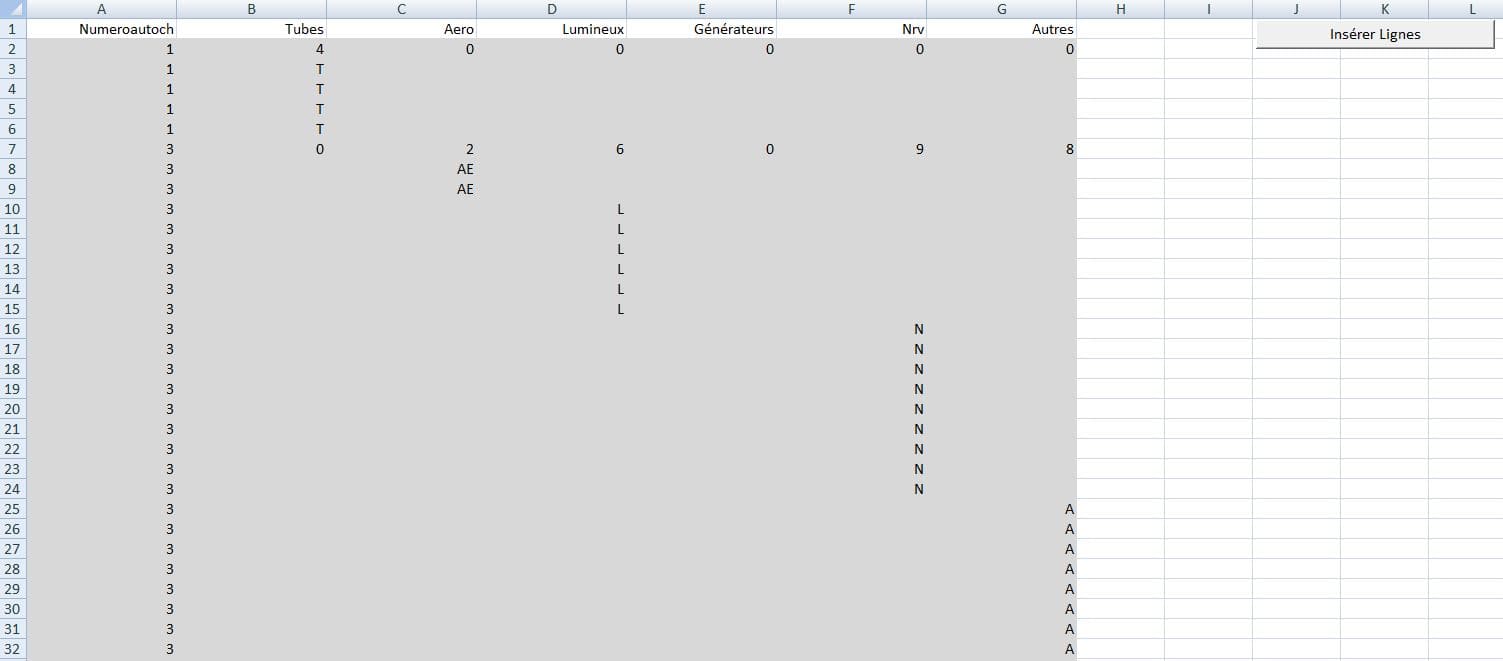
j'aimerais avoir des lettres sur les cellules qui sont ajouté exactement le même chiffre qu'il correspont dans chaque colonne comme l'exemple "APRES AVOIR CLIQUE SUR LE BOUTON" en vert et en vide la ou il y a "0" et les cellules ou le chiffre est plus petit .

je te renvoi l'exemple.

14materiel.xlsm (23.94 Ko)

Re,

Remplace par ce code suivant :

Sub insererLignes()
    Dim derLig As Long, nbLig As Long, i As Long, j As Long, derCol As Long, car As Integer
    derLig = Range("A" & Rows.Count).End(xlUp).Row
    For i = derLig To 2 Step -1
        derCol = Cells(1, Cells.Columns.Count).End(xlToLeft).Column
        nbLig = WorksheetFunction.Max(Range(Cells(i, 2), Cells(i, derCol)))
        Rows(i + 1).Resize(nbLig).Insert shift:=xlDown
        Cells(i, 1).Copy Destination:=Range(Cells(i + 1, 1), Cells(i + nbLig, 1))
        For j = 2 To derCol
            car = Cells(i, j)
            If car <> 0 Then
                If j = 3 Then
                    Range(Cells(i + 1, j), Cells(i + car, j)) = UCase(Left(Cells(1, j), 2))
                Else
                    Range(Cells(i + 1, j), Cells(i + car, j)) = UCase(Left(Cells(1, j), 1))
                End If
            End If
        Next j
    Next i
End Sub

Merci pour ce travail qui m'a beaucoup aidé et pour la patience que vous avez fait.

Cordialement

Merci beaucoup de votre aide.

Pour un meilleur lisibiliter tu tableau est-il possible que visuelement sela donne un rendu comme ci dessous?

capture1

Re,

A essayer :

Sub insererLignes()
    Dim derLig As Long, nbLig As Long, i As Long, j As Long, k As Long, derCol As Long, car As Integer
    derLig = Range("A" & Rows.Count).End(xlUp).Row
    For i = derLig To 2 Step -1
        derCol = Cells(1, Cells.Columns.Count).End(xlToLeft).Column
        nbLig = WorksheetFunction.Sum(Range(Cells(i, 2), Cells(i, derCol)))
        Rows(i + 1).Resize(nbLig).Insert shift:=xlDown
        Cells(i, 1).Copy Destination:=Range(Cells(i + 1, 1), Cells(i + nbLig, 1))
        k = i
        For j = 2 To derCol
            car = Cells(i, j)
            If car <> 0 Then
                If j <> 3 Then
                    Range(Cells(k + 1, j), Cells(k + car, j)) = UCase(Left(Cells(1, j), 1))
                Else
                    Range(Cells(k + 1, j), Cells(k + car, j)) = UCase(Left(Cells(1, j), 2))
                End If
                k = k + car
            End If
        Next j
    Next i
End Sub

Merci c très bien

Bonjour,

une question pour information la macro fonctionne pour combien de ref à traiter?

Parce que quand je rajout plus de ref il me fais un code erreur '1004'.

Pour quel raison?

Cordialement.

Bonjour,

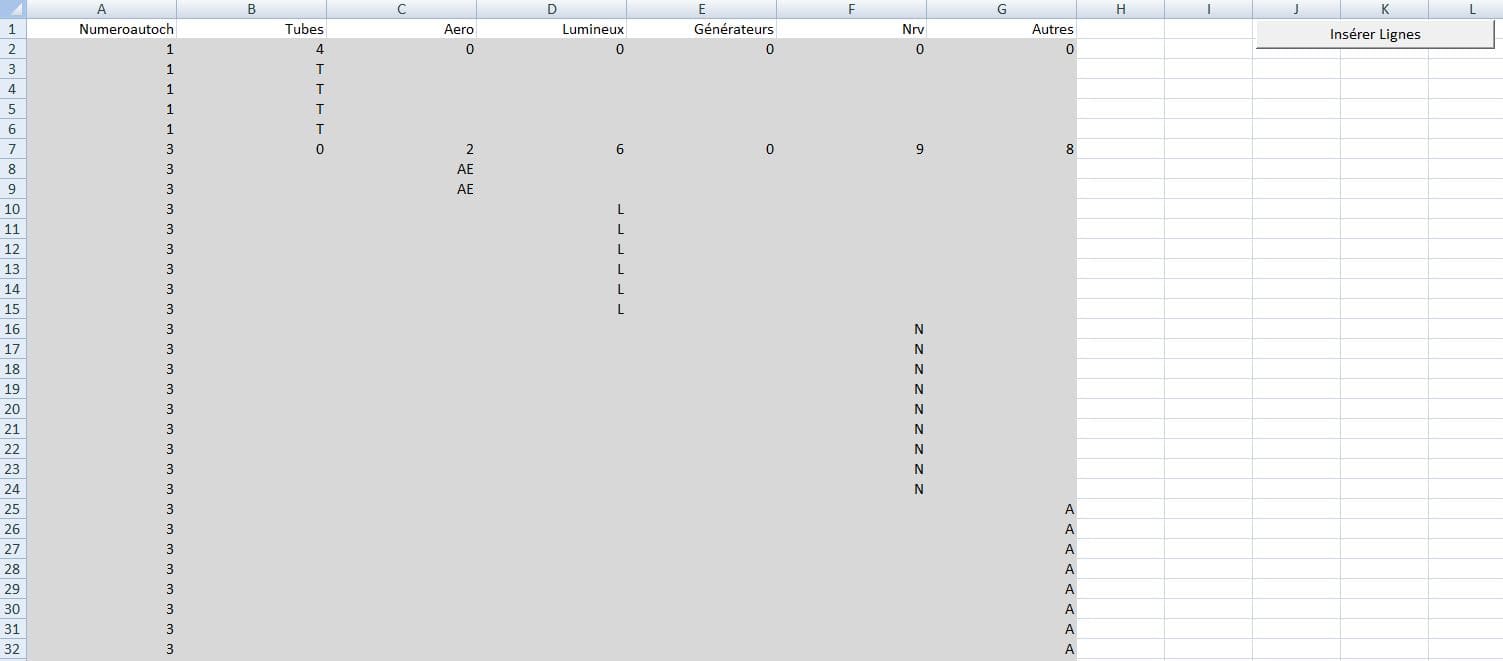
je reviens vers vous pour une question d'organisation de ce tableau,

j'aimerais que visuellement cela ressemble à une cascade comme l'image en PJ:

pouvez-vous m'aider à réctifier le code de ma macro?

Sub insererLignes()
Dim derLig As Long, nbLig As Long, i As Long, j As Long, derCol As Long, car As Integer
derLig = Range("A" & Rows.Count).End(xlUp).Row
For i = derLig To 2 Step -1
   derCol = Cells(1, Cells.Columns.Count).End(xlToLeft).Column
   nbLig = WorksheetFunction.Max(Range(Cells(i, 2), Cells(i, derCol)))
   If nbLig = 0 Then nbLig = 1 ' ICI JE METS 1 SI C'EST ZERO
   Rows(i + 1).Resize(nbLig).Insert shift:=xlDown
   Cells(i, 1).Copy Destination:=Range(Cells(i + 1, 1), Cells(i + nbLig, 1))
   For j = 2 To derCol
      car = Cells(i, j)
      If car <> 0 Then
         If j = 3 Then
            Range(Cells(i + 1, j), Cells(i + car, j)) = UCase(Left(Cells(1, j), 2))
         Else
            Range(Cells(i + 1, j), Cells(i + car, j)) = UCase(Left(Cells(1, j), 1))
         End If
      End If
   Next j
derLig = Range("A" & Rows.Count).End(xlUp).Row
Next i
End Sub

Merci d'avence.

Cordialement.


Voilà le fichier:
file
3materiel-4.xlsm (361.80 Ko)
Rechercher des sujets similaires à "vba duplique chiffre"