Erreur BVA quand j'ajoute une ligne dans mon tableau
bonjour
j'ai fait un code BVA pour envoyer un mail a chaque fois que la quantité du stocke est <20 et tout est ok pour l'instant.
mais quand j'ai voulu agrandir le tableaux pour ajouter une nouvelle ligne ou produit il me renvoi qu'il y'a un erreur et je n'ais pas réussi a trouvé l'erreur, j'espaire que vous réussirez a le trouvé.
le problème se passe quand je change la longueur du tableau
merci d'avance
Private Sub Worksheet_Change(ByVal Target As Range)
    Dim OutlookApp As Object
    Dim OutlookMail As Object
    Dim ws As Worksheet
    Dim cell As Range
    Dim mailBody As String
    Dim lastRow As Long
    Dim modifiedRange As Range
    Dim otherSheet As Worksheet

    If Not Intersect(Target, Me.Columns("F")) Is Nothing Then
        Set OutlookApp = CreateObject("Outlook.Application")
        Set OutlookMail = OutlookApp.CreateItem(0)

        Set ws = ThisWorkbook.Sheets("Produit_fini")
        Set otherSheet = ThisWorkbook.Sheets("ref_pro")

        lastRow = ws.Cells(ws.Rows.Count, "F").End(xlUp).Row

        mailBody = "                                                                                                    Stock insuffisant:" & vbCrLf

        For Each cell In Target
            If cell.Value < 20 Then
                mailBody = mailBody & "Ligne " & cell.Row & ":" & vbCrLf & _
                           "Type: " & ws.Cells(cell.Row, "A").Value & vbCrLf & _
                           "Ref Produit: " & otherSheet.Cells(cell.Row, "B").Value & vbCrLf & _
                           "Nom Fournisseur: " & ws.Cells(cell.Row, "D").Value & vbCrLf & _
                           "Ref fournisseur: " & ws.Cells(cell.Row, "E").Value & vbCrLf & _
                           "Quantité: " & ws.Cells(cell.Row, "F").Value & vbCrLf & _
                           "Caractéristique: " & ws.Cells(cell.Row, "H").Value & vbCrLf & _
                           "Longueur (m): " & ws.Cells(cell.Row, "I").Value & vbCrLf & _
                           "Prix unitaire: " & ws.Cells(cell.Row, "J").Value & vbCrLf & vbCrLf

                If modifiedRange Is Nothing Then
                    Set modifiedRange = cell
                Else
                    Set modifiedRange = Union(modifiedRange, cell)
                End If
            End If
        Next cell

        If Not modifiedRange Is Nothing Then
            With OutlookMail
                .To = "////////@/////.fr"
                .Subject = "Stock insuffisant"
                .Body = mailBody
                .Display
        '        .Send
            End With
        End If

        Set OutlookMail = Nothing
        Set OutlookApp = Nothing
    End If
End SubBonjour,
je vous propose cet arrangement :
Private Sub Worksheet_Change(ByVal Target As Range)
    Dim OutlookApp As Object
    Dim OutlookMail As Object
    Dim ws As Worksheet
    Dim cel As Range
    Dim mailBody As String
    Dim otherSheet As Worksheet
    Dim encours As Boolean

    If Target.CountLarge > 1 Then Exit Sub

    ' si le changement de valeur est bien dans la colonne F
    If Not Intersect(Target, Range("Produits[Quantité]")) Is Nothing Then
        For Each cel In Range("Produits[Quantité]")
            ' si la valeur de la cellule modifiée est bien inférieure à 20
            If cel.Value < 20 Then
                If encours = False Then
                    ' on lance la procédure de mail
                    Set OutlookApp = CreateObject("Outlook.Application")
                    Set OutlookMail = OutlookApp.CreateItem(0)

                    Set ws = ThisWorkbook.Sheets("Produit_fini")
                    Set otherSheet = ThisWorkbook.Sheets("ref_pro")
                    mailBody = "                                                      Stock insuffisant :" & vbCrLf
                    encours = True
                End If
                ' et pour chaque valeur inférieure à 20 on ajoute ceci
                mailBody = mailBody & "Ligne " & cel.Row & " : " & vbCrLf & _
                           "Type : " & ws.Cells(Target.Row, "A").Value & vbCrLf & _
                           "Ref Produit : " & otherSheet.Cells(cel.Row, "B").Value & vbCrLf & _
                           "Nom Fournisseur : " & ws.Cells(cel.Row, "D").Value & vbCrLf & _
                           "Ref fournisseur : " & ws.Cells(cel.Row, "E").Value & vbCrLf & _
                           "Quantité : " & ws.Cells(cel.Row, "F").Value & vbCrLf & _
                           "Caractéristique : " & ws.Cells(cel.Row, "H").Value & vbCrLf & _
                           "Longueur (m) : " & ws.Cells(cel.Row, "I").Value & vbCrLf & _
                           "Prix unitaire : " & ws.Cells(cel.Row, "J").Value & vbCrLf & vbCrLf
            End If
        Next cel
        If mailBody <> "" Then
            With OutlookMail
                .To = "////////@/////.fr"
                .Subject = "Stock insuffisant"
                .Body = mailBody
                .Display
        '        .Send
            End With
        End If

        Set OutlookMail = Nothing
        Set OutlookApp = Nothing
    End If
End Sub
Il vous faut nommer votre tableau "Produits", ou bien vous remplacez "Produits" par "Tableau4" pour que cela fonctionne.
Vu que vous êtes sur un tableau structuré au niveau de la feuille il suffit de demander à VBA de parcourir la colonne "Quantité" du tableau "Produits" pour que la zone complète soit scannée. C'est comme pour l'InterSect, on ne vérifie que sur la plage de cette colonne, car avec "F" le test se faisait également au dessus du tableau et en dessous !
La ligne annoncée est celle de la feuille.
@ bientôt
LouReeD
Salut il y'a un erreur dans
If Not Intersect(Target, Range("Produits[Quantité]") Is Nothing Thenil fonctionne pas
j'ai changer le nom de mon tableaux en Produits
Vous avez lu mon message trop vite, entre temps j'ai corrigé sur le site, il manque une parenthèse fermante pour le InterSect...
Et ça marche très bien
@ bientôt
LouReeD
ça ne marche toujours pas, il disent qu'il y'a toujours un erreur dans cette ligne le voici l'Excel
Bonjour,
Vous n'avez pas renommer le tableau !
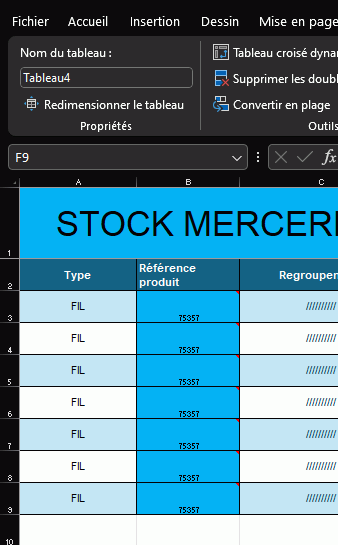
il s'appelle toujours Tableau4 ! Ce que vous avez fais c'est de renommer la plage de cellule des données du tableau, ce qui n'est pas la même chose...
Supprimez ce nom, puis sélectionnez une cellule de votre tableau, dans le ruban d'Excel un nouveau menu apparait "Création de Tableau", cliquez dessus et regardez à gauche dans le ruban, vous y verrez la zone texte qui permet de modifier le nom du tableau.
Et je vous assure cela fonctionne !
@ bientôt
LouReeD
Merci apparemment je ne savais pas renommer un tableaux xd ni effacer le nom d'une plage de donnée xd
Bonjour
Cela veut il dire que tout est OK ?
Merci pour votre retour et remerciement
Ne vous y trompez pas, pas de "colère " dans mes propos.
@ bientôt
LouReeD