Re,
Ok je vais tester.
Autre chose, vos codes pour créer l'identifiant sont supers, mais le fait de ne pas les avoir sous cette forme, cela ne me permet pas de les ranger dans l'ordre.
AA0001-01 / AA0001-02 .... / AA0001-10
J'ai cela a la place
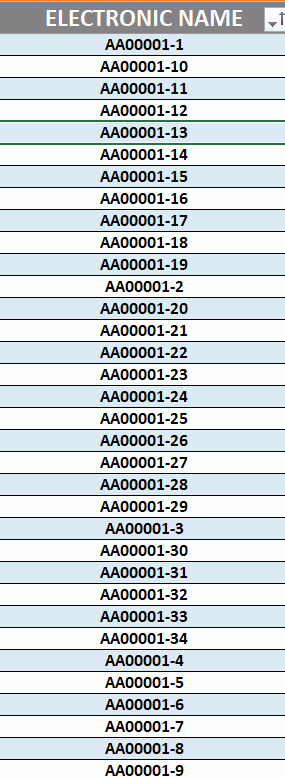
Pour le bouton 5 j'ai donc changer le code comme suit, pour avoir A00001-01 / AA00002-01 / AA00003-01
Private Sub CommandButton5_Click()
With Sheets("DATABASE_VUSHF").Range("Tableau1").ListObject
If .ListRows.Count > 0 Then
With .DataBodyRange.Cells(.ListRows.Count, 1)
h = Left(.Value, 2) & Format(Mid(.Value, 3, 5) + 1, "00000") & "-01"
End With
With .ListRows.Add.Range
.Range("A1").Value = h 'nouveau numéro en A1
.Range("AA1").Resize(, 5).Value = Array(TextBox26.Value, TextBox27.Value, TextBox28.Value, TextBox29.Value, TextBox30.Value) 'ces 5 textboxes en AA:AE
End With
Else
MsgBox "problème, It's the first lign"
End If
End With
MsgBox "new signature created!"
UserForm_Initialize
ListBox20.TopIndex = ListBox20.ListCount - 1
End Sub
Pour le bouton 14, je cherche l'incrementation comme suit, AA00001-01 / AA00001-02 / AA00001-03 / ... / AA00001-10 / AA00001-11 ...
Private Sub CommandButton14_Click()
Dim LO
Set LO = Sheets("DATABASE_VUSHF").Range("Tableau1").ListObject 'ce tableau
With ComboBox1
'Debug.Print .Text
If .Text = "" Then Exit Sub 'si vide, arrête
r = Application.Match(.Text, LO.ListColumns("ELECTRONIC NAME").DataBodyRange, 0) 'ligne du tableau où ce nom se trouve
If Not IsNumeric(r) Then MsgBox "Not found !!!???": Exit Sub 'normallement ceci serait impossible
s = Left(.Value, 8) & Split(.Value, "-")("1") + 1 ' "electronic name" suivant
r1 = Application.Match(s, LO.ListColumns("ELECTRONIC NAME").DataBodyRange, 0) 'rechercher ce nouveau electronic name
If IsNumeric(r1) Then MsgBox "This ""Electronic Name"" already exists !!!", vbCritical, s: Exit Sub 'existe déjà = arrête
End With
Set c = LO.ListRows.Add(r + 1).Range 'insérer une nouvelle ligne après la ligne actuelle
c.Value = c.Offset(-1).Value 'copier et coller les données de l'ancienne ligne >>>> je ne suis pas sû que je peux faire cela, c'est plutôt un exemple
c.Cells(1).Value = s 'seulement l' "Electronic Name" est différent
'votre système de mise à jour
MsgBox "new mode created!"
UserForm_Initialize
ListBox20.TopIndex = ListBox20.ListIndex + 1
End Sub
mais pour le bouton 14, je n'ai pas encore trouve la solution, un conseil ?
a+