Erreur 91 Variable objet ou variable de bloc non définie
Bonjour tout le monde !
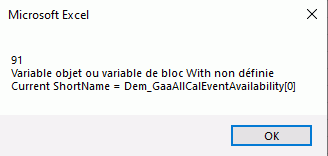
Lorsque je run ma macro j'ai une erreur de ce type qui apparait mais je n'arrive pas à savoir où elle se trouve (je sais qu'elle se trouve dans mon premier If voir capture d'écran). Si quelqu'un aurait une idée je la prends avec plaisir ! ^^
Merci par avance !


Bonjour
Dem_machinchose ne serait-ce pas un tableau ? Du coup il manquerait l'index de la valeur voulue pour le test IF, à tout hasard...
@ bientôt
LouReeD
Bonjour Abderrahmane
Merci de mettre le code non en image mais en texte entre balises SVP
Rappel de la charte :
- Pour plus de lisibilité, utilisez la fonctionnalité </> pour insérer vos codes VBA (et si possible aussi pour vos formules Excel).
J'espère ne pas avoir à me répéter
Cordialement
Re bonjour !
Je me suis rendu compte que j'ai oublié de modifier la définition de la variable DIFF_DETECT_H car l’en-tête ‘Detection Class’ n’est plus sur la 1ère ligne mais sur la 2ème ligne de l’onglet Diff. Malgré cela j'ai une nouvelle erreur :
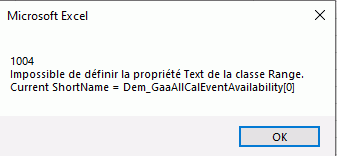
Pour répondre à ta question LouReed ce n'est pas un tableau mais plutot ce que contient ma variable short name dans mon fichier XML :

Je vous laisse mon code (en format texte pour une meilleure visibilité cette fois-ci ^^) :
''''''''''''''''''''''''''''''''''''''''''''''''
'Main procedure to check Diag Matrix vs XML file
''''''''''''''''''''''''''''''''''''''''''''''''
Public Sub DiagMatrixCheck()

Dim MATRIX_WB As Workbook
Dim MATRIX_WS As Worksheet
Dim DIFF_WS As Worksheet
Dim MATRIX_LABEL_H, MATRIX_DETECT_H, MATRIX_STATE_H, MATRIX_DTC_H As Range
Dim MATRIX_LABEL, MATRIX_DETECT, MATRIX_STATE, MATRIX_DTC As Range
Dim DIFF_DETECT_H, DIFF_DETECT, PREV_DIAG As Range
Dim XML_FILE, XML_LABEL, XML_DETECT, PCODE As String
Dim XDOC As DOMDocument60
Dim SHORT_NAME, LONG_NAME, V_NAME, INSTANCE As Object
Dim i As Integer
Dim DebugText As String

On Error GoTo ErrorHandler
Application.ScreenUpdating = False

Set MATRIX_WB = ThisWorkbook

'Define variables for Diag Matrix tab
Set MATRIX_WS = MATRIX_WB.Sheets("Matrix")
'Set the header for every used column of the matrix
Set MATRIX_LABEL_H = MATRIX_WS.Range("A6").EntireRow.Find("Supplier Label")
Set MATRIX_DETECT_H = MATRIX_WS.Range("A6").EntireRow.Find("Detection Class")
Set MATRIX_STATE_H = MATRIX_WS.Range("A6").EntireRow.Find("State of the activation of the strategy")
Set MATRIX_DTC_H = MATRIX_WS.Range("A6").EntireRow.Find("Data Trouble Code (DTC)")

'Define variables for Diff tab
Set DIFF_WS = MATRIX_WB.Sheets("Diff")
Set DIFF_DETECT_H = DIFF_WS.Range("A2").EntireRow.Find("Detection Class")

'TODO Recopier le detection class, le supp, l'activation state et le dtc code de la diag matrix
'TODO initialiser le check resulat avec missing in XML

'Load the XML Document with MSXML2 and DOMDocument 60
XML_FILE = Application.GetOpenFilename(FileFilter:="XML File (*.xml), *.xml", Title:="Open XML File")
Set XDOC = New DOMDocument60
XDOC.async = False: XDOC.validateOnParse = False
XDOC.Load (XML_FILE)

Set PREV_DIAG = MATRIX_LABEL_H

'Query to get "SW-INSTANCE" nodes
Set INSTANCE = XDOC.SelectNodes("//SW-INSTANCE")
'Loop on each instance within XML file
For i = 0 To INSTANCE.Length - 1

    'Get LONG-NAME and SHORT-NAME
    Set LONG_NAME = INSTANCE(i).FirstChild
    Set SHORT_NAME = LONG_NAME.NextSibling
    Set V_NAME = LONG_NAME.SelectNodes("//V")
    DebugText = SHORT_NAME.Text

   'Current INSTANCE is a Detection Class
    If SHORT_NAME.Text Like "Dem_GaaAllCalEventAvailability*" Then

        XML_LABEL = SupplierLabel(LONG_NAME.Text)
        XML_DETECT = DetectionClass(SHORT_NAME.Text)
        Set DIFF_DETECT = DIFF_DETECT_H.EntireColumn.Find(What:=XML_DETECT, LookAt:=xlWhole)

        'Check whether this Detection Class exists in the Excel Diag Matrix
        If DIFF_DETECT Is Nothing Then

            'Add new line into Diff file
            PREV_DIAG.Offset(1, 0).EntireRow.Insert
            Set DIFF_DETECT = PREV_DIAG.Offset(1, 0)
            DIFF_DETECT.Value = XML_DETECT
            DIFF_DETECT.Offset(0, 1).Value = "Missing item in DiagMatrix"
            DIFF_DETECT.Offset(0, 2).Value = XML_LABEL

        Else

            'Detection class is found, remove default difference text and check supplier label
            Set DIFF_DETECT = DIFF_DETECT_H.EntireColumn.Find(What:=XML_DETECT, LookAt:=xlWhole)
            Set PREV_DIAG = DIFF_DETECT
            DIFF_DETECT.Offset(0, 1).Value = ""
            DIFF_DETECT.Offset(0, 5).Text = XML_LABEL

            'If it exists, check the Supplier Label with the one of the Excel Diag Matrix
            If DIFF_DETECT.Offset(0, 2).Text <> XML_LABEL Then
                DIFF_DETECT.Offset(0, 1).Text = "Different"
            End If
        End If
Merci par avance !
Je pense avoir trouver mon problème j'ai changé certains .Text en les remplaçants par des .Value et ça fonctionne mais pas complètement (comme je le souhaite), dois-je remplacer tous mes .Text par des .Value ? Car lorsque j'ai remplacé certains .Text par des .Value ça affiche bien ce que je veux.
Bonjour
Aucune idée cela dépasse mes maigres compétences...
Je parlais de tableau à cause des crochets dans le message d'erreur...
@ bientôt
LouReeD
Merci en tout cas d'avoir essayé LouReeD, quelqu'un d'autre aura peut-être une idée ^^
Problème résolu, j'avais oublié de rajouter un .text dans la condition du PCODE car PCODE <> DIFF_DETECT.Offset(0, 3)’, la lecture de ‘DIFF_DETECT.Offset(0, 3)’ retourne #N/A ce que la macro interprète comme un code d’erreur...