Optimiser une procédure
j
Bonjour;
J'ai créé une procédure qui réinitialise une partie de ma feuille Excel mais il est trop lent lors de l'exécution.
Quelqu’un peut m'aider à le rendre plus rapide svp?
Merci votre aide.
voici mon code
Sub Remise_A_Blanc()

    Dim wsSpport As Worksheet, NoCol As Integer
    Dim NoLig As Long, Var As Variant
    Dim lastcol As Integer, lastrow As Integer, i As Integer

    Set wsSpport = Worksheets("Supports")

    FastRun False

    'Récupération du nombre des colonnes et des lignes
    With wsSpport
        lastcol = .Cells(headRow, .Columns.Count).End(xlToLeft).Column
        lastrow = .Cells(.Rows.Count, 2).End(xlUp).Row
    End With

    NoCol = 25 '-------------------------lecture de la colonne 25

    For NoLig = 5 To lastrow '-----------je parcours chaque ligne
        For i = NoCol To lastcol '-------je parcours chaque colonne
            If wsSpport.Cells(NoLig).Interior.Color <> RGB(128, 128, 128) Then '-- je vérifie si le fond de la cellule a un autre fond
                wsSpport.Cells(NoLig, i).ClearContents '------------ suppression du contenu de la cellule
                wsSpport.Cells(NoLig, i).Interior.Color = RGB(255, 255, 255) '---- affection de la couleur du fond par défaut
            End If
        Next i
    Next NoLig

    FastRun True
    Set wsSpport = Nothing

End Sub

Function FastRun(Setting)

    Application.StatusBar = "Updating Excel settings, please wait..."
    Application.EnableCancelKey = xlDisabled
    Application.ScreenUpdating = Setting
    Application.DisplayAlerts = Setting
    Application.Interactive = Setting

    If Setting = False Then Application.Calculation = xlCalculationManual
    If Setting = False Then Application.Cursor = xlWait
    If Setting = True Then Application.Calculation = xlCalculationAutomatic
    If Setting = True Then Application.Cursor = xlDefault

    Application.StatusBar = False

End FunctionInvité
Bonjour Jah,
Peut-être avec ceci
Sub Remise_A_Blanc()
  Dim RngGris As Range
  ' Appliquer la recherche de format souhaitée
  With Application.FindFormat.Interior
    .Pattern = xlSolid
    .PatternColorIndex = xlAutomatic
    .Color = RGB(128, 128, 128)
    .TintAndShade = 0
    .PatternTintAndShade = 0
  End With
  ' Trouver la 1ère cellule correspondante
  Set RngGris = ActiveSheet.Cells.Find(What:="*", LookIn:=xlValues, LookAt:=xlPart, SearchFormat:=True)
  ' Si trouvée
  Do While Not RngGris Is Nothing
    RngGris.ClearContents
    RngGris.Interior.Color = xlNone
    ' Suivante
    Set RngGris = ActiveSheet.Cells.Find(What:="*", LookIn:=xlValues, LookAt:=xlPart, SearchFormat:=True)
  Loop
End Sub
A+
j
Merci BrunoM45 pour ta proposition.
Mais cela n'a pas, marché malheureusement.
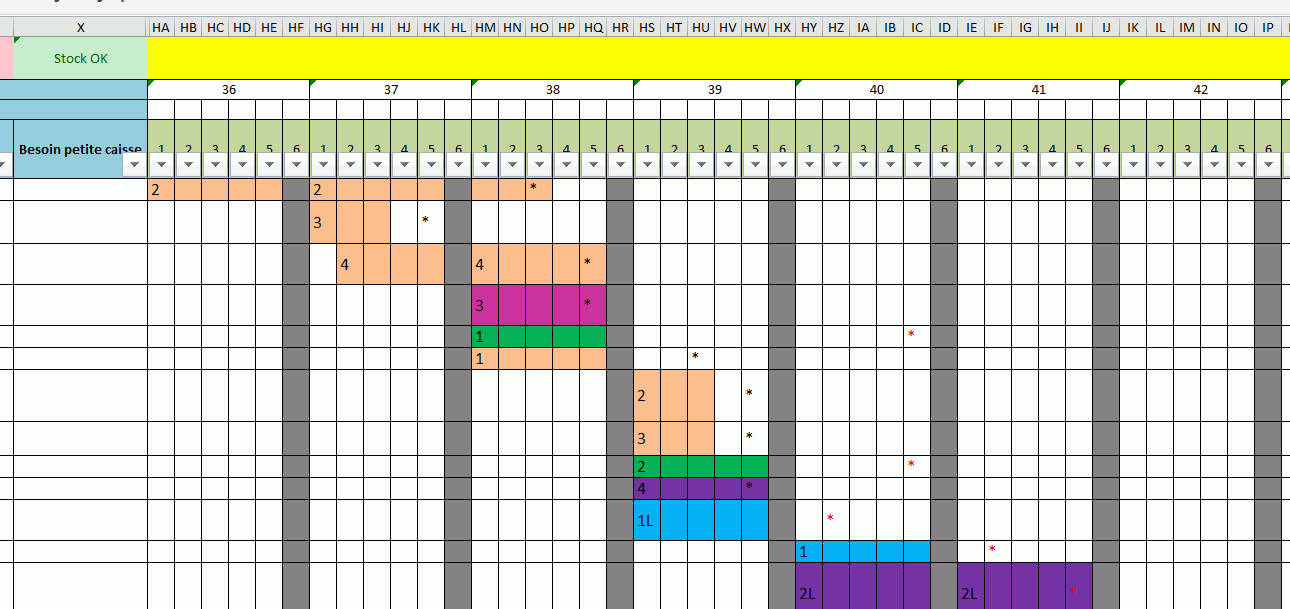
voici ma feuille Excel je dois supprimer et et effacer la couleur de fond excepté les colonnes en gris a partir de la colonne HA et la ligne 5
Invité
Re,
Oups désolé je n'avais pas fait attention au <>
Interior.Color <> RGB(128, 128, 128)Pourquoi ne pas utiliser une MFC pour vos colonne en gris
A+