Copie/collage infos avec lignes et colonnes variables entre 2 onglets
Bonjour à toutes et à tous,
J'ai besoin de synthétiser des informations qui arrivent par semaine pour faire un tableau de bord annuel, puis inter-annuel à terme.
Les données arrivent dans l'onglet "Nb mesures par canal et par jou", ensuite les macros déjà réalisées préparent les données dans un onglet "Temp" qui sera supprimé par la suite...
Je souhaiterai ensuite (et c'est là que j'aurais besoin de vos lumières) que les données de "Temp" (extraction de données des 15 derniers jours) viennent se coller dans l'onglet "Indicateurs_2022" en fonction de leur ID et de la date (ligne 1)...
Dans "Temp" je me doute qu'il faut enregistrer l'ID de chaque ligne (col.A) et les dates de F à T et boucler dessus... mais je n'y arrive pas...
Merci par aance pour votre aide précieuse qui m'a déjà dépanné plusieurs fois
Hello,
tu peux le faire avec une formule (formule en E2 puis dérouler) :
=INDEX(Temp!$A:$T;EQUIV($A2;Temp!$A:$A;0);EQUIV(Indicateurs_2022!E$1;Temp!$1:$1;0))Si tu préfères en macro voici (pas testé en profondeur) :
    Dim wksTmp As Worksheet, wksIndi As Worksheet
    Dim wksFunc As WorksheetFunction
    Dim intCol As Integer, intRow As Integer
    Dim strAddress As String
    Dim lngIndi As Long, lngRowId As Long, lngLastRowId As Long, lngColDate As Long

    Set wksFunc = Application.WorksheetFunction
    Set wksTmp = Worksheets("Temp")
    Set wksIndi = Worksheets("Indicateurs_2022")

    lngLastRowId = wksTmp.Range("A" & wksTmp.Rows.Count).End(xlUp).Row
    lngRowId = 2
    Do Until lngRowId > lngLastRowId
        intRow = wksFunc.Match(wksTmp.Range("A" & lngRowId), wksIndi.Columns(1), False)
        lngColDate = 6
        Do Until wksTmp.Cells(1, lngColDate) = Empty
            lngIndi = wksTmp.Cells(lngRowId, lngColDate).Value
            With wksFunc
                intCol = .Match(wksTmp.Cells(1, lngColDate), wksIndi.Rows(1), False)
                strAddress = .Index(wksIndi.[A:NE], intRow, intCol).Address
                wksIndi.Range(strAddress).Value = lngIndi
            End With
            lngColDate = lngColDate + 1
        Loop
        lngRowId = lngRowId + 1
    Loop

    Set wksFunc = Nothing
    Set wksTmp = Nothing
Set wksIndi = NothingEffectivement je préfère en macro car l'onglet Temp est voué a être supprimé chaque semaine donc je voulais vraiment écrire les données en dur...
Je vais tester ça aujourd'hui et te fais un retour, merci beaucoup !!!
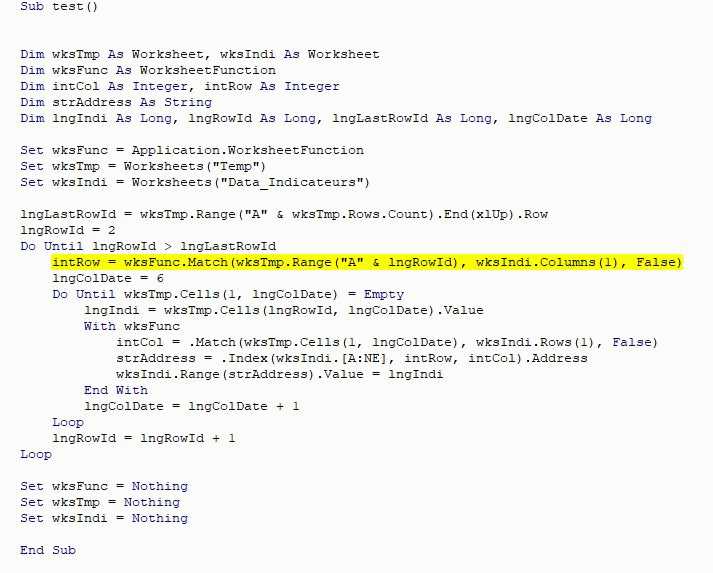
Les fonctions ne marchent pas et j'ai le message d'erreur suivant et ne connaissant pas ce mode de fonctionnement, j'ai du mal à le débugger...
Erreur 1004 : Impossible de lire la propriété Match de la classe WorksheetFunction
Hello,
Car tu as un ID qui est dans Temp mais pas dans tes indicateurs.
Solution de contournement :
    Dim wksTmp As Worksheet, wksIndi As Worksheet
    Dim wksFunc As WorksheetFunction
    Dim intCol As Integer, intRow As Integer
    Dim strAddress As String
    Dim lngIndi As Long, lngRowId As Long, lngLastRowId As Long, lngColDate As Long

    Set wksFunc = Application.WorksheetFunction
    Set wksTmp = Worksheets("Temp")
    Set wksIndi = Worksheets("Indicateurs_2022")

    lngLastRowId = wksTmp.Range("A" & wksTmp.Rows.Count).End(xlUp).Row
    lngRowId = 2
    Do Until lngRowId > lngLastRowId
        On Error Resume Next
        intRow = wksFunc.Match(wksTmp.Range("A" & lngRowId), wksIndi.Columns(1), False)
        On Error GoTo 0
        If Not intRow = 0 Then
            lngColDate = 6
            Do Until wksTmp.Cells(1, lngColDate) = Empty
                lngIndi = wksTmp.Cells(lngRowId, lngColDate).Value
                With wksFunc
                    intCol = .Match(wksTmp.Cells(1, lngColDate), wksIndi.Rows(1), False)
                    strAddress = .Index(wksIndi.[A:NE], intRow, intCol).Address
                    wksIndi.Range(strAddress).Value = lngIndi
                End With
                lngColDate = lngColDate + 1
            Loop
        End If
        lngRowId = lngRowId + 1
        intRow = 0
    Loop

    Set wksFunc = Nothing
    Set wksTmp = Nothing
Set wksIndi = NothingMerci pour ton retour Rag02700, malheureusement j'ai le même message d'erreur :
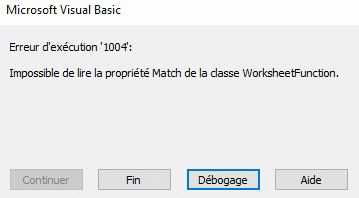
J'ai comme version MS Office Famille et Petite Entreprise 2019... est-ce que ça pourrait venir de là ?
J'ai pourtant bien un ID dans les 2 onglets concernés...
ton code est dans le module 2 -> Test2 ()
Hello,
Non ce n'est pas la version.
Comme ceci :
Dim wksTmp As Worksheet, wksIndi As Worksheet
    Dim wksFunc As WorksheetFunction
    Dim intCol As Integer, intRow As Integer
    Dim strAddress As String
    Dim lngIndi As Long, lngRowId As Long, lngLastRowId As Long, lngColDate As Long

    Set wksFunc = Application.WorksheetFunction
    Set wksTmp = Worksheets("Temp")
    Set wksIndi = Worksheets("Indicateurs_2022")

    lngLastRowId = wksTmp.Range("A" & wksTmp.Rows.Count).End(xlUp).Row
    lngRowId = 2
    Do Until lngRowId > lngLastRowId
        On Error Resume Next
        intRow = wksFunc.Match(wksTmp.Range("A" & lngRowId), wksIndi.Columns(1), False)
        On Error GoTo 0
        If Not intRow = 0 Then
            lngColDate = 6
            Do Until wksTmp.Cells(1, lngColDate) = Empty
                lngIndi = wksTmp.Cells(lngRowId, lngColDate).Value
                With wksFunc
                    intCol = .Match(Clng(wksTmp.Cells(1, lngColDate)), wksIndi.Rows(1), False)
                    strAddress = .Index(wksIndi.[A:NE], intRow, intCol).Address
                    wksIndi.Range(strAddress).Value = lngIndi
                End With
                lngColDate = lngColDate + 1
            Loop
        End If
        lngRowId = lngRowId + 1
        intRow = 0
    Loop

    Set wksFunc = Nothing
    Set wksTmp = Nothing
Set wksIndi = NothingCa maaaaaaaarche !!!! Super, un ENORME merci à toi !!!!!!!!!!!!!!!!!!!!!!!!!!!!!!!!!!!!!!!!!!!!!!!!!!!!!!!!!!!!!!
Il y a quelques soucis, ça a marché 1 fois mais après il me met le message suivant : Erreur 13 incompatibilité de type...
J'ai vérifié si c'était pas un souci de format de date qui n'aurait pas été identique entre le fichier Temp et la partie indicateurs.
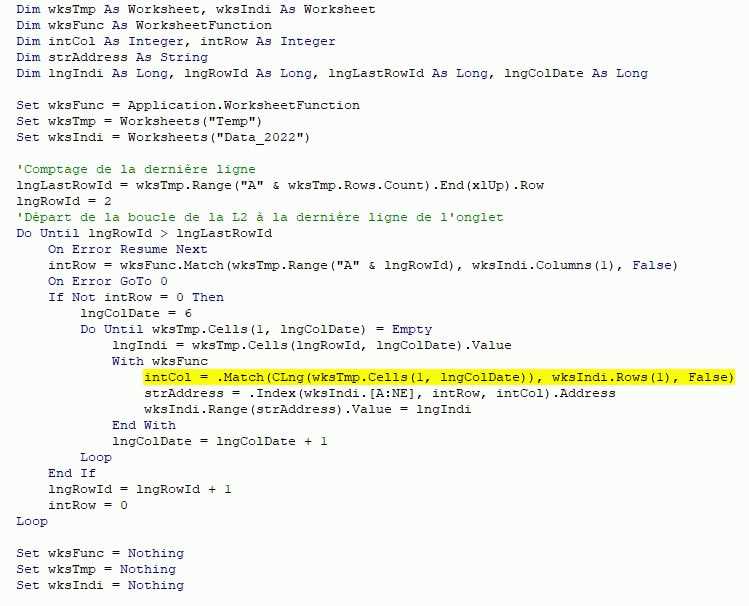
C'est bon, j'ai trouvé... il y avait effectivement une date qui ne passait pas au format date mais restait du texte et du coup la fonction Match ne marchait plus...
Tout fonctionne, encore un GRAND merci pour ton aide !!!