Salut,
tout d'abord tu active la référence...
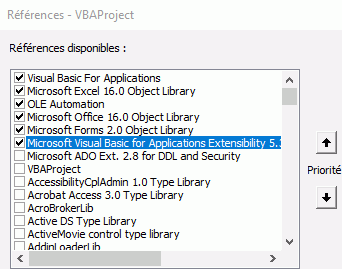
Tu peux créer un module qui se nommera "basTestVbComponent"
ThisWorkbook.VBProject.VBComponents.Add(vbext_ct_StdModule).Name = "basTestVbcomponent"
Pour créer une macro voici une sub
Sub SetMacroInModule(ModuleName As String, StringMacro As String)
' // # Ajoute un retour chariot
' // * Ajoute une tabulation
' // ^ Ajoute un guillemet
' // Ne pas mettre d'espace dans le nom de la sub ou fonction
Dim strtemp As String
strtemp = Replace(Replace(Replace(StringMacro, "#", vbCr), "*", vbTab), "^", Chr(34))
ThisWorkbook.VBProject.VBComponents(ModuleName).CodeModule.AddFromString strtemp
End Sub
Que tu peux tester comme ceci
Sub testWriteFunction()
    Dim strtemp As String
    strtemp = "sub Test11(strName as string)" & _
              "#dim i as integer" & _
              "#*for i = 1 to 10" & _
              "#*debug.print ^i: ^;i" & _
              "#*next i" & _
              "#*strname = ^toto la rico^" & _
              "#*msgbox strname" & _
              "#end sub"
    SetMacroInModule "module1", strtemp
End Sub
Pour créer un bouton sur un UserForm
Dim usf As Object
Set Usf = ThisWorkbook.VBProject.VBComponents.Add(3) ' // On crée l'UserForm

With Usf
        .Properties("Caption") = "Test UserForm"
        .Properties("BackColor") = RGB(255, 255, 255)
End With
With Usf.Designer.Controls.Add("Forms.CommandButton.1")
            .AutoSize = True
            .Caption = "Lance Test"
            .AutoSize = False
End With
Ensuite tu crée la Sub pour ton bouton en reprenant
Dim strtemp As String
    strtemp = "Sub CommandButton1_Click(strName as string)" & _
              "#dim i as integer" & _
              "#*for i = 1 to 10" & _
              "#*debug.print ^i: ^;i" & _
              "#*next i" & _
              "#*strname = ^toto la rico^" & _
              "#*msgbox strname" & _
              "#end sub"SetMacroInModule(ModuleName As String, StringMacro As String)
With usf.CodeModule
.AddFromString strtemp
End With
Par contre si c'est pour l'insertion du bouton sur une feuille je ne te serais d'aucune utilité.