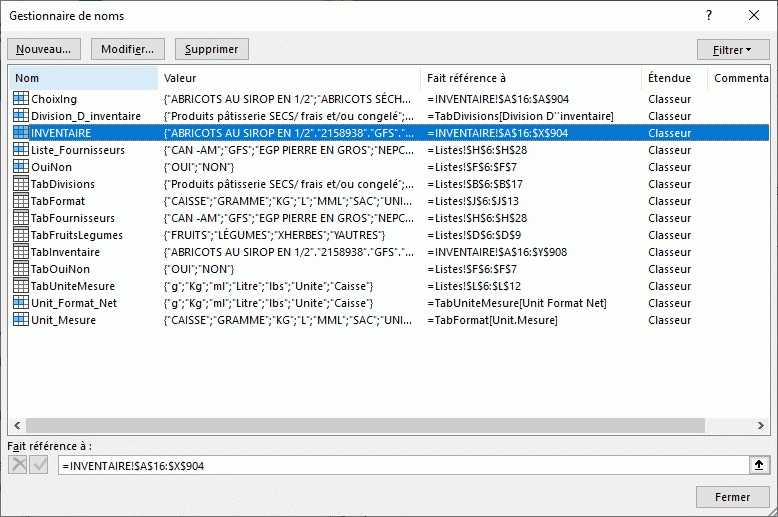
Ces étapes étant terminées, mettez ces deux codes dans l'userform SaisieInventaire
1. Ouverture userform
Private Sub UserForm_Initialize() 'ouverture userform - Dan 30-11-21

With Sheets("Listes")
    CboFournisseurs.List = .ListObjects("TabFournisseurs").DataBodyRange.Value
    CobDivision.List = .ListObjects("TabDivisions").DataBodyRange.Value
    CboUnitMesure.List = .ListObjects("TabFormat").DataBodyRange.Value
    CboUnitFormatNet.List = .ListObjects("TabUniteMesure").DataBodyRange.Value
    ComboBox1.List = .ListObjects("TabOuiNon").DataBodyRange.Value
End With
End Sub
2. Validation : remplacez votre code actuel par celui ci-dessous
'Procédure permattant d'accéder à la feuille d'inventaire
Private Sub BoutonValider_Click() 'valider nouvelle entree - Dan 30-11-21

With Sheets("INVENTAIRE").ListObjects("TabInventaire")
    If .ListRows.Count = 0 Then
        .ListRows.Add: lig = 1
    Else: .ListRows.Add: lig = .ListRows.Count 'insérer à la dernière ligne
    End If

    With .DataBodyRange
        .Item(lig, 1) = TextArticles.Value
        .Item(lig, 2) = TextCode.Value
        .Item(lig, 3) = CboFournisseurs.Value
        .Item(lig, 4) = CobDivision.Value
        .Item(lig, 15) = CCur(TextPrix.Value)
        .Item(lig, 16) = TextFormat.Value
        .Item(lig, 17) = CCur(TextBox1.Value)
        .Item(lig, 18) = CboUnitMesure.Value
        .Item(lig, 20) = CCur(TextBox2.Value)
        .Item(lig, 21) = CboUnitFormatNet.Value
        .Item(lig, 25) = Combobo1.Value
    End With

    'Tri base de donnees inventaire
     With .Sort
        .SortFields.Clear
        .SortFields.Add Key:=Sheets("INVENTAIRE").Range("TabInventaire[ARTICLES]"), SortOn:= _
        xlSortOnValues, Order:=xlAscending
        .Header = xlYes
        .MatchCase = False
        .Orientation = xlTopToBottom
        .SortMethod = xlPinYin
        .Apply
    End With
End With
End Sub
Une fois effectué, faites quelques tests
3. codes "Private sub...Change". Je suppose que dans cette userform ils sont destinés à vérifier que les rubriques sont complétées avant validation. Si oui, on peut faire un seul code pour cela.
Dites moi quelles sont les rubriques qui doivent absolument être complétées. Je vous proposerai une modification à effectuer