(if et Else) condition VBA qui fonctionne mal pour feuille de caisse
Bonjour,
pour mon travail je dois mettre en place un system de feuil de caisse informatisé,
mon problème c'est que je n'arrive pas a faire ma formule a condition fonctionne mal.
en appuyant sur le bouton clôture on a un rapport des entrée et sortie( le total des sorties, la différence qui s'affiche en dessous du total plus petit, puis les totaux égaux qui fait une vérification en additionnant la différance et le plus petit total.
voici un Example:
pourtant quand le total des entrée sont plus élevée la calcule est faux
voici la formule utilisée:
Private Sub CommandButton28_Click()
Dim Lastrow As Long

Lastrow = Range("D8").End(xlDown).Row
Stampentry = Cells(Lastrow + 1, 7).Value
stampout = Cells(Lastrow + 1, 6).Value
Cashout = Cells(Lastrow + 1, 8).Value
Cashentry = Cells(Lastrow + 1, 9).Value

'Totaux
    Cells(Lastrow + 1, 6).Value = Application.WorksheetFunction.Sum(ActiveSheet.Range("F8:F" & Lastrow))
    Cells(Lastrow + 1, 7).Value = Application.WorksheetFunction.Sum(ActiveSheet.Range("G8:G" & Lastrow))
    Cells(Lastrow + 1, 8).Value = Application.WorksheetFunction.Sum(ActiveSheet.Range("H8:H" & Lastrow))
    Cells(Lastrow + 1, 9).Value = Application.WorksheetFunction.Sum(ActiveSheet.Range("I8:I" & Lastrow))

'Diff timbre
Lastrow = Range("D8").End(xlDown).Row
Stampentry = Cells(Lastrow + 1, 6).Value
stampout = Cells(Lastrow + 1, 7).Value

If Stampentry < stampout Then
    Cells(Lastrow + 2, 6).Value = Stampentry - stampout
Else
    Cells(Lastrow + 2, 6).Value = "0"
End If

If Stampentry > stampout Then
    Cells(Lastrow + 2, 7).Value = Stampentry - stampout
Else
    Cells(Lastrow + 2, 7).Value = "0"
End If

 'Totaux egg
Cashout = Cells(Lastrow + 1, 8).Value
Cashentry = Cells(Lastrow + 1, 9).Value
DCashout = Cells(Lastrow + 2, 8).Value
DCashentry = Cells(Lastrow + 2, 9).Value

If DCashout = 0 Then
    Cells(Lastrow + 3, 8).Value = DCashentry + Cashentry
    Cells(Lastrow + 3, 9).Value = DCashentry + Cashentry
Else
    Cells(Lastrow + 3, 9).Value = Cashout + DCashout
    Cells(Lastrow + 3, 8).Value = Cashout + DCashout

End If

'Diffcaisse
Lastrow = Range("D8").End(xlDown).Row
Cashout = Cells(Lastrow + 1, 9).Value
Cashentry = Cells(Lastrow + 1, 8).Value

If Cashentry < Cashout Then
    Cells(Lastrow + 2, 8).Value = Cashentry - Cashout
Else
    Cells(Lastrow + 2, 8).Value = "0"
End If

If Cashentry > Cashout Then
    Cells(Lastrow + 2, 9).Value = Cashentry - Cashout
Else
    Cells(Lastrow + 2, 9).Value = "0"
End If

'Libellé
Range("D184").Select
Selection.End(xlUp).Select
aligne = ActiveCell.Row + 1
bligne = ActiveCell.Row + 2
cligne = ActiveCell.Row + 3

Cells(aligne, 4).Value = Sheets("Fermeture").Cells(1, 3).Value
Cells(bligne, 4).Value = Sheets("Fermeture").Cells(1, 4).Value
Cells(cligne, 4).Value = Sheets("Fermeture").Cells(1, 5).Value
Range("D2").SelectSalut
tu veux faire quoi avec cette partie :
Private Sub CommandButton28_Click()
Dim Lastrow As Long

Lastrow = Range("D8").End(xlDown).Row
Stampentry = Cells(Lastrow + 1, 7).Value
stampout = Cells(Lastrow + 1, 6).Value
Cashout = Cells(Lastrow + 1, 8).Value
Cashentry = Cells(Lastrow + 1, 9).Value

'Totaux
    Cells(Lastrow + 1, 6).Value = Application.WorksheetFunction.Sum(ActiveSheet.Range("F8:F" & Lastrow))
    Cells(Lastrow + 1, 7).Value = Application.WorksheetFunction.Sum(ActiveSheet.Range("G8:G" & Lastrow))
    Cells(Lastrow + 1, 8).Value = Application.WorksheetFunction.Sum(ActiveSheet.Range("H8:H" & Lastrow))
Cells(Lastrow + 1, 9).Value = Application.WorksheetFunction.Sum(ActiveSheet.Range("I8:I" & Lastrow))mince les images ne se sont pas mis, voila le tableau
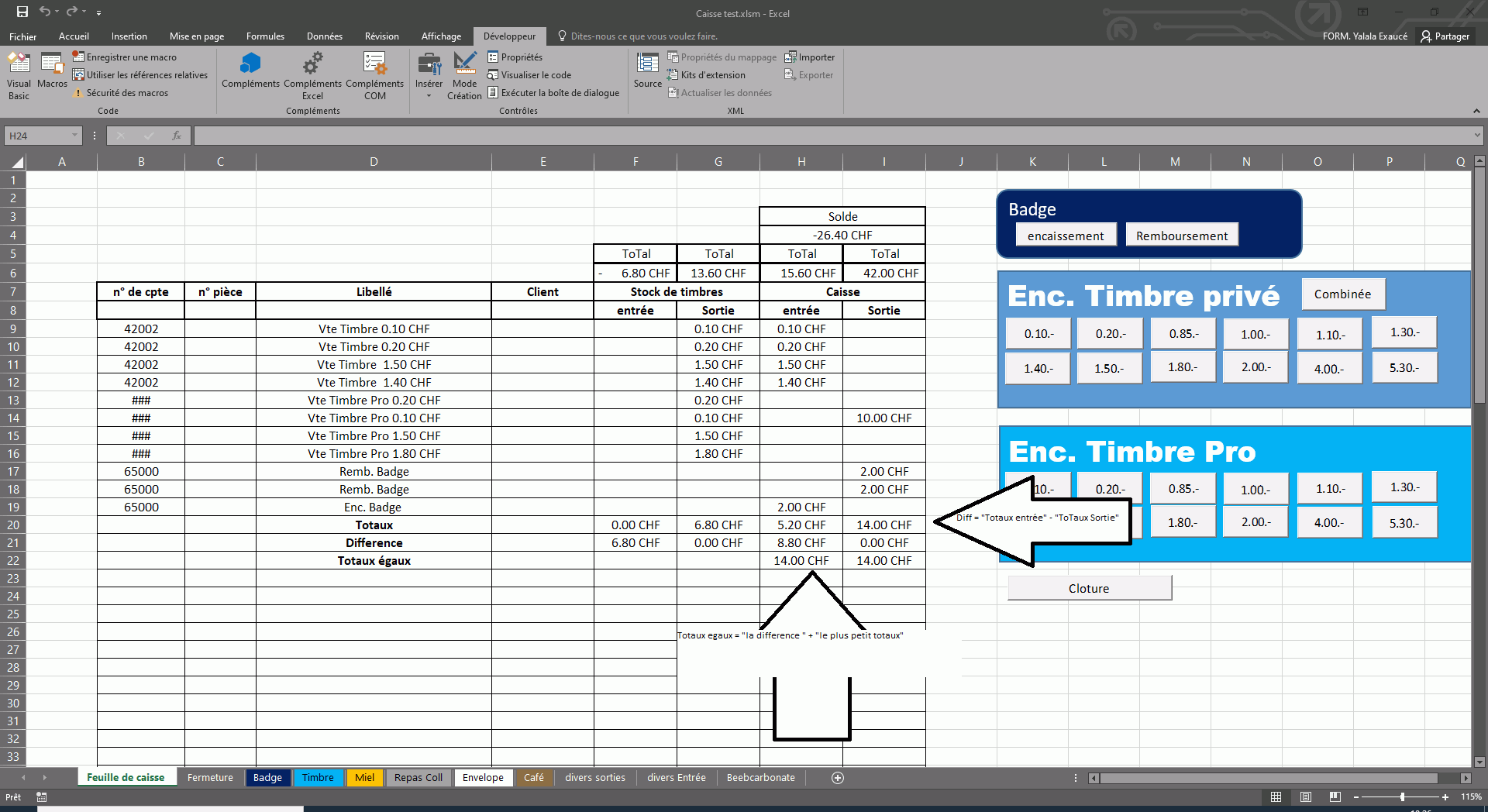

Salut
je n ai pas compris les images, si tu veux dit moi , pas a pas a quoi sert le bout de code !
Private Sub CommandButton28_Click()
Dim Lastrow As Long

Lastrow = Range("D8").End(xlDown).Row
Stampentry = Cells(Lastrow + 1, 7).Value
stampout = Cells(Lastrow + 1, 6).Value
Cashout = Cells(Lastrow + 1, 8).Value
Cashentry = Cells(Lastrow + 1, 9).Value
cette partie représente les ligne de sortie et d'entrée
traduction
Stampentry = entrée de timbre
stampout = sortie de timbres
cashout = sortie de caisse
Cashentry = entrée de caisse
'Totaux
    Cells(Lastrow + 1, 6).Value = Application.WorksheetFunction.Sum(ActiveSheet.Range("F8:F" & Lastrow))
    Cells(Lastrow + 1, 7).Value = Application.WorksheetFunction.Sum(ActiveSheet.Range("G8:G" & Lastrow))
    Cells(Lastrow + 1, 8).Value = Application.WorksheetFunction.Sum(ActiveSheet.Range("H8:H" & Lastrow))
    Cells(Lastrow + 1, 9).Value = Application.WorksheetFunction.Sum(ActiveSheet.Range("I8:I" & Lastrow))
puis cette partie est pour calculer la somme des entrée et sortie
mais cette partie est pas un problème c'est plutot la partie des totaux egg
Salut Exau
lire les commentaires et dit moi :
Dim Lastrow As Long
'Lastrow = Cells(Rows.Count, "D").End(xlup).Row cette instruction evite les faute lier au vide entre les cellules
'sauf si tu as autre données au dessous du tableau de "Libellé" deferente alors tu peut ecrire
'  =>> Lastrow = Range("D50").End(xlup).Row ou D50 est par exemple le titre d'autre tab au dessous le tab "Libellé"
Lastrow = Range("D8").End(xlDown).Row
Stampentry = Cells(Lastrow + 1, 7).Value ' ICI Stampentry et stampout  il prends deux emplacemet deferentes
stampout = Cells(Lastrow + 1, 6).Value
Cashout = Cells(Lastrow + 1, 8).Value
Cashentry = Cells(Lastrow + 1, 9).Value

'----------------------------------------
 '-----------------------------------
'Diff timbre
Lastrow = Range("D8").End(xlDown).Row ' tu n a pas besoin de repeter ....
Stampentry = Cells(Lastrow + 1, 6).Value ' ' ICI Stampentry et stampout  il prends deux emplacemet deferentes
stampout = Cells(Lastrow + 1, 7).Value
'-----------------------------------
'---pour les instruction ifs je pense qu ils ne te posent pas de probleme
'si oui je vais voir  mais tu dois me dire quel regle tu suis pas a  pas ------
'----------------merci,
pour finir j'ai pu trouver une solution, c'étais tout bête il y avais quelque faute qui se sont glisser entre les formules