Menu Clic droit cellule, ligne, colonne - Erreur
s
Bonjour,
Après plusieurs tentatives et malgré plusieurs recherches sur internet, j'ai un problème avec Excel 2013 pour bloquer les options du menu contextuel (Clic droit sur une cellule, la ligne ou une colonne).
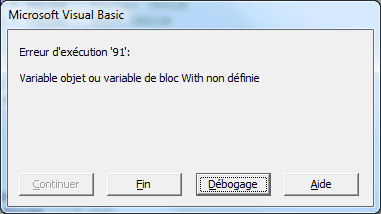
J'obtiens une erreur d'exécution '91' comme indiqué dans le fichier joint.
Je n'arrive pas à bloquer l'option du copier-coller sur la ligne, la colonne ou la cellule.
Je vous joint mon code:
        '===============
        ' Cell level
        '===============
        With Application.CommandBars("Cell")
            .FindControl(ID:=21).Enabled = False    ' Cut
            .FindControl(ID:=19).Enabled = False    ' Copy
            .FindControl(ID:=22).Enabled = False    ' Paste
            .FindControl(ID:=755).Enabled = False   ' Paste Special

            .FindControl(ID:=3125).Enabled = False  ' Clear Contents
            .FindControl(ID:=292).Enabled = False   ' Delete cells
            .FindControl(ID:=2031).Enabled = False  ' Insert comments

            .FindControl(ID:=31402).Enabled = False ' Filter Cells
            .FindControl(ID:=31435).Enabled = False ' Sort Cells

            .FindControl(ID:=855).Enabled = False   ' Format Cells
            .FindControl(ID:=1966).Enabled = False  ' Pick from List
            .FindControl(ID:=13380).Enabled = False ' Defining a range
            .FindControl(ID:=1576).Enabled = False  ' Hyperlink
        End With

        '===============
        ' Column level
        '===============
        With Application.CommandBars("Column")
            .FindControl(ID:=21).Enabled = False    ' Cut
            .FindControl(ID:=19).Enabled = False    ' Copy
            .FindControl(ID:=22).Enabled = False    ' Paste
            .FindControl(ID:=755).Enabled = False   ' Paste Special
            .FindControl(ID:=294).Enabled = False   ' Delete
            .FindControl(ID:=3125).Enabled = False  ' Clear Contents
            .FindControl(ID:=855).Enabled = False   ' Format Cells
            .FindControl(ID:=542).Enabled = False   ' Column Width
            .FindControl(ID:=886).Enabled = False   ' Hide
            .FindControl(ID:=887).Enabled = False   ' Unhide
        End With

        '===============
        ' Row level
        '===============
        With Application.CommandBars("Row")
            .FindControl(ID:=21).Enabled = False    ' Cut
            .FindControl(ID:=19).Enabled = False    ' Copy
            .FindControl(ID:=22).Enabled = False    ' Paste
            .FindControl(ID:=755).Enabled = False   ' Paste Special
            .FindControl(ID:=3125).Enabled = False  ' Clear Contents
            .FindControl(ID:=855).Enabled = False   ' Format Cells
            .FindControl(ID:=541).Enabled = False   ' Row Height
            .FindControl(ID:=883).Enabled = False   ' Hide
            .FindControl(ID:=884).Enabled = False   ' Unhide

        End With

        '===============
        ' Insert level
        '===============
        Application.CommandBars("Insert").FindControl(ID:=295).Enabled = False  ' Insert Cells
        Application.CommandBars("Cell").FindControl(ID:=295).Enabled = False    ' Insert Cells
        Application.CommandBars("Insert").FindControl(ID:=296).Enabled = False  ' Insert Rows
        Application.CommandBars("Row").FindControl(ID:=296).Enabled = False     ' Insert Row
        Application.CommandBars("Insert").FindControl(ID:=297).Enabled = False  ' Insert Columns
        Application.CommandBars("Column").FindControl(ID:=297).Enabled = False  ' Insert Column
Pouvez-vous m'aider ou me dire ce qui ne va pas dans mon code?
Par avance, merci pour votre aide.
bonjour,
ça ne suffirait pas :
Private Sub Worksheet_BeforeRightClick(ByVal Target As Range, Cancel As Boolean)
Cancel = True
End Sub
?
A+