Supprimer le fond d'une checkBox

Bonjour,
J'ai un code VBA qui génère une centaine de checkbox, mais celles ci ont un fond blanc et un nom "CheckBox n°i" que j'aimerai enlever, c'est à dire les rendre transparentes et sans nom. Mais je n'arrive pas a compléter mon code pour qu'il s'en charge automatiquement, sauriez vous m'aider ? Voilà mon code, ainsi qu'une photo de ce qu'il donne :
Sub CheckBoxBDDDFor()
Dim ligne As Integer
Dim Chekbox As OLEObject
Dim Target As Range
ligne = Cells.Find("*", SearchOrder:=xlByRows, SearchDirection:=xlPrevious, LookIn:=xlFormulas).Row - 112
Dim n As Integer
Dim CB As OLEObject
While n < 110
If Sheets("DetailsProjets").Cells(ligne, 9).Value = "Faux" Then

Set Target = Sheets("DetailsProjets").Cells(ligne, 9)
Set Chekbox = ActiveSheet.OLEObjects.Add(ClassType:="Forms.CheckBox.1", Left:=Target.Left, Top:=Target.Top, Width:=Target.Width, Height:=Target.Height)
With Chekbox
.LinkedCell = "DetailsProjets!I" & ligne
.Object.Value = False

End With
End If
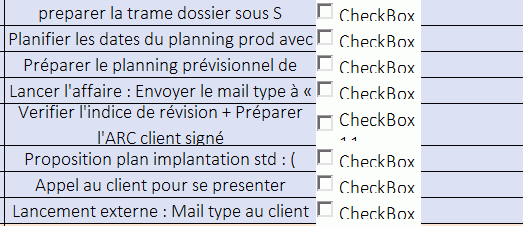
capture d ecran 2021 06 28 110703

Bonjour,

Un test :

Sub CheckBoxBDDDFor()
Dim ligne As Integer
Dim Chekbox As OLEObject
Dim Target As Range
ligne = Cells.Find("*", SearchOrder:=xlByRows, SearchDirection:=xlPrevious, LookIn:=xlFormulas).Row - 112
Dim n As Integer
Dim CB As OLEObject
While n < 110
    If Sheets("DetailsProjets").Cells(ligne, 9).Value = "Faux" Then
        Set Target = Sheets("DetailsProjets").Cells(ligne, 9)
        Set Chekbox = ActiveSheet.OLEObjects.Add(ClassType:="Forms.CheckBox.1", Left:=Target.Left, Top:=Target.Top, Width:=Target.Width, Height:=Target.Height)
        With Chekbox
            .LinkedCell = "DetailsProjets!I" & ligne
            .Object.Value = False
            .Object.Caption = ""
            .Object.BackStyle = fmBackStyleTransparent
            '.Object.AutoSize = True
            .Interior.ColorIndex = xlNone
        End With
    End If
Wend
End Sub

Le fond n'est visible que lorsque la CB est sélectionnée. Vous pouvez jouer sur la propriété AutoSize pour ajuster la taille de la CB au contenu du Caption > Si il est vide alors la taille ne sera limité qu'à la case avec un léger débord (ligne en commentaire).

Cdlt,

Bonjour,

Code :

    With Chekbox
        .LinkedCell = "DetailsProjets!I" & ligne
        .Object.Value = False
        .Object.Caption = ""
        .Object.BackColor = Target.Interior.Color
    End With
Rechercher des sujets similaires à "supprimer fond checkbox"