Private Sub CommandButton4_Click()

Sheets("Invoice").Unprotect Password:=190995

'Invoice sheet
Application.ScreenUpdating = False

Sheets("Invoice").Range("A17:H46").ClearContents

Set MaPlage = Range("F17:A42")

Sheets("Invoice").Cells(2, 6).Value = TextBox52.Value
Sheets("Invoice").Cells(4, 6).Value = TextBox53.Value
Sheets("Invoice").Cells(3, 6).Value = TextBox56.Value
Sheets("Invoice").Cells(5, 6).Value = TextBox57.Value
Sheets("Invoice").Cells(12, 5).Value = TextBox58.Value
Dim A As Integer, x As Range

For A = 1 To Me.ListBox2.ListCount - 1
Set x = Sheets("Invoice").Range("A46").End(xlUp).Offset(1, 0)
x.Value = Me.ListBox1.List(A, 0)
For b = 1 To 8
x.Offset(0, b - 1) = Me.ListBox2.List(A, b)
Next b
Next A

'Set MaPlage = Range("F17:A42")
Dim i As Integer
Sum = 0
For i = 17 To 46
If IsNumeric(Sheets("Invoice").Cells(i, 6)) Then
Sum = Sum + Sheets("Invoice").Cells(i, 6).Value
Else
End If
Next i

Sheets("Invoice").Cells(47, 6).Value = Sum

'For Pdf Save

Sheets("Invoice").Range("A1:H47").ExportAsFixedFormat xlTypePDF, _
Filename:="D:\" & _
Sheets("Invoice").Range("F2").Value
Unload Me
'Transaction.Show
Application.ScreenUpdating = True
Sheets("Invoice").Protect Password:=190995

End Sub

Private Sub TextBox51_Change()
Dim i As Long
Dim t(12)

Me.ListBox2.Column = t
ListBox2.ColumnCount = 13
ListBox2.BoundColumn = 13
Me.ListBox2.Clear

Me.TextBox51 = Format(StrConv(Me.TextBox51, vbLowerCase))
Me.ListBox2.AddItem "ID"
Me.ListBox2.List(0, 1) = "Code Article"
Me.ListBox2.List(0, 2) = "Designation"
Me.ListBox2.List(0, 4) = "Qte"
Me.ListBox2.List(0, 3) = "Unite"
Me.ListBox2.List(0, 5) = "Prix UN"
Me.ListBox2.List(0, 6) = "Total"

Me.ListBox2.Selected(0) = True

With Sheets("Opérations")

For i = 2 To .Range("A20000").End(xlUp).Row
For x = 1 To Len(.Cells(i, 1))

A = Me.TextBox51.TextLength

If LCase(Mid(.Cells(i, 1), x, A)) = Me.TextBox51 And TextBox51 <> "" Then
Me.ListBox2.AddItem .Cells(i, 2)
Me.ListBox2.List(ListBox2.ListCount - 1, 1) = .Cells(i, 4)
Me.ListBox2.List(ListBox2.ListCount - 1, 2) = .Cells(i, 5)
Me.ListBox2.List(ListBox2.ListCount - 1, 3) = .Cells(i, 8)
Me.ListBox2.List(ListBox2.ListCount - 1, 4) = Val(Replace(.Cells(i, 7), ",", "."))
Me.ListBox2.List(ListBox2.ListCount - 1, 5) = Val(Replace(.Cells(i, 9), ",", "."))
Me.ListBox2.List(ListBox2.ListCount - 1, 6) = Val(Replace(.Cells(i, 10), ",", "."))
Me.TextBox52 = .Cells(i, 3)
Me.TextBox53 = .Cells(i, 13)
Me.TextBox56 = .Cells(i, 1)
Me.TextBox57 = .Cells(i, 11)
Me.TextBox58 = .Cells(i, 15)

End If
Next x

Next i
End With
End Sub
Bonjour
j'ai un probleme avec les virgules ,
A partir de la ListBox suivante :
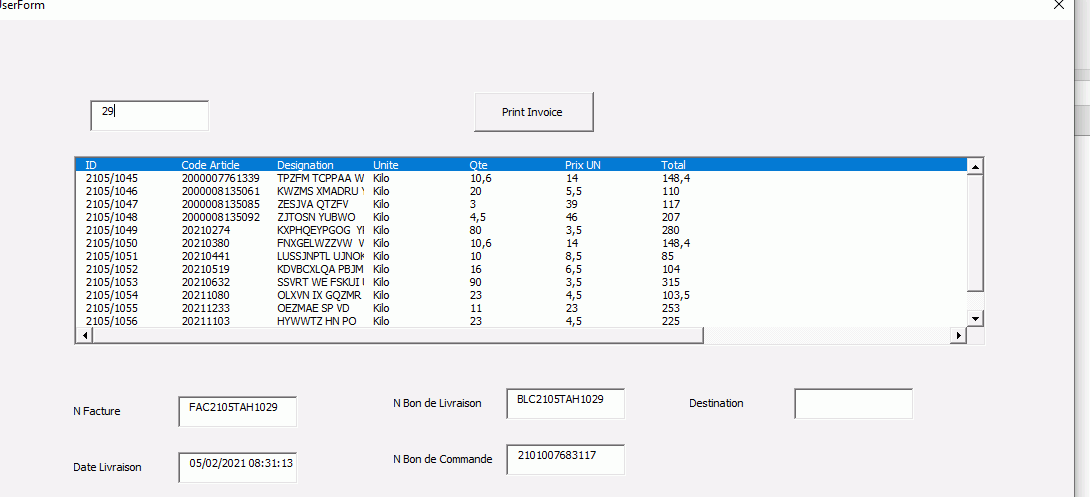
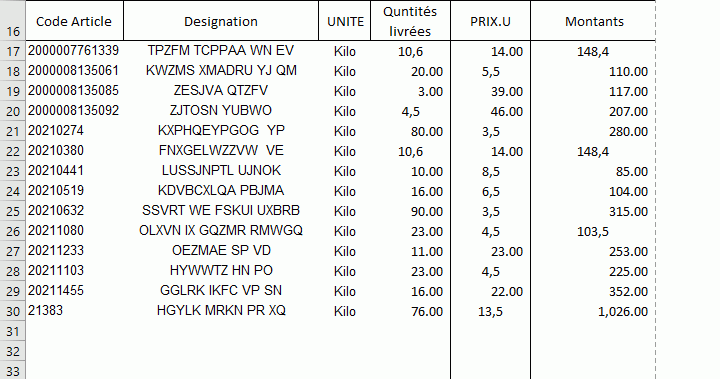
Je genere le tableau ci-dessous pour objectif editer une Facture, mais j'ai un probleme avec les nombres décimaux (Avec virgule",") .
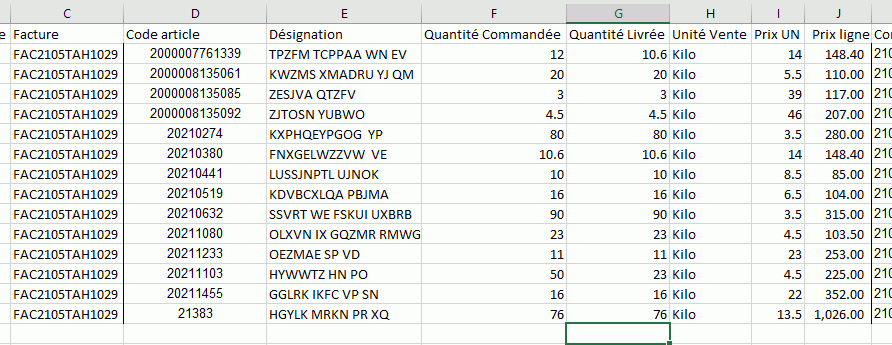
Par exemple : dans une cellule y a le chiffre suivant 12.3 La listBox affiche 12,3---> le fichier facture affiche 12,3. la chose qui me bloque pour faire des calcul par la suite.
la feuille des donnees entrants :
le code
En piece jointe le document
Merci d'avance