VBA / trier puis filtrer pour faire un plan sous-total
Bonjour à tous,
Je suis à la recherche d'une solution pour faire un plan "sous-total", après avoir trier puis filtrer des éléments. Aucun soucis lorsque je le fais manuellement, mais dès lors que je tente de le faire avec un code VBA, les filtres ne se font pas toujours correctement pour faire le plan (par exemple, voir ci-après).
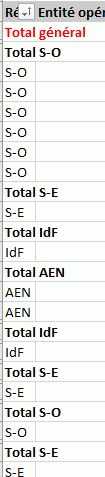
Je ne suis pas très douée en VBA, et ne comprends pas du tout où pêche mon code.
With ActiveSheet
    If .FilterMode Then .ShowAllData
End With

    Range("A21").Select
    ActiveSheet.Range("$A$21:$U$15000").AutoFilter Field:=1, Criteria1:=Array( _
        "Total général", "Total S-O", "Total S-E", "Total AEN", "Total IdF"), Operator:=xlFilterValues 'Sélectionne les Régions pour les supprimer
    Rows("22:15000").Select
    Selection.Delete Shift:=xlUp
    ActiveSheet.Range("$A$21:$U$15000").AutoFilter Field:=1

      ActiveSheet.AutoFilter.Sort.SortFields.Clear
    ActiveSheet.AutoFilter.Sort.SortFields.Add _
        Key:=Range("A21", Selection.End(xlDown)), SortOn:=xlSortOnValues, Order:=xlAscending, _
        DataOption:=xlSortNormal
     With ActiveSheet.AutoFilter.Sort
        .Header = xlYes
        .MatchCase = False
        .Orientation = xlTopToBottom
     End With

   With ActiveSheet.AutoFilter.Sort.SortFields.Clear
    ActiveSheet.AutoFilter.Sort.SortFields.Add _
        Key:=Range("I21", Selection.End(xlDown)), SortOn:=xlSortOnValues, Order:=xlAscending, _
        DataOption:=xlSortNormal
    With ActiveSheet.AutoFilter.Sort
        .Header = xlYes
        .MatchCase = False
        .Orientation = xlTopToBottom
    End With
    ActiveSheet.Range("$A$21", Selection.End(xlDown)).AutoFilter Field:=9, Criteria1:="En cours"
   End With

   With ActiveSheet.AutoFilter.Sort.SortFields.Clear
    ActiveSheet.AutoFilter.Sort.SortFields.Add _
        Key:=Range("J21", Selection.End(xlDown)), SortOn:=xlSortOnValues, Order:=xlAscending, _
        DataOption:=xlSortNormal
    With ActiveSheet.AutoFilter.Sort
        .Header = xlYes
        .MatchCase = False
        .Orientation = xlTopToBottom
    End With
    ActiveSheet.Range("$A$21", Selection.End(xlDown)).AutoFilter Field:=10, Criteria1:="Demande"
   End With

   With ActiveSheet.AutoFilter.Sort.SortFields.Clear
    ActiveSheet.AutoFilter.Sort.SortFields.Add _
        Key:=Range("K21", Selection.End(xlDown)), SortOn:=xlSortOnValues, Order:=xlAscending, _
        DataOption:=xlSortNormal
    With ActiveSheet.AutoFilter.Sort
        .Header = xlYes
        .MatchCase = False
        .Orientation = xlTopToBottom
    End With
    ActiveSheet.Range("$A$21", Selection.End(xlDown)).AutoFilter Field:=11, Criteria1:="Oui"
   End With

   With ActiveSheet.AutoFilter.Sort.SortFields.Clear
    ActiveSheet.AutoFilter.Sort.SortFields.Add _
        Key:=Range("H21", Selection.End(xlDown)), SortOn:=xlSortOnValues, Order:=xlAscending, _
        DataOption:=xlSortNormal
    With ActiveSheet.AutoFilter.Sort
        .Header = xlYes
        .MatchCase = False
        .Orientation = xlTopToBottom
    End With
     ActiveSheet.Range("$A$21", Selection.End(xlDown)).AutoFilter Field:=8, Criteria1:=Array( _
        "BE", "CA", "PA"), Operator:=xlFilterValues
    End With

   ActiveSheet.AutoFilter.Sort.SortFields.Clear
    ActiveSheet.AutoFilter.Sort.SortFields.Add _
        Key:=Range("A21", Selection.End(xlDown)), SortOn:=xlSortOnValues, Order:=xlDescending, _
        DataOption:=xlSortNormal
    ActiveSheet.AutoFilter.Sort.SortFields.Clear
    ActiveSheet.AutoFilter.Sort.SortFields.Add _
        Key:=Range("B21", Selection.End(xlDown)), SortOn:=xlSortOnValues, Order:=xlAscending, _
        DataOption:=xlSortNormal
    With ActiveSheet.Sort
        .SetRange Range("A21", Selection.End(xlDown))
        .Header = xlYes
        .MatchCase = False
        .Orientation = xlTopToBottom
    End With

'Création du plan
Range("A21").Select
Selection.Subtotal GroupBy:=1, Function:=xlSum, TotalList:=Array(13), _
    Replace:=True, PageBreaks:=False, SummaryBelowData:=False

'Mise en forme de la police pour les totaux
Dim Rech_TotGén As Range
Dim Rech_TotSO As Range
Dim Rech_TotSE As Range
Dim Rech_TotIdF As Range
Dim Rech_TotAEN As Range
Dim Plage As Range

Set Plage = ActiveSheet.Columns(1).Cells
Set Rech_TotGén = Plage.Find(What:="Total général", LookAt:=xlWhole)
Set Rech_TotSO = Plage.Find(What:="Total S-O", LookAt:=xlWhole)
Set Rech_TotSE = Plage.Find(What:="Total S-E", LookAt:=xlWhole)
Set Rech_TotIdF = Plage.Find(What:="Total IdF", LookAt:=xlWhole)
Set Rech_TotAEN = Plage.Find(What:="Total AEN", LookAt:=xlWhole)

Range("A21").Select
If Not Rech_TotGén Is Nothing Then
     Rech_TotGén.Offset(0, 0).Select
        With Selection.Font
        .Color = -16776961
        .TintAndShade = 0
        End With
End If
ActiveCell.Offset(0, 12).Select
    With Selection.Font
            .Color = -16776961
            .Bold = True
    End With

Range("A21").Select
If Not Rech_TotSO Is Nothing Then
     Rech_TotSO.Offset(0, 0).Select
End If
ActiveCell.Offset(0, 12).Select
    With Selection.Font
            .Bold = True
    End With

Range("A21").Select
If Not Rech_TotSE Is Nothing Then
     Rech_TotSE.Offset(0, 0).Select
End If
ActiveCell.Offset(0, 12).Select
    With Selection.Font
            .Bold = True
    End With

Range("A21").Select
If Not Rech_TotIdF Is Nothing Then
     Rech_TotIdF.Offset(0, 0).Select
End If
ActiveCell.Offset(0, 12).Select
    With Selection.Font
            .Bold = True
    End With

Range("A21").Select
If Not Rech_TotAEN Is Nothing Then
     Rech_TotAEN.Offset(0, 0).Select
End If
ActiveCell.Offset(0, 12).Select
    With Selection.Font
            .Bold = True
    End With

' cacul_pipeforfait_prop_CdC
    Range("D11").Select
    ActiveCell.FormulaR1C1 = "=SUMIFS(C[9],C[4],""<>AT"",C[4],""<>AO"",C[5],""En cours"",C[6],""Demande"",C[7],""Oui"")"
    Selection.NumberFormat = _
        "_-* #,##0.00 [$€-fr-FR]_-;-* #,##0.00 [$€-fr-FR]_-;_-* ""-""?? [$€-fr-FR]_-;_-@_-"

    Range("E11").Select
    ActiveCell.FormulaR1C1 = "=SUM(SUMIFS(C[8],C[3],""<>AT"",C[3],""<>AO"",C[-4],""IdF"",C[4],""En cours"",C[5],""Demande"",C[6],""Oui""),(SUMIFS(C[8],C[3],""<>AT"",C[3],""<>AO"",C[-4],""AEN"",C[4],""En cours"",C[5],""Demande"",C[6],""Oui"")))"
    Selection.NumberFormat = _
        "_-* #,##0.00 [$€-fr-FR]_-;-* #,##0.00 [$€-fr-FR]_-;_-* ""-""?? [$€-fr-FR]_-;_-@_-"

    Range("F11").Select
    ActiveCell.FormulaR1C1 = "=SUMIFS(C[7],C[2],""<>AT"",C[2],""<>AO"",C[-5],""S-O"",C[3],""En cours"",C[4],""Demande"",C[5],""Oui"")"
    Selection.NumberFormat = _
        "_-* #,##0.00 [$€-fr-FR]_-;-* #,##0.00 [$€-fr-FR]_-;_-* ""-""?? [$€-fr-FR]_-;_-@_-"

    Range("G11").Select
    ActiveCell.FormulaR1C1 = "=SUMIFS(C[6],C[1],""<>AT"",C[1],""<>AO"",C[-6],""S-E"",C[2],""En cours"",C[3],""Demande"",C[4],""Oui"")"
    Selection.NumberFormat = _
        "_-* #,##0.00 [$€-fr-FR]_-;-* #,##0.00 [$€-fr-FR]_-;_-* ""-""?? [$€-fr-FR]_-;_-@_-"

End Sub
Ce que je souhaite c'est avoir un plan correct seulement avec mes données filtrées et du coup triées pour avoir un joli plan correct.
Je vous joins un fichier pour plus de compréhension de mon besoin.
Je vous remercie par avance pour votre (vos) aide(s) que vous pourrez m'apporter.
Bonjour
Les Sous-totaux sont dépassés et notamment incompatibles avec la plupart des nouveautés depuis 2007
Utilises plutôt des tableaux structurés et des TCD...
Merci 78Chris pour ta réponse, malheureusement ma direction veut que les données soient présentées comme ça. Je vais tenter de mettre les données en "tableau" en vba, mais je n'ai pas toujours le même nombre de ligne.
Merci encore ! Bonne soirée!
Bonjour à tous,
Bon, j'ai tenté sous forme de tableau structuré, malheureusement cela me donne le même résultat : tri incorrect...
Quelqu'un aurait-il d'autres solutions ?
Vous en remerciant par avance,