Ouverture d'une boite de dialogue afin de sélectionner un fichier
j
Rebonjour,
Voici un échantillon de mon code VBA :
ActiveWorkbook.Queries.Add Name:="Customer_hotline", Formula:= _
        "let" & Chr(13) & "" & Chr(10) & "    Source = Csv.Document(File.Contents(""C:\Customer_hotline.csv""),[Delimiter="","", Columns=14, Encoding=65001, QuoteStyle=QuoteStyle.None])," & Chr(13) & "" & Chr(10) & "    #""En-têtes promus"" = Table.PromoteHeaders(Source, [PromoteAllScalars=true])," & Chr(13) & "" & Chr(10) & "    #""Type modifié"" = Table.TransformColumnTypes(#""En-têtes promus"",{{""CostType"", type text}, " & _
        "{""TicketID"", Int64.Type}, {""TicketType"", type text}, {""CompanyCode"", type text}, {""InterventionDay"", type date}, {""ServicePackage"", type text}, {""NoteCreatedByTeam"", type text}, {""NoteCreatedBy"", type text}, {""Title"", type text}, {""Amount"", type number}, {""Unit"", Currency.Type}, {""Total"", Int64.Type}, {""Billable"", type text}, {""Invoiced"", t" & _
        "ype logical}})" & Chr(13) & "" & Chr(10) & "in" & Chr(13) & "" & Chr(10) & "    #""Type modifié"""
J'aimerais ajouter le bout de code ci-dessous qui permet l'ouverture d'une boîte de dialogue mais je ne sais pas ou le placé :
Application.GetOpenFilename()Merci d'avance pour votre aide !
Bonjour,
voici un exemple,
 Dim FD As Office.FileDialog
 Set FD = Application.FileDialog(msoFileDialogFilePicker)
 With FD
  .InitialFileName = ThisWorkbook.Path & "\*.csv"  'adapter le répertoire
  .Show
  If .SelectedItems.Count > 0 Then fichier = .SelectedItems(1)
 End With

' Debug.Print fichier  'pour un test

 ActiveWorkbook.Queries.Add Name:="Customer_hotline", Formula:= _
        "let" & Chr(13) & "" & Chr(10) & "    Source = Csv.Document(File.Contents(" & fichier & "),[Delimiter="","", Columns=14, Encoding=65001, QuoteStyle=QuoteStyle.None])," & Chr(13) & "" & Chr(10) & "    #""En-têtes promus"" = Table.PromoteHeaders(Source, [PromoteAllScalars=true])," & Chr(13) & "" & Chr(10) & "    #""Type modifié"" = Table.TransformColumnTypes(#""En-têtes promus"",{{""CostType"", type text}, " & _
        "{""TicketID"", Int64.Type}, {""TicketType"", type text}, {""CompanyCode"", type text}, {""InterventionDay"", type date}, {""ServicePackage"", type text}, {""NoteCreatedByTeam"", type text}, {""NoteCreatedBy"", type text}, {""Title"", type text}, {""Amount"", type number}, {""Unit"", Currency.Type}, {""Total"", Int64.Type}, {""Billable"", type text}, {""Invoiced"", t" & _
"ype logical}})" & Chr(13) & "" & Chr(10) & "in" & Chr(13) & "" & Chr(10) & " #""Type modifié"""j
Bonjour,
Merci pour votre réponse.
Lorsque j’exécute le code j'ai l'erreur suivante :
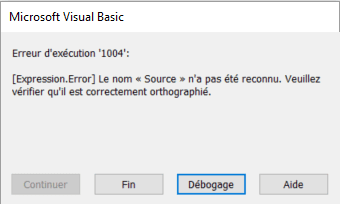
La ligne suivante de monde code contient le mot "Source" également, c'est peut-être du à cela :
 With ActiveSheet.ListObjects.Add(SourceType:=0, Source:= _
        "OLEDB;Provider=Microsoft.Mashup.OleDb.1;Data Source=$Workbook$;Location=Customer_hotline;Extended Properties="""""
        , Destination:=Range("$A$1")).QueryTable
        .CommandType = xlCmdSql
        .CommandText = Array("SELECT * FROM [Customer_hotline]")
        .RowNumbers = False
        .FillAdjacentFormulas = False
        .PreserveFormatting = True
        .RefreshOnFileOpen = False
        .BackgroundQuery = True
        .RefreshStyle = xlInsertDeleteCells
        .SavePassword = False
        .SaveData = True
        .AdjustColumnWidth = True
        .RefreshPeriod = 0
        .PreserveColumnInfo = False
        .ListObject.DisplayName = "Customer_hotline"
.Refresh BackgroundQuery:=FalseBonjour,
à quoi correspond la variable $Workbook$ ?