Transfert de données depuis un TCD d'un classeur à un tableau d'un autre
Bonjour à tous,
Tout d'abord, je vous remercie par avance pour la potentielle aide que vous allez m'apporter. Merci pour votre temps.
Je vous explique maintenant mon problème :
J'ai commencé à créer (avec l'aide de notre bon ami chatGPT) une macro permettant de transférer des données depuis 2 classeurs comprenant chacun un TCD jusqu'à un seul et même classeur dans un seul et même tableau. Le but ici est de comparé des données financières sur des produits spécifiques comportant chacun un prix facturé et un poids total en kilo pour chaque référence. (voilà en ce qui concerne le contexte ^^)
Le problème étant que le programme permet bien de récupérer le nom de chaque produit mais ne parvient pas à récupérer les chiffres associés. Il affiche automatiquement des 0. À priori c'est parce que dans un TCD les données ne sont pas "réellement présente" mais je ne suis déjà pas sûr de ça et encore moins d'une potentielle solution. De plus, si elles n'étaient pas réellement présentent, comment le programme pourrait-il récupérer le nom des produits qui sont eux aussi dans le TCD.
Mon problème est donc bien d'importer les données chiffrés à la place des 0 qu'il m'affiche.
J'espère avoir été assez clair, sinon n'hésitez pas à me poser davantage de questions.
Si jamais ça peut vous aider, voici le code :
Function GetColumnByHeader(ws As Worksheet, headerName As String, headerRow As Long) As Long

    Dim col As Long

    For col = 1 To ws.Cells(headerRow, ws.Columns.Count).End(xlToLeft).Column

        If Trim(ws.Cells(headerRow, col).Value) = headerName Then

            GetColumnByHeader = col

            Exit Function

        End If

    Next col

    GetColumnByHeader = 0 ' Non trouvé

End Function

Sub RemplirTableauProduits()

    Dim wbMain As Workbook

    Dim wbPY As Workbook

    Dim wbCY As Workbook

    Dim wsMain As Worksheet

    Dim wsPY As Worksheet

    Dim wsCY As Worksheet

    Dim filePY As String, fileCY As String

    Dim dictData As Object

    Set dictData = CreateObject("Scripting.Dictionary")

    Dim lastRow As Long, i As Long

    Dim produit As String

    Dim revenuePY As Double, revenueCY As Double

    Dim kgPY As Double, kgCY As Double

    ' Demander les fichiers de données

    filePY = Application.GetOpenFilename("Excel Files (*.xlsx), *.xlsx", , "Select the file from the previous year (PY)")

    If filePY = "Faux" Then Exit Sub

    fileCY = Application.GetOpenFilename("Excel Files (*.xlsx), *.xlsx", , "Select the file from the current year (CY)")

    If fileCY = "Faux" Then Exit Sub

    Set wbMain = ThisWorkbook

    Set wsMain = wbMain.Sheets(1) ' Feuille principale

    Set wbPY = Workbooks.Open(filePY, ReadOnly:=True)

    Set wbCY = Workbooks.Open(fileCY, ReadOnly:=True)

    On Error Resume Next

    Set wsPY = wbPY.Sheets("Pivots")

    Set wsCY = wbCY.Sheets("Pivots")

    On Error GoTo 0

    If wsPY Is Nothing Or wsCY Is Nothing Then

        MsgBox "The 'Pivots' sheet cannot be found in one of the files.", vbCritical

        wbPY.Close False

        wbCY.Close False

        Exit Sub

    End If

    ' Identifier les colonnes

    Dim colClassPY As Long, colRevenuePY As Long, colKgPY As Long

    Dim colClassCY As Long, colRevenueCY As Long, colKgCY As Long

    colClassPY = GetColumnByHeader(wsPY, "Product Description", 5)

    colRevenuePY = GetColumnByHeader(wsPY, "Invoice Value", 5)

    colKgPY = GetColumnByHeader(wsPY, "Sum of Weight Invd", 5)

    colClassCY = GetColumnByHeader(wsCY, "Product Description", 5)

    colRevenueCY = GetColumnByHeader(wsCY, "Invoice Value", 5)

    colKgCY = GetColumnByHeader(wsCY, "Sum of Weight Invd", 5)

    If colClassPY = 0 Or colRevenuePY = 0 Or colKgPY = 0 Or colClassCY = 0 Or colRevenueCY = 0 Or colKgCY = 0 Then

        MsgBox "One or more required column headers not found in the pivot sheets.", vbCritical

        wbPY.Close False

        wbCY.Close False

        Exit Sub

    End If

    ' Lire données PY

    lastRow = wsPY.Cells(wsPY.Rows.Count, colClassPY).End(xlUp).Row

    For i = 6 To lastRow

        produit = Trim(wsPY.Cells(i, colClassPY).Value)

        If produit <> "" Then

            If Not dictData.exists(produit) Then

                dictData.Add produit, Array(0, 0, 0, 0)

            End If

            dictData(produit)(0) = Val(wsPY.Cells(i, colRevenuePY).Value2)

            dictData(produit)(1) = Val(wsPY.Cells(i, colKgPY).Value2)

        End If

    Next i

    ' Lire données CY

    lastRow = wsCY.Cells(wsCY.Rows.Count, colClassCY).End(xlUp).Row

    For i = 6 To lastRow

        produit = Trim(wsCY.Cells(i, colClassCY).Value)

        If produit <> "" Then

            If Not dictData.exists(produit) Then

                dictData.Add produit, Array(0, 0, 0, 0)

            End If

            dictData(produit)(2) = Val(wsPY.Cells(i, colRevenueCY).Value2)

            dictData(produit)(3) = Val(wsPY.Cells(i, colKgCY).Value2)

        End If

    Next i

    ' Nettoyer les anciennes données à partir de la ligne 3

    wsMain.Range("A3:E" & wsMain.Cells(wsMain.Rows.Count, 1).End(xlUp).Row).ClearContents

    ' Remplir les données fusionnées

    i = 3 ' Démarrer à la ligne 3

    Dim key As Variant

    For Each key In dictData.keys

        wsMain.Cells(i, 1).Value = key                             ' Product

        wsMain.Cells(i, 2).Value = dictData(key)(0)               ' Revenue PY

        wsMain.Cells(i, 3).Value = dictData(key)(2)               ' Revenue CY

        wsMain.Cells(i, 4).Value = dictData(key)(1)               ' Kg PY

        wsMain.Cells(i, 5).Value = dictData(key)(3)               ' Kg CY

        i = i + 1

    Next key

    ' Fermer les fichiers sources

    wbPY.Close False

    wbCY.Close False

    MsgBox "The data has been successfully updated!", vbInformation

End SubBonjour,
Peut-être avez vous fait une erreur de saisie notamment dans la partie " Lire données CY", pour prenez "wsPY" au lieu de "wsCY".
Pour vous dépanner de par vous-même, faites du pas-à-pas avec la touche F8, vous devriez voir aisément où ça coince. Après difficile d'en dire plus sans fichier à disposition.
En attendant, voici le code légèrement réorganisé pour le rendre plus lisible, la zone suspectée en erreur et corrigée est comprise entre 2 lignes d''astérisques,
Function GetColumnByHeader(ws As Worksheet, headerName As String, headerRow As Long) As Long
    Dim col As Long
    For col = 1 To ws.Cells(headerRow, ws.Columns.Count).End(xlToLeft).Column
        If Trim(ws.Cells(headerRow, col).Value) = headerName Then
            GetColumnByHeader = col
            Exit Function
        End If
    Next col
    GetColumnByHeader = 0 ' Non trouvé
End Function

Sub RemplirTableauProduits()
    'déclaration des variables
    Dim wbMain As Workbook, wbPY As Workbook, wbCY As Workbook
    Dim wsMain As Worksheet, wsPY As Worksheet, wsCY As Worksheet
    Dim filePY As String, fileCY As String, produit As String
    Dim dictData As Object
    Dim revenuePY As Double, revenueCY As Double, kgPY As Double, kgCY As Double
    Dim lastRow As Long, i As Long
    Dim colClassPY As Long, colRevenuePY As Long, colKgPY As Long
    Dim colClassCY As Long, colRevenueCY As Long, colKgCY As Long
    Dim key As Variant

    Set dictData = CreateObject("Scripting.Dictionary")
    ' Demander les fichiers de données
    filePY = Application.GetOpenFilename("Excel Files (*.xlsx), *.xlsx", , "Select the file from the previous year (PY)")
    If filePY = "Faux" Then Exit Sub
    fileCY = Application.GetOpenFilename("Excel Files (*.xlsx), *.xlsx", , "Select the file from the current year (CY)")
    If fileCY = "Faux" Then Exit Sub
    Set wbMain = ThisWorkbook
    Set wsMain = wbMain.Sheets(1) ' Feuille principale
    Set wbPY = Workbooks.Open(filePY, ReadOnly:=True)
    Set wbCY = Workbooks.Open(fileCY, ReadOnly:=True)
    On Error Resume Next
    Set wsPY = wbPY.Sheets("Pivots")
    Set wsCY = wbCY.Sheets("Pivots")
    On Error GoTo 0
    If wsPY Is Nothing Or wsCY Is Nothing Then
        MsgBox "The 'Pivots' sheet cannot be found in one of the files.", vbCritical
        wbPY.Close False
        wbCY.Close False
        Exit Sub
    End If

    ' Identifier les colonnes
    colClassPY = GetColumnByHeader(wsPY, "Product Description", 5)
    colRevenuePY = GetColumnByHeader(wsPY, "Invoice Value", 5)
    colKgPY = GetColumnByHeader(wsPY, "Sum of Weight Invd", 5)
    colClassCY = GetColumnByHeader(wsCY, "Product Description", 5)
    colRevenueCY = GetColumnByHeader(wsCY, "Invoice Value", 5)
    colKgCY = GetColumnByHeader(wsCY, "Sum of Weight Invd", 5)
    If colClassPY = 0 Or colRevenuePY = 0 Or colKgPY = 0 Or colClassCY = 0 Or colRevenueCY = 0 Or colKgCY = 0 Then
        MsgBox "One or more required column headers not found in the pivot sheets.", vbCritical
        wbPY.Close False
        wbCY.Close False
        Exit Sub
    End If

    ' Lire données PY
    lastRow = wsPY.Cells(wsPY.Rows.Count, colClassPY).End(xlUp).Row
    For i = 6 To lastRow
        produit = Trim(wsPY.Cells(i, colClassPY).Value)
        If produit <> "" Then
            If Not dictData.exists(produit) Then dictData.Add produit, Array(0, 0, 0, 0)
            dictData(produit)(0) = Val(wsPY.Cells(i, colRevenuePY).Value2)
            dictData(produit)(1) = Val(wsPY.Cells(i, colKgPY).Value2)
        End If
    Next i

'*********************************************************************************************
    ' Lire données CY
    lastRow = wsCY.Cells(wsCY.Rows.Count, colClassCY).End(xlUp).Row
    For i = 6 To lastRow
        produit = Trim(wsCY.Cells(i, colClassCY).Value)
        If produit <> "" Then
            If Not dictData.exists(produit) Then dictData.Add produit, Array(0, 0, 0, 0)
            dictData(produit)(2) = Val(wsCY.Cells(i, colRevenueCY).Value2) ' Corrigé
            dictData(produit)(3) = Val(wsCY.Cells(i, colKgCY).Value2)      ' Corrigé
        End If
    Next i
'*********************************************************************************************

    ' Nettoyer les anciennes données à partir de la ligne 3
    wsMain.Range("A3:E" & wsMain.Cells(wsMain.Rows.Count, 1).End(xlUp).Row).ClearContents
    ' Remplir les données fusionnées
    i = 3 ' Démarrer à la ligne 3
    For Each key In dictData.keys
        wsMain.Cells(i, 1).Value = key                             ' Product
        wsMain.Cells(i, 2).Value = dictData(key)(0)               ' Revenue PY
        wsMain.Cells(i, 3).Value = dictData(key)(2)               ' Revenue CY
        wsMain.Cells(i, 4).Value = dictData(key)(1)               ' Kg PY
        wsMain.Cells(i, 5).Value = dictData(key)(3)               ' Kg CY
        i = i + 1
    Next key

    ' Fermer les fichiers sources
    wbPY.Close False
    wbCY.Close False
    MsgBox "The data has been successfully updated!", vbInformation
End Sub
Cdlt
Bonjour Arturo,
Je vais en effet reprendre cela au plus vite, je vous tiendrai informé du résultat.
Cordialement
Bonjour Arturo,
Après vérification, ça ne change rien...
Je vous joint cette image qui vous permettra peut être de mieux comprendre le problème :
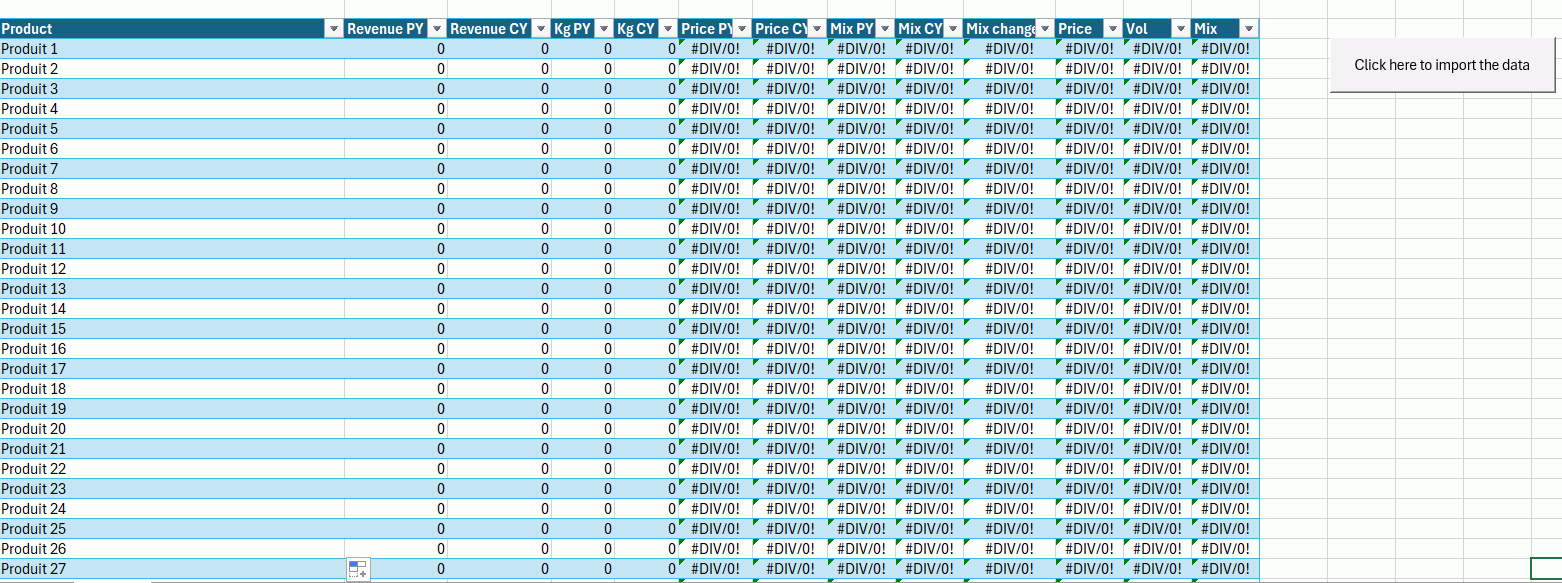
Malheureusement je ne peux pas vous transmettre les fichiers par soucis de confidentialité mais ce tableau est censé se remplir depuis 2 fichiers comportant des TCD comme je l'ai dit précédemment. Ce qui pose problème est l'importation des chiffres associés à chaque produit. Ce que je ne comprends c'est qu'il parvient à importer le nom des produits correctement mais pas les chiffres.
Si vous avez n'importe quelle autre proposition, je suis preneur.
Merci encore.
Bonjour,
Ce qui pose problème est l'importation des chiffres associés à chaque produit
Sans fichier, difficile de donner une réponse correcte. Ne pouvez vous pas fournir les fichiers en remplaçant les données confidentielles par des noms bidons mais qui collent à la réalité?
Cdlt
Bonsoir,
J'adorerai pouvoir vous fournir cela, le problème étant que les TCD en question vont chercher leurs données dans une grande base de données.
Je vais tout de même essayer de voir ce que je peux faire pour essayer de vous fournir quelque chose de ressemblant.
Je vous envoie ça asap.
Cordialement.
Bonjour,
J'ai fini réussi à régler mon problème. Voici le code qui m'a permis de le résoudre :
Function GetColumnByHeader(ws As Worksheet, headerName As String, headerRow As Long) As Long

    ' Cette fonction trouve la colonne d'un en-tête sur une ligne donnée.

    Dim col As Long

    For col = 1 To ws.Cells(headerRow, ws.Columns.Count).End(xlToLeft).Column

        If Trim(ws.Cells(headerRow, col).Value) = headerName Then

            GetColumnByHeader = col

            Exit Function

        End If

    Next col

    GetColumnByHeader = 0 ' Not found

End Function

Function FindHeaderRowAndColumn(ws As Worksheet, keyHeader As String, Optional maxRowsToSearch As Long = 15) As Variant

    ' Cette fonction cherche un en-tête clé (ex: "Class") dans les premières lignes

    ' et retourne un tableau contenant la ligne et la colonne de cet en-tête.

    ' Retourne Array(0, 0) si non trouvé.

    Dim r As Long, c As Long

    Dim searchRange As Range

    Dim foundCell As Range

    ' Définir la plage de recherche (ex: A1:X15)

    Set searchRange = ws.Range("A1", ws.Cells(maxRowsToSearch, ws.Columns.Count).End(xlToLeft))

    On Error Resume Next ' Gérer l'erreur si la valeur n'est pas trouvée

    Set foundCell = searchRange.Find(What:=keyHeader, LookIn:=xlValues, LookAt:=xlWhole, _

                                     SearchOrder:=xlByRows, SearchDirection:=xlNext, MatchCase:=False)

    On Error GoTo 0

    If Not foundCell Is Nothing Then

        FindHeaderRowAndColumn = Array(foundCell.Row, foundCell.Column)

    Else

        FindHeaderRowAndColumn = Array(0, 0) ' Non trouvé

    End If

End Function

Sub RemplirTableauProduits()

    Dim wbMain As Workbook, wbPY As Workbook, wbCY As Workbook

    Dim wsMain As Worksheet, wsPY As Worksheet, wsCY As Worksheet

    Dim filePY As String, fileCY As String

    Dim dictData As Object

    Set dictData = CreateObject("Scripting.Dictionary")

    Dim lastRow As Long, i As Long, col As Integer

    Dim produit As String

    Dim colRevenuePY As Integer, colKgPY As Integer

    Dim colRevenueCY As Integer, colKgCY As Integer

    ' Variables pour la détection dynamique de l'en-tête

    Dim headerRowPY As Long, colClassPY As Long

    Dim headerRowCY As Long, colClassCY As Long

    Dim headerCoords As Variant ' Pour stocker le résultat de FindHeaderRowAndColumn

    ' Sélection des fichiers sources

    filePY = Application.GetOpenFilename("Excel Files (*.xlsx), *.xlsx", , "Select the file from the previous year (PY)")

    If filePY = "Faux" Then Exit Sub

    fileCY = Application.GetOpenFilename("Excel Files (*.xlsx), *.xlsx", , "Select the file from the current year (CY)")

    If fileCY = "Faux" Then Exit Sub

    ' Références aux classeurs/feuilles

    Set wbMain = ThisWorkbook

    Set wsMain = wbMain.Sheets(1) ' Assurez-vous que c'est la bonne feuille pour le tableau final

    On Error GoTo ErrorHandler ' Gestion des erreurs pour l'ouverture des classeurs et des feuilles

    Set wbPY = Workbooks.Open(filePY, ReadOnly:=True)

    Set wbCY = Workbooks.Open(fileCY, ReadOnly:=True)

    Set wsPY = wbPY.Sheets("Pivots")

    Set wsCY = wbCY.Sheets("Pivots")

    If wsPY Is Nothing Or wsCY Is Nothing Then

        MsgBox "The 'Pivots' sheet cannot be found in one of the files", vbCritical

        GoTo CleanUp

    End If

    ' *** Détection dynamique de la ligne d'en-tête et de la colonne "Class" pour PY ***

    headerCoords = FindHeaderRowAndColumn(wsPY, "Class")

    headerRowPY = headerCoords(0)

    colClassPY = headerCoords(1)

    If headerRowPY = 0 Then

        MsgBox "The 'Class' header was not found in the first lines of the Pivot PY sheet.", vbCritical

        GoTo CleanUp

    End If

    ' Marquage des autres colonnes dans le fichier N-1 en utilisant la ligne d'en-tête détectée

    colRevenuePY = GetColumnByHeader(wsPY, "Invoice Value", headerRowPY)

    colKgPY = GetColumnByHeader(wsPY, "Sum of Weight Invd", headerRowPY)

    If colRevenuePY = 0 Or colKgPY = 0 Then

        MsgBox "One or more of the required column headings were not found in the Pivot PY sheet (Invoice Value or Sum of Weight Invd).", vbCritical

        GoTo CleanUp

    End If

    ' Lecture des données N-1

    lastRow = wsPY.Cells(wsPY.Rows.Count, colClassPY).End(xlUp).Row

    For i = headerRowPY + 1 To lastRow ' Commence à lire après la ligne d'en-tête détectée

        produit = Trim(wsPY.Cells(i, colClassPY).Value)

        ' *** Ignore les lignes de totaux ou les lignes vides ***

        If produit = "" Or InStr(1, produit, "Total", vbTextCompare) > 0 Then

            GoTo NextPYRow

        End If

        ' ******************************************************

        Dim currentDataPY As Variant

        If Not dictData.exists(produit) Then

            dictData.Add produit, Array(0#, 0#, 0#, 0#) ' Utilisation de # pour forcer le type Double

        End If

        currentDataPY = dictData(produit)

        On Error Resume Next

        currentDataPY(0) = CDbl(wsPY.Cells(i, colRevenuePY).Value) ' Revenue N-1

        If Err.Number <> 0 Then

            currentDataPY(0) = 0

            Err.Clear

        End If

        currentDataPY(1) = CDbl(wsPY.Cells(i, colKgPY).Value) ' Kg N-1

        If Err.Number <> 0 Then

            currentDataPY(1) = 0

            Err.Clear

        End If

        On Error GoTo 0

        dictData(produit) = currentDataPY

NextPYRow:

    Next i

    ' *** Détection dynamique de la ligne d'en-tête et de la colonne "Class" pour CY ***

    headerCoords = FindHeaderRowAndColumn(wsCY, "Class")

    headerRowCY = headerCoords(0)

    colClassCY = headerCoords(1)

    If headerRowCY = 0 Then

        MsgBox "The 'Class' header was not found in the first lines of the Pivot CY sheet.", vbCritical

        GoTo CleanUp

    End If

    ' Marquage des autres colonnes dans le fichier N en utilisant la ligne d'en-tête détectée

    colRevenueCY = GetColumnByHeader(wsCY, "Invoice Value", headerRowCY)

    colKgCY = GetColumnByHeader(wsCY, "Sum of Weight Invd", headerRowCY)

    If colRevenueCY = 0 Or colKgCY = 0 Then

        MsgBox "One or more of the required column headings were not found in the Pivot CY sheet (Invoice Value or Sum of Weight Invd).", vbCritical

        GoTo CleanUp

    End If

    ' Lecture des données N

    lastRow = wsCY.Cells(wsCY.Rows.Count, colClassCY).End(xlUp).Row

    For i = headerRowCY + 1 To lastRow ' Commence à lire après la ligne d'en-tête détectée

        produit = Trim(wsCY.Cells(i, colClassCY).Value)

        ' *** Ignore les lignes de totaux ou les lignes vides ***

        If produit = "" Or InStr(1, produit, "Total", vbTextCompare) > 0 Then

            GoTo NextCYRow

        End If

        ' ******************************************************

        Dim currentDataCY As Variant

        If Not dictData.exists(produit) Then

            dictData.Add produit, Array(0#, 0#, 0#, 0#) ' Utilisation de # pour forcer le type Double

        End If

        currentDataCY = dictData(produit)

        On Error Resume Next

        currentDataCY(2) = CDbl(wsCY.Cells(i, colRevenueCY).Value) ' Revenue N

        If Err.Number <> 0 Then

            currentDataCY(2) = 0

            Err.Clear

        End If ' Fin du bloc If de gestion d'erreur

        currentDataCY(3) = CDbl(wsCY.Cells(i, colKgCY).Value) ' Kg N

        If Err.Number <> 0 Then

            currentDataCY(3) = 0

            Err.Clear

        End If

        On Error GoTo 0

        dictData(produit) = currentDataCY

NextCYRow:

    Next i

    ' Insertion dans un tableau Excel structuré (ListObject)

    Dim lo As ListObject

    On Error Resume Next ' Gérer l'erreur si le tableau "tblProduits" n'existe pas

    Set lo = wsMain.ListObjects("tblProduits")

    On Error GoTo ErrorHandler ' Réactive la gestion des erreurs normale

    If lo Is Nothing Then

        MsgBox "The structured table 'tblProduits' cannot be found in the sheet '" & wsMain.Name & "'. Please create a table named 'tblProduits'.", vbCritical

        GoTo CleanUp

    End If

    ' Supprimer l'ancien contenu du tableau

    If Not lo.DataBodyRange Is Nothing Then

        lo.DataBodyRange.Delete

    End If

    ' Ajouter les nouvelles données ligne par ligne

    Dim newRow As ListRow

    Dim key As Variant

    Dim dataArray As Variant

    For Each key In dictData.Keys

        Set newRow = lo.ListRows.Add

        dataArray = dictData(key)

        newRow.Range(1, 1).Value = key ' Produit

        newRow.Range(1, 2).Value = dataArray(0) ' Revenue N-1

        newRow.Range(1, 3).Value = dataArray(2) ' Revenue N

        newRow.Range(1, 4).Value = dataArray(1) ' Kg N-1

        newRow.Range(1, 5).Value = dataArray(3) ' Kg N

    Next key

    MsgBox "The data has been successfully updated and inserted into the table !", vbInformation

CleanUp:

    ' Fermer les fichiers sources si ouverts

    If Not wbPY Is Nothing Then

        wbPY.Close False

    End If

    If Not wbCY Is Nothing Then

        wbCY.Close False

    End If

    Exit Sub

ErrorHandler:

    MsgBox "An error has occurred : " & Err.Description & " (Code: " & Err.Number & ")", vbCritical

    Resume CleanUp

End Sub
Encore merci pour votre aide !
Cordialement.