Faire évoluer ma macro pour passer d'une colonne à 6 colonne (point 10
Bonjour
Grace à mon précédent post et l'aide obtenu sur ce forum j ai réussi à convertir les points 5' en Watt en point 10 et 30 en restant sur une colonne
Là je cherche à rajouter une macro qui me donnerait le format 10 MINUTES une heure par ligne au lieu de 1 point par ligne
LA MACRO ACTUELLE
FORMAT SOUHAITE
| dd | ||||||
| Date | TRAVAIL | |||||
| 01/01/2022 00:00 | 488 | 508 | 490 | 494 | 495 | 479 |
| 01/01/2022 01:00 | 477 | 482 | 486 | 504 | 505 | 545 |
| 01/01/2022 02:00 | 494 | 474 | 468 | 475 | 483 | 484 |
| 01/01/2022 03:00 | 480 | 477 | 470 | 466 | 469 | 477 |
| 01/01/2022 04:00 | 480 | 539 | 497 | 478 | 487 | 489 |
| 01/01/2022 05:00 | 484 | 486 | 484 | 495 | 498 | 493 |
| 01/01/2022 06:00 | 499 | 499 | 496 | 548 | 527 | 508 |
| 01/01/2022 07:00 | 507 | 515 | 519 | 513 | 514 | 520 |
| 01/01/2022 08:00 | 520 | 538 | 534 | 540 | 533 | 577 |
| 01/01/2022 09:00 | 557 | 531 | 540 | 543 | 525 | 526 |
| 01/01/2022 10:00 | 528 | 523 | 529 | 541 | 534 | 569 |
La macro actuelle que j utilse
Sub CONV10()
Set ws = Sheets.Add
With Sheets("test")
.Range("A1").Resize(, 3).Copy ws.Range("A1")
ws.Columns(1).NumberFormat = "dd/mm/yy"
ws.Columns(2).NumberFormat = "hh:mm"
k = 1
dl = .Cells(Rows.Count, 1).End(xlUp).Row
For i = 2 To dl Step 2
k = k + 1
ws.Cells(k, 1) = .Cells(i, 1)
ws.Cells(k, 2) = .Cells(i + 0, 2)
ws.Cells(k, 3) = Round(Application.WorksheetFunction.Average(.Cells(i, 3).Resize(3, 1)) / 1000, 1)
Next i
End With
End Sub
Mille merci par avance et bonne journée
Bonjour,
Si j'ai bien compris, essayez ceci:
Sub CONV10_En_Colonnes()
    Dim ws As Worksheet
    Dim i As Long, j As Long, k As Long, m As Long, h As Long, dl As Long
    Set ws = Sheets.Add
    With Sheets("test")
        ws.Range("A2:B2") = Array("Date", "TRAVAIL")
        With ws.Columns(1)
            .NumberFormat = "dd/mm/yy hh:mm"
            .ColumnWidth = 20
        End With
        k = 2
        dl = .Cells(Rows.Count, 1).End(xlUp).Row
        m = 2
        h = 2
        For i = 2 To dl Step 2
            k = k + 1
            If .Cells(h, 3) = "" Then Exit Sub
            ws.Cells(k, 1) = .Cells(h, 1) + .Cells(h, 2)
            For j = 2 To 7
                ws.Cells(k, j) = Round(Application.WorksheetFunction.Average(.Cells(m, 3).Resize(3, 1)) / 1000, 1)
                m = m + 2
            Next j
            h = h + 12
        Next i
    End With
    Set ws = Nothing
End Sub
Cdlt
merci Arturo83 C'est presque que cela
Il y a juste la première colonne que je dois scinder en deux
je pense que je dois modifier cette partie là mais je n'y arrive pase
h Sheets("test")
ws.Range("A2:B2") = Array("Date", "TRAVAIL")
With ws.Columns(1)
.NumberFormat = "dd/mm/yy hh:mm"
.ColumnWidth = 20
Format attendu
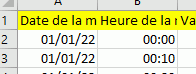
| Date |
| 01/01/22 00:00 |
| 01/01/22 01:00 |
| 01/01/22 02:00 |
| Date de la mesure | Heure de la mesure |
| 01/01/22 | 00:00 |
| 01/01/22 | 00:10 |
| 01/01/22 | 00:20 |
Bonjour,
Ceci:
Sub CONV10_En_Colonnes()
    Dim ws As Worksheet
    Dim i As Long, j As Long, k As Long, m As Long, h As Long, dl As Long
    Set ws = Sheets.Add
    With Sheets("test")
        ws.Range("A2:C2") = Array("Date", "Heure", "TRAVAIL")
        With ws.Columns(1)
            .NumberFormat = "dd/mm/yy"
            .ColumnWidth = 20
        End With
        With ws.Columns(2)
            .NumberFormat = "hh:mm"
            .ColumnWidth = 20
        End With
        k = 2
        dl = .Cells(Rows.Count, 1).End(xlUp).Row
        m = 2
        h = 2
        For i = 2 To dl Step 2
            k = k + 1
            If .Cells(h, 3) = "" Then Exit Sub
            ws.Cells(k, 1) = .Cells(h, 1)
            ws.Cells(k, 2) = .Cells(h, 2)
            For j = 3 To 8
                ws.Cells(k, j) = Round(Application.WorksheetFunction.Average(.Cells(m, 3).Resize(3, 1)) / 1000, 1)
                m = m + 2
            Next j
            h = h + 12
        Next i
    End With
    Set ws = Nothing
End Sub
Cdlt
Top
Merci Arturo83;
Je vais affiner ma macro et je la posterai
Merci à tous