Liste à plusieurs niveaux
Bonjour,
Est il possible de créer une liste à plusieurs niveaux dans une feuille Excel, comme dans Word
J'aurai besoin d'avoir 1, à la ligne suivante 2 ou 1.1, à la ligne suivant 1.2 ou 1.1.1
On aurait un nouveau chiffre en insérant une nouvelle ligne. Il faudrait pouvoir choisir le type de numéro: 1, 2, 1.1, 1.2, 1.1.1,....
Merci d'avance
Bonjour,
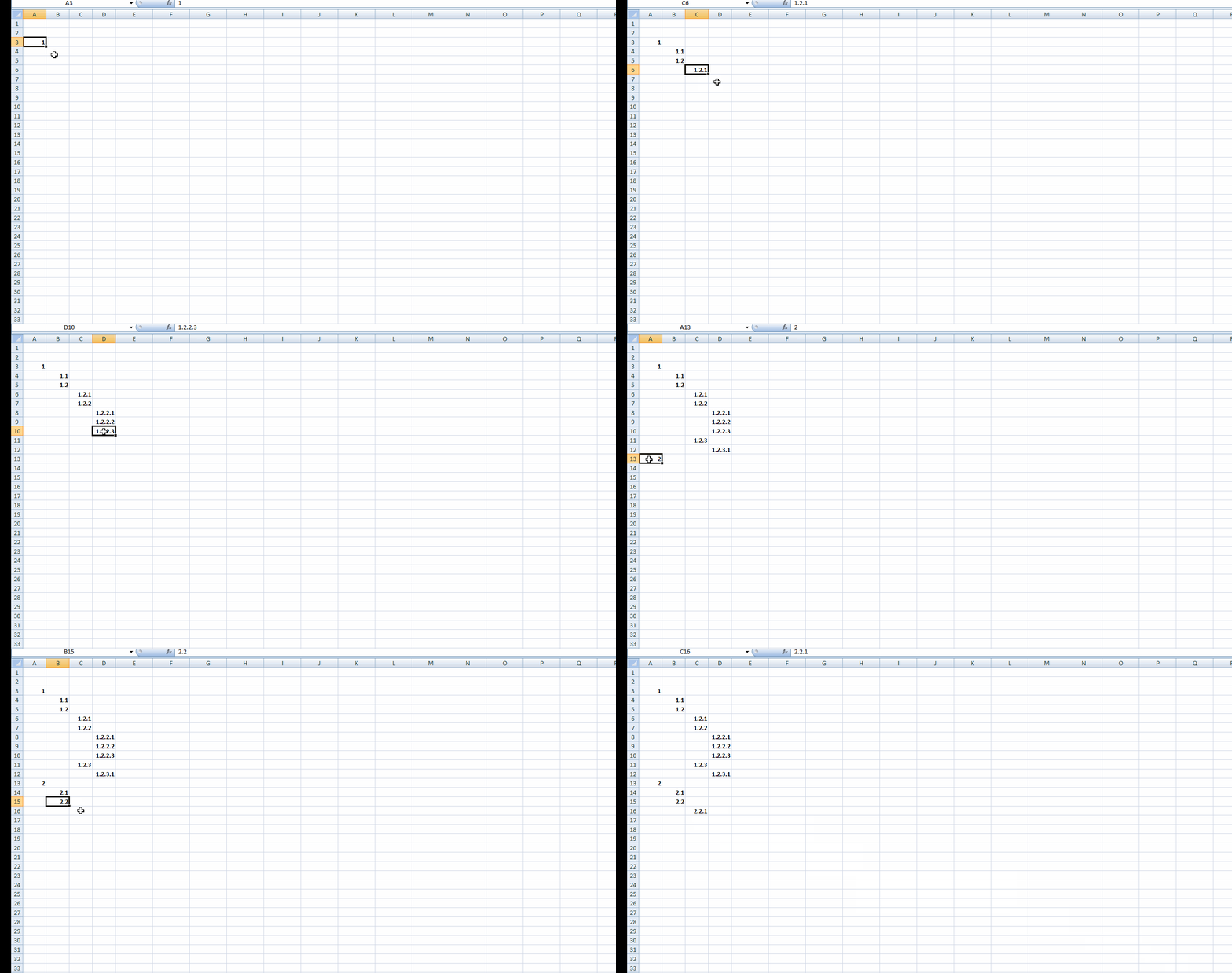
Essayez ceci, les 4 colonnes de droites sont réservées pour la sélection des paragraphes et sous-paragrphes.
les n° s'inscrivent en faisant un double-clic sur une cellule. Voici en vidéo ce que ça donne:
le fichier
Cdlt
Bonjour Arturo 83
Peux tu m'expliquer comment tu as fait cela? ce n'est pas une maro, car je ne la voie pas
c'est pour devenir un peu plus malin
Marcus
Bien sûr que cette une macro, seulement elle réagit au double-clic (macro évènementielle), pour cela elle doit être placée dans le module de la feuille et non dans un module standard.

Cdlt
Rebonjour Arturo
Pour continuer sur la même lancé, serait il possible de créer une macro pour insérer une ligne en dessous, qui reprendrait la même forme de la ligne avec la cellule fusionnée et au niveau de la colonne A, B, C ou D une unité de plus (dans le fichier ligne en bleu ciel: 5.2, ou 5.1.2 ou 5.1.1.2 ) et supprimerait le contenu (le texte) de la cellule fusionnée.
Bonjour,
Copiez ceci dans le module de la feuille.
Pas besoin de boutons, la macro réagit au clic droit sur les cellules des colonnes B, C et D.
notes Importantes :
- clic droit dans une cellule située sur la ligne à insérer
-1 clic droit sur une seule cellule.
- pour effacer, soit vous sélectionnez la ou les lignes entières ou un groupe de cellules(il faut qu'il y en ait plus d'une), puis suppression.

le code
Private Sub Worksheet_BeforeRightClick(ByVal Target As Range, Cancel As Boolean)
    Dim Plage As String
    Dim i As Long
    On Error GoTo Sortie
    Application.EnableEvents = False
    If Target.Count = 1 Then
        If Not Intersect(Target, Columns("B:D")) Is Nothing Then
            Range(Cells(Target.Row + 1, "A"), Cells(Target.Row + 1, "J")).Insert Shift:=xlDown
            Select Case Target.Column
                Case 2
                    For i = Target.Row - 1 To 1 Step -1
                        If Cells(i, "A") <> "" Then
                            Target.Value = Cells(i, "A") & ".1"
                            Plage = Range(Cells(Target.Row, "C"), Cells(Target.Row, "J")).Address
                            GoTo Sortie
                        ElseIf Cells(i, "B") <> "" Then
                            Point = InStrRev(Cells(i, "B"), ".", -1)
                            Sous_paragraphe = Mid(Cells(i, "B"), InStrRev(Cells(i, "B"), ".", -1) + 1, 5)
                            Target.Value = "'" & Left(Cells(i, "B"), Point - 1) & "." & Sous_paragraphe + 1
                            Plage = Range(Cells(Target.Row, "C"), Cells(Target.Row, "J")).Address
                            GoTo Sortie
                        End If
                    Next i

                Case 3
                    For i = Target.Row - 1 To 1 Step -1
                        If Cells(i, "B") <> "" Then
                            Target.Value = Cells(i, "B") & ".1"
                            Plage = Range(Cells(Target.Row, "D"), Cells(Target.Row, "J")).Address
                            GoTo Sortie
                        ElseIf Cells(i, "C") <> "" Then
                            Point = InStrRev(Cells(i, "C"), ".", -1)
                            Sous_paragraphe = Mid(Cells(i, "C"), InStrRev(Cells(i, "C"), ".", -1) + 1, 5)
                            Target.Value = "'" & Left(Cells(i, "C"), Point - 1) & "." & Sous_paragraphe + 1
                            Plage = Range(Cells(Target.Row, "D"), Cells(Target.Row, "J")).Address
                            GoTo Sortie
                        End If
                    Next i

                Case 4
                    For i = Target.Row - 1 To 1 Step -1
                        If Cells(i, "C") <> "" Then
                            Target.Value = Cells(i, "C") & ".1"
                            Plage = Range(Cells(Target.Row, "E"), Cells(Target.Row, "J")).Address
                            GoTo Sortie
                        ElseIf Cells(i, "D") <> "" Then
                            Point = InStrRev(Cells(i, "D"), ".", -1)
                            Sous_paragraphe = Mid(Cells(i, "D"), InStrRev(Cells(i, "D"), ".", -1) + 1, 5)
                            Target.Value = "'" & Left(Cells(i, "D"), Point - 1) & "." & Sous_paragraphe + 1
                            Plage = Range(Cells(Target.Row, "E"), Cells(Target.Row, "J")).Address
                            GoTo Sortie
                        End If
                    Next i
            End Select
        End If
    End If

Sortie:
    If Target.Count = 1 Then
        Range(Plage).MergeCells = True
        Range(Plage).Select
    End If
    Application.EnableEvents = True
End Sub
Cdlt
merci beaucoup,
on va examiner cela, mais ça semble correspondre à ce qu'on recherchait
Bonne après-midi