Macro Export .csv qui ne fonctionne qu'une seule fois
Bonjour à tous,
Je cherche à réaliser une macro qui permet d'enregistrer plusieurs feuilles dans des fichiers CSV individuels.
Dans la théorie, j'ai trouvé ce sujet "VBA - Export .csv - Save as - nouveau document" https://forum.excel-pratique.com/excel/vba-export-csv-save-as-nouveau-document-126906#p778060 qui répond à ma demande... Une fois le nom de la worksheet ajusté la macro proposé par "Ric" fonctionne, je retrouve bien le fichier CSV dans le dossier séléectionné.
Problème n°1
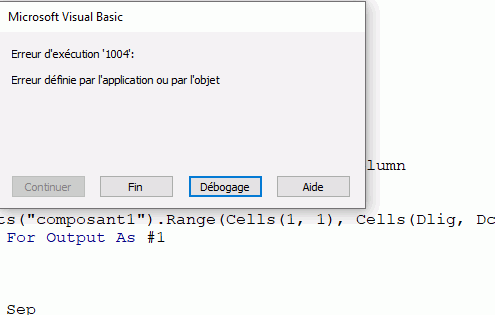
Mais ... si je supprime le fichier CSV créé pour lancer une nouvelle fois la macro j'ai un message d'erreur. Je dois entièrement supprimer la macro et la re copier/coller pour la faire fonctionner à nouveau ...
Avez vous une idée à ce sujet ?
Problème n°2
Dans l'idée, j'aimerai boucler cette commande pour enregristrer autant de fichier CSV que de worksheet "composant*" (pouvant aller jusqu'à 10)
Dans la théorie toujours, j'ai composé un code avec comme nom de worksheet ("composant" & I ) mais je n'arrive pas à le tester car il s'arrête toujours sur la même ligne que le problème n°1. Je pense qu'une fois le problème n°1 résolu le deuxième en découlera.
D'avance, merci pour votre aide
HB

' Code une worksheets

Sub SelDossierExportCSV()
Dim sChemin As String, Destination As String
Dim Plage As Object, oL As Object, oC As Object, Tmp As String, Sep$
Dim Dlig As Integer, Dcol As Integer

    sChemin = ThisWorkbook.Path
    With Application.FileDialog(msoFileDialogFolderPicker)
        .InitialFileName = sChemin & "\"
        .Title = "Sélectionner le dossier de destination ..."
        .AllowMultiSelect = False
        .InitialView = msoFileDialogViewDetails
        .ButtonName = "Sélection destination"
        .Show

        If .SelectedItems.Count > 0 Then
            Destination = .SelectedItems(1) & "\"

            Dlig = Worksheets("composant1").Cells(Rows.Count, "A").End(xlUp).Row
            Dcol = Worksheets("composant1").Cells(1, Columns.Count).End(xlToLeft).Column

            Sep = ";"
            Set Plage = ActiveWorkbook.Worksheets("composant1").Range(Cells(1, 1), Cells(Dlig, Dcol))
            Open Destination & "composant1.csv" For Output As #1
            For Each oL In Plage.Rows
                Tmp = ""
                For Each oC In oL.Cells
                    Tmp = Tmp & CStr(oC.Text) & Sep
                Next
                Print #1, Tmp
            Next
            Close
            Set Plage = Nothing
        End If
    End With
End Sub
' Boucle pour X worksheets
Sub SelDossierExportCSV()
Dim sChemin As String, Destination As String
Dim Plage As Object, oL As Object, oC As Object, Tmp As String, Sep$
Dim Dlig As Integer, Dcol As Integer
Dim reactif As Range
Dim nombre As Integer
Set reactif = Range("C4:L4")
nombre = Application.WorksheetFunction.CountA(reactif)
sChemin = ThisWorkbook.Path
With Application.FileDialog(msoFileDialogFolderPicker)
.InitialFileName = sChemin & "\"
.Title = "Sélectionner le dossier de destination ..."
.AllowMultiSelect = False
.InitialView = msoFileDialogViewDetails
.ButtonName = "Sélection destination"
.Show
If .SelectedItems.Count > 0 Then
Destination = .SelectedItems(1) & "\"
For I = 1 to nombre
Dlig = Worksheets("composant" & I).Cells(Rows.Count, "A").End(xlUp).Row
Dcol = Worksheets("composant" & I).Cells(1, Columns.Count).End(xlToLeft).Column
Sep = ";"
Set Plage = ActiveWorkbook.Worksheets("composant" & I).Range(Cells(1, 1), Cells(Dlig, Dcol))
Open Destination & "composant" & I & ".csv" For Output As #1
For Each oL In Plage.Rows
Tmp = ""
For Each oC In oL.Cells
Tmp = Tmp & CStr(oC.Text) & Sep
Next
Print #1, Tmp
Next
Close
Set Plage = Nothing
End If
End With
End Sub