Mise en forme / Format de cellule - remplissage
Bonjour,
Comme énoncé dans le sujet, j'ai un problème lié à la mise en forme de cellule.
Tout d'abord pour la compréhension, voici quelques informations :
1 - je travaille sur un fichier excel 2013
2 - je gère un planning gantt avec des macros
3 - sous ce planning, j'ai des macros qui me permettent d'afficher des données (en lien avec le planning situé au dessus & stockées dans une autre feuille)
4 - Bien évidement, la taille du planning peut varier (nombre de ligne et colonnes) et la quantité de données en dessous aussi.
5 - La mise à jour des données sous le planning ce fait par suppression complète de celle-ci puis la ré-écriture de celle-ci. (avec des marcos)
6 - je ne peux pas vous mettre en PJ mon fichier, car il contient des tarifs d'entreprise, que je ne peux pas divulguer.
Après toutes ces informations, mon problème ce situe lorsque que je veux mettre en couleur (remplissage de cellule) les données affichées sous le planning. Je ne peux pas le faire via des mises en forme conditionnelles car lors de mes MAJ, le fait de supprimer les données change la plage d'application des MFC... qui ne sont pas gérables par macros....
Donc j'ai créé une macro appliquant un format à mes case en fonction de critères.
MAIS, (on arrive au problème), cette mise en forme par macro augmente fortement le poids de mon fichier. (de 800ko à plus de 10 Mo !) D'un coté j'applique une mise en forme à plus de 500 lignes voir plus !
Auriez-vous une autre solution pour appliquer une mise en forme plus légère ?
J'arrive à retrouver la taille initiale de mon fichier en supprimant "l’excès de mise en forme" en passant par le complément INQUIRE. Mais ce n'est pas une solution viable pour un utilisateur courant.
Ci-dessous le code appliquant la mise en forme.
Sub couleur_plg() 'affiche les couleurs sur le planning matériel
Application.ScreenUpdating = False 'desactive l'affichage

For i = ind_lgn_plgmtl + 1 To ind_fin_plgmtl
    If FPL.Cells(i, ind_col_couleur_plg) <> "" Then
        Select Case FPL.Cells(i, ind_col_couleur_plg).Value
            Case Is = "21G"
                For j = ind_col_debutplanning_plg To ind_col_finplanning_plg
                    If FPL.Cells(i, j) > 0 Then
                        FPL.Cells(i, j).Select
                        With Selection.Interior
                            .Pattern = xlSolid
                            .ThemeColor = xlThemeColorAccent1
                            .TintAndShade = -0.249946592608417
                        End With
                    End If
                Next j

            Case Is = "21P"
                For j = ind_col_debutplanning_plg To ind_col_finplanning_plg
                    If FPL.Cells(i, j) > 0 Then
                        FPL.Cells(i, j).Select
                        With Selection.Interior
                            .Pattern = xlGray25
                            .PatternThemeColor = xlThemeColorDark1
                            .Color = 12611584
                        End With
                    End If
                Next j

            Case Is = "22G"
                For j = ind_col_debutplanning_plg To ind_col_finplanning_plg
                    If FPL.Cells(i, j) > 0 Then
                        FPL.Cells(i, j).Select
                        With Selection.Interior
                            .Pattern = xlSolid
                            .Color = 204
                        End With
                    End If
                Next j

            Case Is = "22P"
                For j = ind_col_debutplanning_plg To ind_col_finplanning_plg
                    If FPL.Cells(i, j) > 0 Then
                        FPL.Cells(i, j).Select
                        With Selection.Interior
                            .Pattern = xlGray25
                            .PatternThemeColor = xlThemeColorDark1
                            .Color = 204
                        End With
                    End If
                Next j

            Case Is = "23G"
                For j = ind_col_debutplanning_plg To ind_col_finplanning_plg
                    If FPL.Cells(i, j) > 0 Then
                        FPL.Cells(i, j).Select
                        With Selection.Interior
                            .Pattern = xlSolid
                            .Color = 49407
                        End With
                    End If
                Next j

            Case Is = "23P"
                For j = ind_col_debutplanning_plg To ind_col_finplanning_plg
                    If FPL.Cells(i, j) > 0 Then
                        FPL.Cells(i, j).Select
                        With Selection.Interior
                            .Pattern = xlGray25
                            .PatternThemeColor = xlThemeColorDark1
                            .ThemeColor = xlThemeColorAccent4
                        End With
                    End If
                Next j

            Case Is = "24G"
                For j = ind_col_debutplanning_plg To ind_col_finplanning_plg
                    If FPL.Cells(i, j) > 0 Then
                        FPL.Cells(i, j).Select
                        With Selection.Interior
                            .Pattern = xlSolid
                            .PatternColorIndex = xlAutomatic
                            .ThemeColor = xlThemeColorAccent2
                            .TintAndShade = -0.249946592608417
                        End With
                    End If
                Next j

            Case Is = "24P"
                For j = ind_col_debutplanning_plg To ind_col_finplanning_plg
                    If FPL.Cells(i, j) > 0 Then
                        FPL.Cells(i, j).Select
                        With Selection.Interior
                            .Pattern = xlGray25
                            .PatternThemeColor = xlThemeColorDark1
                            .ThemeColor = xlThemeColorAccent2
                            .TintAndShade = -0.249946592608417
                        End With
                    End If
                Next j

            Case Is = "25G"
                For j = ind_col_debutplanning_plg To ind_col_finplanning_plg
                    If FPL.Cells(i, j) > 0 Then
                        FPL.Cells(i, j).Select
                        With Selection.Interior
                            .Pattern = xlSolid
                            .PatternColorIndex = xlAutomatic
                            .Color = 10498160
                        End With
                    End If
                Next j

            Case Is = "26G"
                For j = ind_col_debutplanning_plg To ind_col_finplanning_plg
                    If FPL.Cells(i, j) > 0 Then
                        FPL.Cells(i, j).Select
                        With Selection.Interior
                            .Pattern = xlSolid
                            .PatternColorIndex = xlAutomatic
                            .ThemeColor = xlThemeColorAccent6
                            .TintAndShade = 0.399945066682943
                        End With
                    End If
                Next j

            Case Is = "26P"
                For j = ind_col_debutplanning_plg To ind_col_finplanning_plg
                    If FPL.Cells(i, j) > 0 Then
                        FPL.Cells(i, j).Select
                        With Selection.Interior
                            .Pattern = xlGray25
                            .PatternThemeColor = xlThemeColorDark1
                            .ThemeColor = xlThemeColorAccent6
                            .TintAndShade = 0.399945066682943
                        End With
                    End If
                Next j

        End Select
    End If
Next i
Application.ScreenUpdating = True 'active l'affichage
End Sub
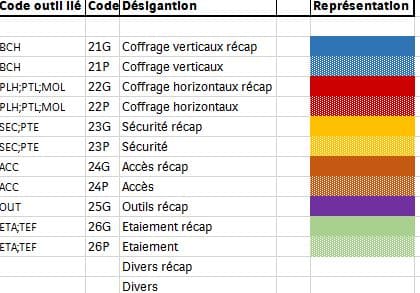
L'image représente les différentes mises en forme.
Merci d'avance pour vos réponses
Tom
Personne n'aurait d'idées ?