How to copy and transfer data into multiple worksheets under its own histor

Hello VBS Fans

I have a huge challenge here & what I am going to asked may sound impossible. "Well, for me I should say".

Here are the steps:

Step #1: The data below is updated automatically into excel worksheet. The name of the worksheet is: "PMI".

Step #2: Every Country represent a worksheet. "Yes. I know. It sounds crazy, you guess it".

Step #3: Each country worksheet have it own historical data, that data vary from different rows. Or in other words, all rows or cell numbers of each worksheet is not equal.

Step #4: Historical dates and data begins with the oldest dates on, Name: "Column1" in cell "B2" and values on, Name: "Last" in cell "C2"

Now. Here is my problem:

How can excel copy, (the data example below) and paste each country data, into own "country worksheet, below its historical data value automatically when new data is plugin?

This is my challenge. How do you want me to proceed?

Thanks in advance

Salut corriedtoppin et

essaie comme ca et surtout en francais s'il vous plaît

Sub UpdateSheets()
Dim ws As Worksheet, sh As Worksheet
Dim Rng As Range, c As Range
Dim Lastrow As Integer
Set ws = Sheets("PMI")

Lastrow = ws.Cells(Rows.Count, 1).End(xlUp).Row

Set Rng = ws.Range("A2:A" & Lastrow)

  For Each c In Rng.Cells

For Each sh In Sheets
        If sh.Name = c Then
            Lastrow = sh.Cells(Rows.Count, 2).End(xlUp).Row
            ws.Range("B" & c.Row & ":C" & c.Row).Copy Destination:=sh.Range("B" & Lastrow)
            sh.Range("D" & Lastrow - 1 & ":E" & Lastrow - 1).Copy Destination:=sh.Range("D" & Lastrow)

        End If
Next sh
    Next c
End Sub

It works wonderfully.

Thank you, Thank you Thank you

I really appropriate it a lot

Avec plaisir = with pleasure

Hello m3ellem1.

I must say again. I appreciate your support.

I made some changes on your code you have recommended, to solve my problem since the last time we have chat.

I'm currently preparing to create multiple worksheets similar to the "PMI" worksheet "you have help me solve", to capture data online, then paste the data under a new cell column, under the historical value that represent the country worksheet and worksheet online data.

Again: Like the last worksheet, I have created: "PMI"

I have created a new worksheet name: "NON_PMI"

The problem here is this:

I've tried to modify your code to paste data under a new column historical data and it is not updating.

How can I fix this?

Please view work book below...

Thanks in advance

Salut corriedtoppin,

c'est normal puisque dans la feuille "NON_PMI" il n'y a des données que dans les colonnes A, B et C.

Set ws = Sheets("NON_PMI")

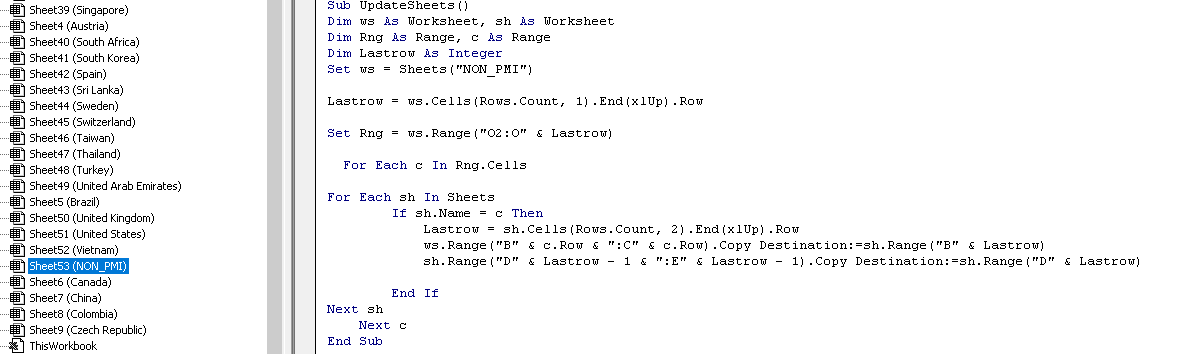
Set Rng = ws.Range("O2:O" & Lastrow) ' pourquoi la colonne O???

bonne nuit

The Code below was place in VBA, NON_PMI worksheet.

For some reason, it don't seems to work.

You quote: "' pourquoi la colonne O???" = 'why column O ???

Like the worksheets: "PMI" & "NON_PMI".

I'm in the process in creating other online updating report of each country.

Now each country worksheet should show all the "report historical data", of that country for chart creation and records.

It may look like a tedious way of storing data. But this is all I know...

What is your recommendation in moving forward?

q

à tester

Sub UpdateSheets_1()
Dim ws As Worksheet, sh As Worksheet
Dim Rng As Range, q As Range
Dim Lastrow As Integer
Set ws = Sheets("NON_PMI")

Lastrow = ws.Cells(Rows.Count, 1).End(xlUp).Row

Set Rng = ws.Range("A2:A" & Lastrow)

  For Each q In Rng.Cells

For Each sh In Sheets
        If sh.Name = q Then
            Lastrow = sh.Cells(Rows.Count, 16).End(xlUp).Row
            ws.Range("B" & q.Row & ":C" & q.Row).Copy Destination:=sh.Range("P" & Lastrow)

        End If
Next sh
    Next q
End Sub

alors ca a fonctionné?

This is the updated version Below:

Sub Update_Sheets()

Dim sh1 As Worksheet, sh2 As Worksheet

Dim i As Long, j As Long, f As Range

Set sh1 = Sheets("NON_PMI")

For i = 2 To sh1.Range("A:A").Find("*", , xlValues, , xlByRows, xlPrevious).Row

Set sh2 = Sheets(sh1.Range("A" & i).Value)

Set f = sh2.Range("B:B").Find(sh1.Range("B" & i).Value, , xlFormulas, xlWhole)

If f Is Nothing Then

j = sh2.Range("B:B").Find("*", , xlValues, , xlByRows, xlPrevious).Row + 1

sh2.Range("B" & j).Value = sh1.Range("B" & i).Value

sh2.Range("C" & j).Value = sh1.Range("C" & i).Value

End If

Next

End Sub
ok merci

Rechercher des sujets similaires à "copy transfer data into multiple worksheets under its own histor"