Format date Inversé
Invité
Bonsoir le Forum,
J'ai mis en place un fichier de suivi bancaire où on rentre la date via un userform.
Au début tout était bien au niveau du format (jj/mm/aaaa) mais à partir d'un moment il m'a inversé le mois et le jour (mm/jj/aaaa). Même dans le code vba, je l'ai bien indiqué (je n'ai pas eu ce problème avec un autre fichier du même genre).
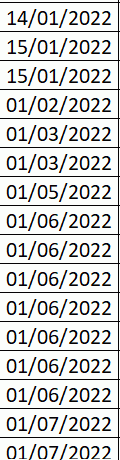
voici le code VBA incrémenté :
Private Sub CommandButton1_Click() 'bouton valider le formulaire
If TextBox1 <> "" Then Mois = Month(TextBox1.Value)
ws = Sheets("Données").Cells(Mois + 1, 1)
derligne = Sheets(ws).Range("B" & Rows.Count).End(xlUp).Row + 1

With Sheets(ws)
    .Range("B" & derligne).Value = Format(TextBox1, "dd/mm/yyyy")
    .Range("C" & derligne).Value = ListBox1
    .Range("D" & derligne).Value = TextBox2
    .Range("E" & derligne).Value = TextBox3
    .Range("F" & derligne).Value = ListBox2
    .Range("J" & derligne).Value = TextBox6
    If TextBox5 <> "" Then .Range("G" & derligne).Value = CDbl(TextBox5.Value)
    If TextBox4 <> "" Then .Range("H" & derligne).Value = CDbl(TextBox4.Value)
    If OptionButton1.Value = True Then
    .Range("I" & derligne).Value = OptionButton1.Caption
    ElseIf OptionButton2.Value = True Then
    Range("I" & derligne).Value = OptionButton2.Caption
    End If
End With

Unload Me
Ajouter.Show  'Nom du UserForm
End Sub

Private Sub CommandButton2_Click() 'bouton fermer le formulaire

Unload Ajouter

End Sub

Private Sub TextBox4_AfterUpdate() 'format de cellule crédit
On Error Resume Next
Me.TextBox4 = Replace(TextBox4, ".", ",")
Me.TextBox4 = Format(TextBox4.Value, "# ##0.00 €")
End Sub

Private Sub TextBox5_AfterUpdate() 'format de cellule débit
On Error Resume Next
Me.TextBox5 = Replace(TextBox5, ".", ",")
Me.TextBox5 = Format(TextBox5.Value, "# ##0.00 €")
End Sub
Comment puis je régler ce problème?
Merci de votre attention
E
Bonsoir,
Que donne ?
.Range("B" & derligne).Value = Cdate(TextBox1) 'Format(TextBox1, "dd/mm/yyyy")